

 ChatGPT
 Perplexity
 Claude
 Gemini
 Grok
Grok



Last Tuesday, you shipped a new feature. The changelog went out, the blue dot lit up in the sidebar, and a week later adoption is near zero. The feature works fine. Customers just don't understand what it does or why they should care. It's one of the most common failure patterns in SaaS. Everyone knows a 60-second explainer video is the best fix, but traditional production still means storyboarding, recording, editing, voiceover, and rounds of revisions, and by the time the final cut lands, the moment has passed.
This guide covers a research-first workflow that fits into a single afternoon. You'll use YouMind to collect and synthesize real user feedback and write a script grounded in their language, then hand it to Pexo to produce the finished video through conversation. No film crew. No editing timeline.
Why Most Feature Explainer Videos Fall Flat
Watch ten explainer videos back to back. Nine of them sound like the product manager wrote the script during a standup. "We're excited to announce our new collaboration workspace that streamlines cross-functional alignment." Nobody talks like that. Nobody watches past the second five. The problem is that teams always write the script from the inside out, describing features the way they were built, not the way a customer experiences the pain. Internal jargon leaks in, sentences run long, and the video ends up being a narrated feature spec.
Here is the uncomfortable truth: the bottleneck is never production quality. A mediocre-looking video with a sharp script outperforms a polished video with a generic one every single time. A good script is a research problem, not a writing problem. When making a SaaS explainer video, if you haven't spent time understanding how your users describe their own pain, you are guessing at language that sounds like marketing copy instead of a conversation.
How to Make a SaaS Explainer Video in Five Steps
A research-first SaaS explainer video follows a clear sequence, and once you've done it once, the whole thing fits into a single afternoon.
-
Research real user pain. Collect product docs, YouTube videos, and social posts for the exact words customers use. YouMind organizes all your sources and helps you extract real user pain points.
-
Write the script with YouMind. Structure it in four parts (pain, resolution, workflow, outcome) to turn scattered research into a tight 60-second script.
-
Generate the video with Pexo. Paste your script into Pexo. The script does the heavy lifting; Pexo takes it from there with transitions, rhythm, and layout.
-
Review and tighten. Check the opening hook. Chat with Pexo for two to three rounds and you'll land on a video you're happy with.
-
Reformat for every channel. Generate each version fresh so the pacing feels native to the platform.
How to Research Real User Pain With YouMind Before Writing the Script
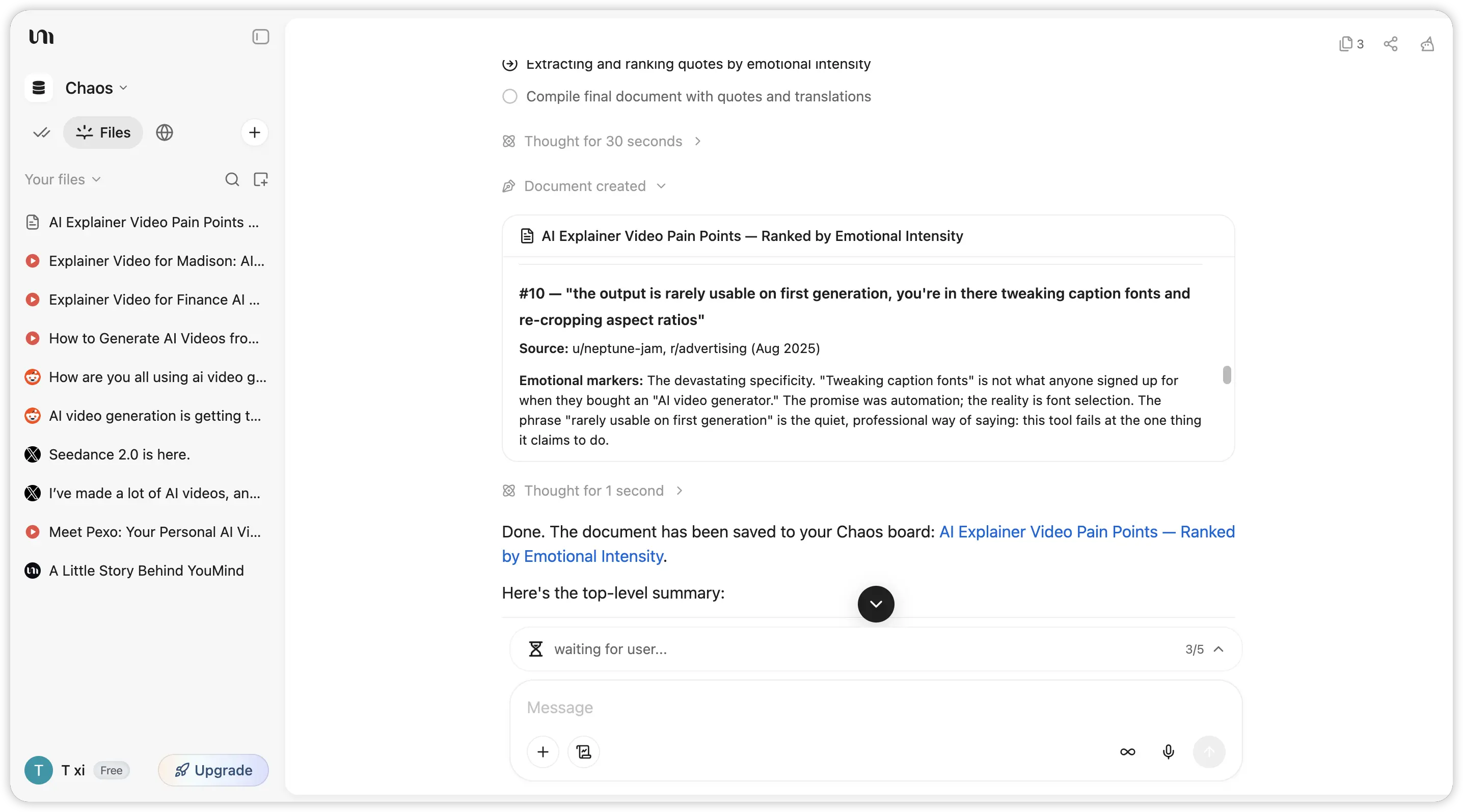 Before you write a single word of script, you need three layers of input. Each serves a different purpose, and skipping any one of them leaves a gap in the final video.
Product Docs and Changelogs Give You the Facts
Start with what the feature actually does. Pull up the internal spec, the changelog entry, the help article if one exists. This layer keeps your script factually correct. You need it, but you should never build the script on top of it alone. A changelog entry tells you what shipped. It does not tell you why anyone should care.
Search YouTube for How Users Describe the Problem
Search YouTube for videos where users discuss the old workflow your feature replaces. Tutorial creators and power users are candid in ways NPS surveys never capture. This gives your script its emotional anchor. A good explainer opens by making the viewer think "that's exactly my problem," and you can only write that line once you've heard how real people describe it.
Social Media and Forums Give You the Real Phrasing
Check Reddit, X, community forums, and support tickets. You're not after feature requests, you're after phrasing, the words users actually use for the need your feature addresses. The best scripts mirror that vocabulary. If users say, "I waste 20 minutes every morning copying data between tabs," and your script says, "eliminate redundant cross-platform data transfer," you've lost them.
Bringing It All Together
Three sources, each with its own purpose, and the trouble is they live in different formats and different places: a PDF spec, a few YouTube videos, and a loose pile of Reddit comments and tweets. You can pull all of these sources together in YouMind, then summarize them, extract recurring pain points, and draft a script from the user's own language. You can save videos, web pages, PDFs, and social posts into one workspace, then use AI to generate summaries, surface key themes, and pull out the user quotes that should anchor your script. Instead of tabbing between a dozen browser windows, you get one clean view of everything your script needs.
Write Your SaaS Explainer Script in Your User's Own Language
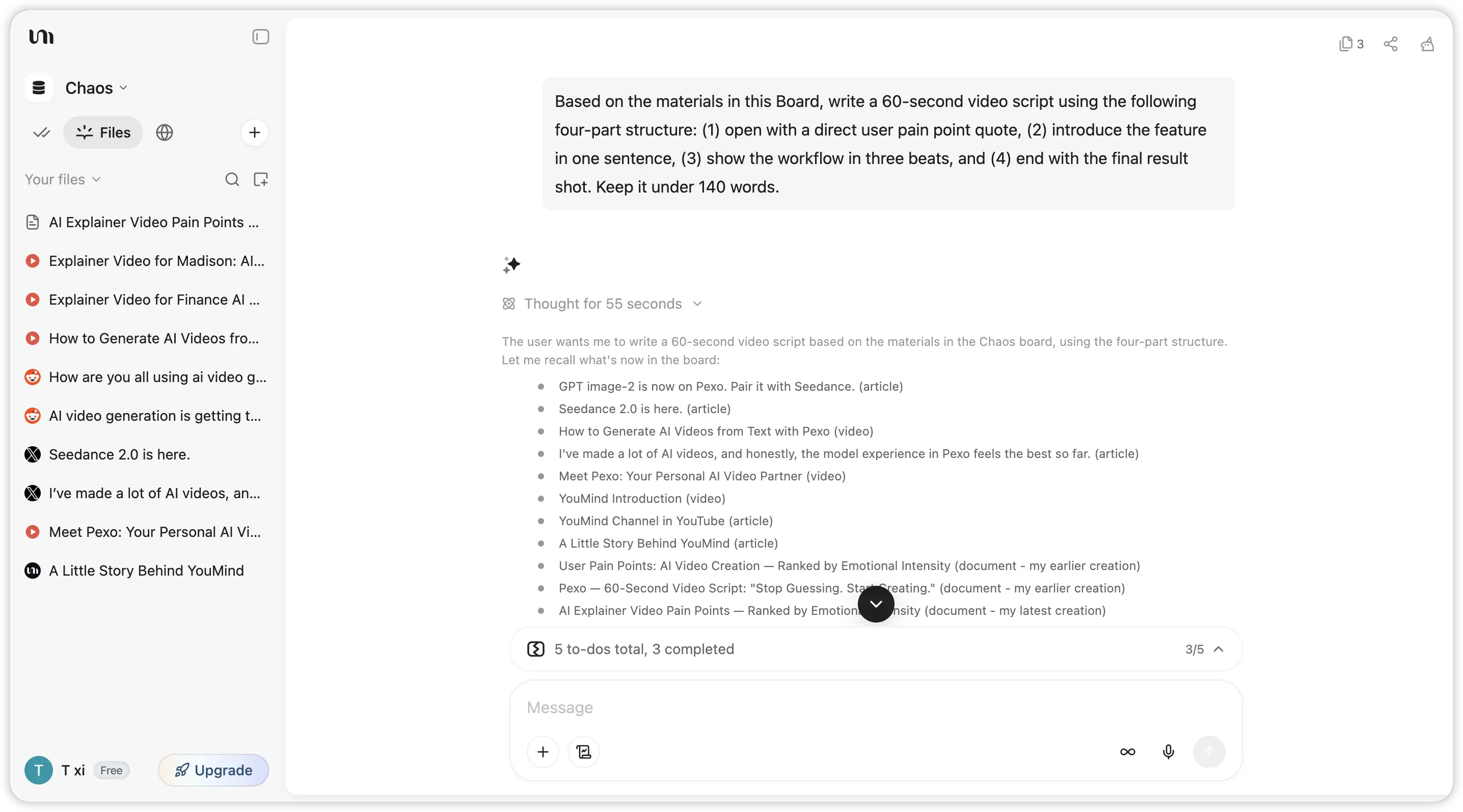 Most scripts are written from the inside out: here's our feature, here's what it does, here's why it's great. Flip that. Write from the outside in, starting with the user's world and pulling the feature in only when the viewer is ready for it.
The Four-Part Structure for a 60-Second Explainer Script
1. Open with the pain, not the feature.
Pull this directly from the user quotes you collected. If a Reddit user wrote "I spend half my Monday morning just figuring out what changed over the weekend," that is your opening line, adapted slightly for flow. The viewer should recognize their own frustration within the first five seconds.
2. Introduce the feature as the resolution.
One sentence. Not a press release, not a feature list. "Now there's a changelog feed built right into your dashboard." That is enough. The viewer already understands the problem; they just need to know a solution exists.
3. Show the workflow in three beats.
Each beat is one sentence and one visual scene. Think of it like: click, result, outcome. Three beats are tight enough to fit in 60 seconds and clear enough that the viewer can picture themselves doing it. More than three and you are making a tutorial, not an explainer.
4. End with the outcome, not a CTA.
Show the "after" picture. The dashboard is clean. The Monday morning scramble is gone. A strong explainer ends by letting the viewer imagine life with the feature, not by asking them to "start your free trial today."
Formatting Your Script for AI Video Tools
AI video generators work best with scripts that follow a few simple rules:
-
Keep sentences under 20 words. Each sentence becomes roughly one visual scene.
-
Use line breaks as scene breaks. One line, one shot.
-
Add visual direction in square brackets: [Screen recording: dashboard changelog feed] or [Animation: calendar flipping from Friday to Monday].
-
For a 60-second video, aim for 130 to 150 words. Every word over that limit compresses your pacing.
With your research already organized, an AI writing assistant can draft the initial structure. With your research already organized, YouMind can help you turn your collected sources into a first draft that follows the four-part structure. You will still need to edit, but you are editing a grounded draft instead of staring at a blank page.
How to Generate Your Explainer Video in Pexo by Describing Tone and Pacing
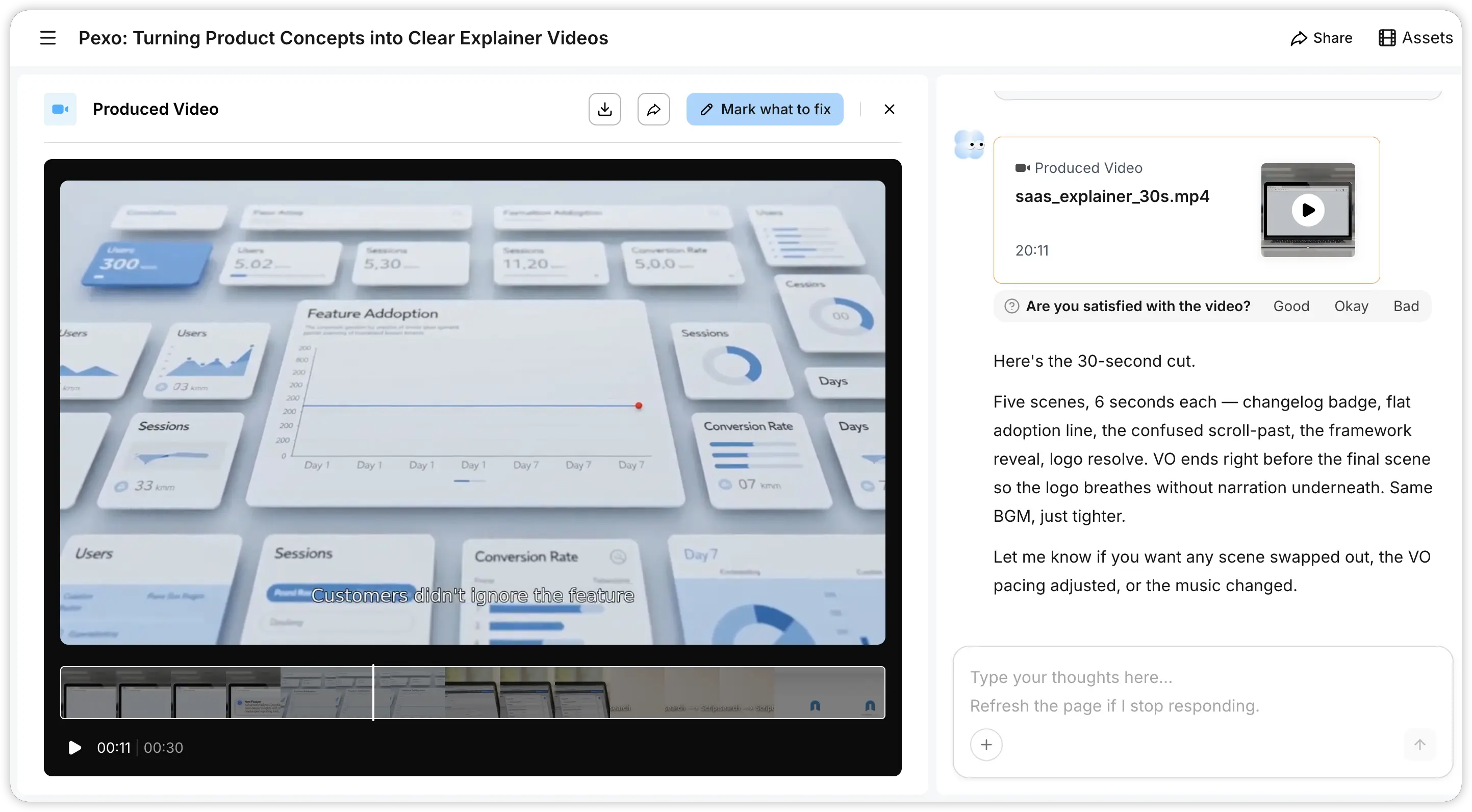 You have a script. Now you need to turn it into visuals. This is where Pexo comes in. Instead of dragging clips onto a timeline or configuring templates, you paste your script, chat with the AI about the tone and style you want, and it produces a finished video. The entire process works through conversation, the same way you'd brief a human editor.
Here is what a brief for our SaaS changelog explainer might look like:
Tone: Calm and confident, like a senior colleague showing you a shortcut you missed. Not corporate, not hyped.
Pacing: Unhurried for the first 10 seconds while the Monday-morning frustration lands, then slightly faster through the three beats (open dashboard, scan the feed, catch the change), then slow down for the clean "after" shot.
Visual direction: Clean UI close-ups of the changelog feed. Minimal text overlays. The product should feel simple and immediate, not feature-dense.
Ending: Linger on the calm, organized dashboard for 3 seconds. No end card with a CTA, just a clean logo resolve.
Watch It Back and Tighten the Hook, Transition, and Pacing
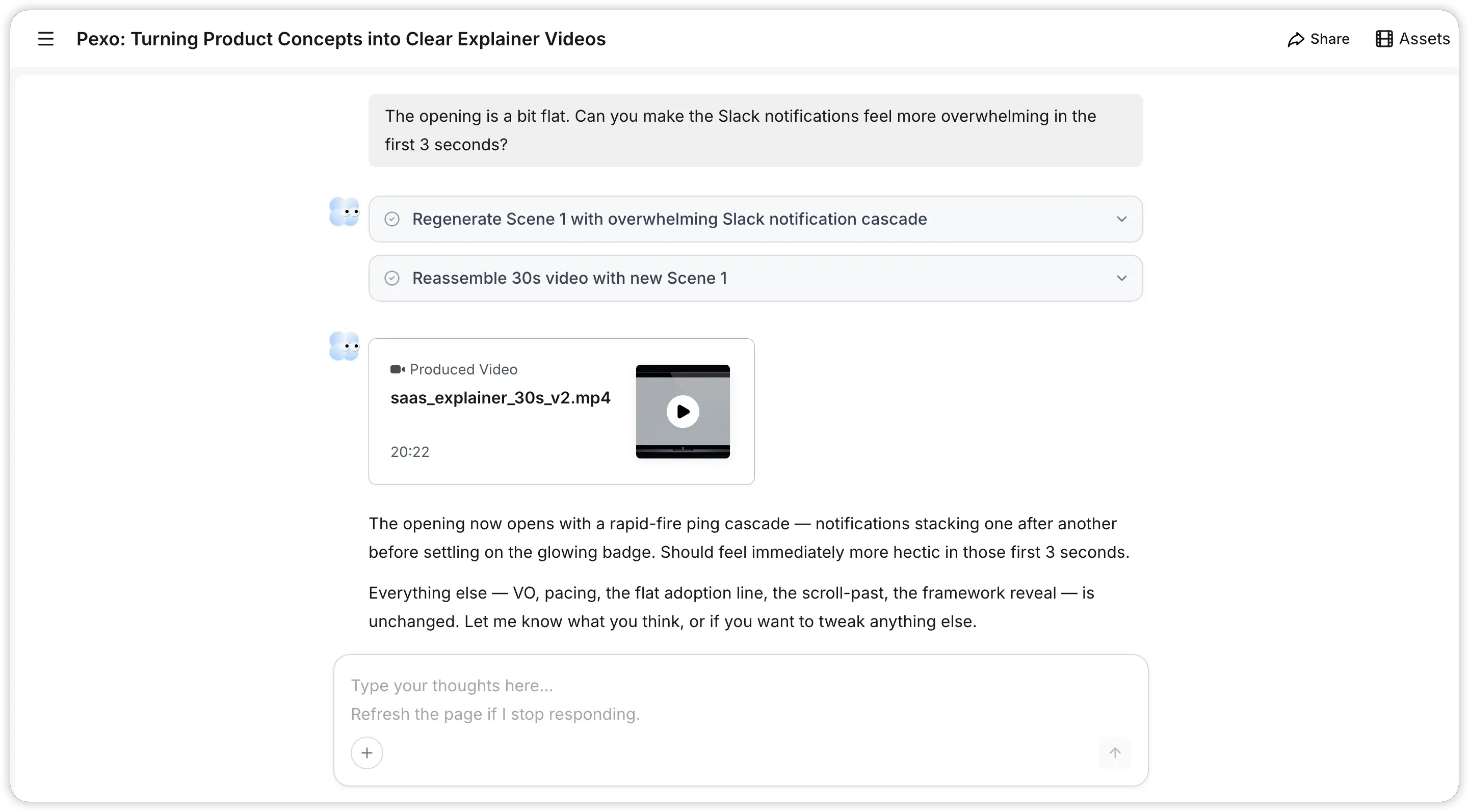 The first render is almost never the final version. That's fine. The goal of the first pass is to see whether the core message lands, not whether every frame is perfect.
Three Checkpoints for Every Preview
1. Does the opening hook land in the first three seconds?
Play the video with no context, as if you are a customer who stumbled onto it. Does the first shot make you want to keep watching? If the opening feels generic, rewrite the first line of your script to be more specific. "Tired of messy workflows?" is weak. "You open Slack on Monday morning, and there are 47 unread messages about changes nobody documented" is strong.
2. Is the problem-to-feature transition clear?
There should be a moment, usually around the 10 to 15 second mark, where the video shifts from "here's the problem" to "here's the fix." If that transition feels abrupt or confusing, add a bridging sentence to your script, something like "What if that information was already waiting for you?"
3. Does the pacing feel like explaining or rushing?
If you find yourself needing to rewatch a section to catch what was said, the pacing is too fast. Cut a sentence from your script rather than speeding up the delivery. Fewer words at a comfortable pace always beat more words crammed in.
Giving Feedback in Natural Language
In Pexo, you iterate just by talking to it. No timecodes, no frame numbers. You can say "make the opening slower and more dramatic" or "the transition in the middle feels jarring, smooth it out." Two to three rounds is typical. By round three, the video should feel like yours.
Reformat Your Explainer Video for Different Distribution Channels
A single explainer video shouldn't live in one place. Different channels need different formats. Here's a quick reference:
| Where | Aspect Ratio | Length |
|---|---|---|
| Landing page / help center | 16:9 | 45-90s |
| LinkedIn / X | 16:9 or 1:1 | 30-60s |
| In-app onboarding modal | 1:1 or 9:16 | 15-30s |
| Email campaign | 16:9 | 30-45s |
| TikTok / Reels / Shorts | 9:16 | 30-60s |
One important rule: don't crop the long version to make the short version. A 60-second video trimmed to 30 seconds will feel incomplete. Instead, write a shorter script, hit the same core message in fewer beats, and generate the short version fresh.
What Separates a Great Explainer From a Forgettable One
Line up the explainer videos that actually drive adoption against the ones that get politely ignored, and the pattern is consistent.
Forgettable explainers start with the feature; good ones start with the pain point. The forgettable ones lean on internal vocabulary, while the great ones use the words customers actually say. And where a weak explainer tries to cover everything, a strong one picks a single job-to-be-done and nails it. The difference isn't production budget, animation quality, or voiceover talent. It's research.
Wrapping Up
The bottleneck for great SaaS explainer videos has never been cameras, editors, or budgets. It's the script, and the script is only as good as the research behind it.
The workflow is simpler than it sounds. Use YouMind to gather user feedback, then write a complete script that starts from the user's pain point. Hand it to Pexo to generate the video, refine it through conversation, and iterate until you're happy with it. The SaaS explainer video you want, done in one afternoon, and your feature finally gets the introduction it deserves.





