
The Image to Restyle
Supply the subject and arrangement that should anchor the transformation.
Image Style Transfer gives an existing image a different visual treatment while using its subject and layout as a starting point. Provide the source and a style description or reference; the Pexo AI video agent interprets which appearance changes you want and which details matter.
Image input
Add the image to restyle and describe the look you want to borrow.
If you provide two images, identify which one supplies the subject and which one supplies the style.
What it is
Image style transfer changes how a source image is rendered: its linework, texture, shading, or overall artistic treatment. The subject image answers what should appear; the style reference answers how it should look.
Be specific about the features you need to keep. A painted or illustrated treatment can alter fine detail, facial resemblance, small text, and product markings. Review those details rather than assuming a new style will leave them untouched.
Supply the subject and arrangement that should anchor the transformation.
Name the linework, material, texture, or shading you want, not just a vague mood.
Compare layout, identity cues, labels, and other essential features after the change.
Agent decisions
Good direction names the treatment and the details that should survive it.
01 / Reference Interpretation
Separate texture, linework, light, and color cues from the unrelated subjects inside a style reference.
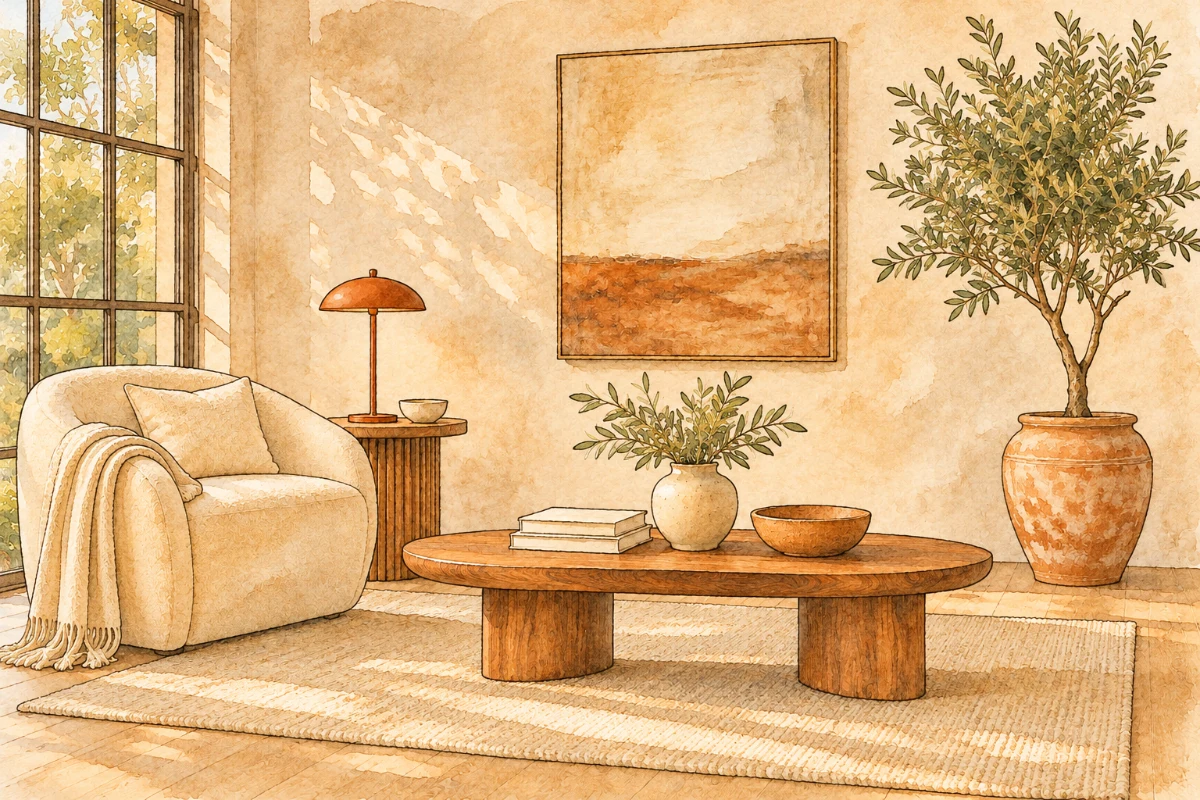
The room supplies the subject and layout. The street illustration supplies the drawing treatment: thin contours, translucent washes, and textured paper.


02 / Subject Anchoring
Use the source subject and composition as the starting point, with explicit instructions for features that matter.
The result keeps the armchair on the left, low table in front, and large potted tree on the right. The reference’s street and doorway are not part of the requested scene.
03 / Treatment Direction
Describe a coherent finish such as soft watercolor, ink linework, or a flat editorial illustration.
Name the finish you want to see. Here the visible change is from photographic surfaces to drawn edges and layered watercolor, rather than a different room.
04 / Detail Review
Inspect faces, hands, small lettering, and product shapes that may change during restyling.
Compare the same objects across the pair. Check distinctive outlines, furniture proportions, and small details before accepting a style you like.
AI-generated creative examples illustrating source, reference, and treatment. They are not results of a Pexo product test.
How it works
Separate the subject from the style reference, then review the new treatment against both.
Upload the content image and identify the desired visual treatment. If you have a reference, say which aspects to borrow and which subjects or objects should not be copied.
Describe the essential composition, subject features, and product elements. Image to Image handles broader changes; keep this request centered on the visual treatment rather than a new scene.
Review the restyled image beside the source. If the starting visual does not exist yet, Text to Image is the separate creation step. For product-led work, check labels and shape as carefully as you would with AI Product Image Generator.
Common questions
No. A clear written description can define the look. A reference is useful when texture, linework, or lighting is difficult to describe; label its role so it is not mistaken for the source subject.
Not necessarily. The source guides the result, but restyling can change shapes and fine details. State the features to retain and compare the output with the original.
Style is the visual treatment, such as paint texture or graphic linework. Composition is the arrangement, framing, and relative position of the subjects. Give separate instructions for each.
Describe the required wording and markings, then inspect them closely in the result. Do not assume fine text or brand details will remain accurate through a generative style change.
No. A style change may affect texture, edges, shading, and rendering as well as color. If you only want a palette adjustment, say so and ask to retain the existing rendering treatment.
Keep the subject in focus
Bring the source, define the treatment, and review the details that make the image yours.