

 ChatGPT
 Perplexity
 Claude
 Gemini
 Grok
Grok


Pexo, a credit-based AI video agent, produced a usable still image in our 2026 product-shot test and then turned it into a 15-second video ad in the same conversation with no context loss, though it sits outside this ranking of free, no-sign-up tools.You want to make an image. You don't want to make an account, hand over a card, or wait on a confirmation email first. So you searched for a free AI image generator with no sign-up, and got a wall of sites all swearing they're exactly that.
Here's the part most of them leave off the homepage: "free" usually has a string attached. Maybe a watermark stamped across the corner. Maybe a daily cap that locks you out after three pictures. Maybe a result quietly downscaled to a low resolution while the sharp version waits behind a paywall. "No sign-up" is genuinely true for some of these tools and a soft bait-and-switch for others.
We tried the tools that actually rank for this search and judged them on what matters when you just want a usable image fast: can you truly skip the account, is there a watermark, how many images per day, and is the output any good. Here are the six that hold up, ranked by how well they balance quality against the strings attached.
What "Free, No Sign-Up" Really Means for AI Image Generators
A no-sign-up AI image generator is a text-to-image tool you can use straight from the browser: type a description, get a picture, no account and no payment details. The appeal is obvious. You're in, you've got your image, you're out. For a quick meme, a blog thumbnail, a moodboard reference, or a one-off product mock-up, that's often all you need.
The trade-offs are where these tools differ, and they're worth knowing before you pick. Truly free generators usually pay for themselves one of four ways: a watermark on free output, a daily or hourly cap on how many images you can make, lower resolution on the free tier (with HD behind a paywall), or ads on the page. There's also a quieter consideration: commercial rights and privacy. Not every free tool lets you use the image commercially, and some keep or train on what you generate. If the picture is going on a product you sell, check the terms first.
The Best Free, No-Sign-Up AI Image Generators at a Glance
Here's how the six tools compare on what matters most when you just want a picture fast: whether you truly skip the account, the real free limit, watermarks, the cheapest paid step-up, and what each one does best.
| Tool | No sign-up? | Free tier | Watermark (free) | Paid from | Best for |
|---|---|---|---|---|---|
| Perchance | Yes | Unlimited | None | Free only | Unlimited throwaway images |
| Raphael AI | Yes | Unlimited | None | Free only | Best photorealism (FLUX.1) |
| Craiyon | Yes | Unlimited (ads, queue) | Small logo | ~$5/mo | Quick, familiar grid generation |
| DeepAI | Yes (to try) | Limited free | None | ~$5/mo | Keeping full commercial rights |
| Magic Studio | Yes | Free generations | None on art | ~$8/mo | An image plus light editing |
| Stable Diffusion Online | Yes (basic) | Rate-limited | None | Paid for speed | Open-model tinkering |
Prices are approximate starting points as of June 2026 and vary by region and promotion. For category reviews and ratings across these tools, see the AI image generator category on G2.
How We Tested and Compared
We focused on the criteria that actually decide this search, weighted in this order. First, whether you truly skip the account. That's the whole point, so a tool that quietly demands a login or an email ranked lower. Second, the real free limit: how many images you get before a cap, a queue, or a paywall kicks in. Third, output quality, because a free image you can't use is no bargain. We also checked watermarks, commercial-use rights, and generation speed, and we broke ties on quality. Every tool here was usable in the browser with no account, or close to it, when we checked in June 2026.
The 6 Best Free AI Image Generators With No Sign-Up
Here are the six that earned a place, ranked by how well they deliver on a free, no-account workflow, with the honest caveat for each.
1. Perchance: Best for Truly Unlimited, No-Account Generation
If your only requirement is "free, no account, no limits," Perchance's AI image generator is the cleanest answer on this list. It runs entirely in the browser, asks for nothing, and doesn't meter you: no login, no daily credit, no watermark on what you make. Type a prompt, it returns a batch in seconds, and you can keep going as long as you like.
What makes it stand out is the genuine lack of friction. Most "unlimited" tools quietly mean "unlimited until you hit the daily cap." Perchance is one of the few where unlimited actually means unlimited, which is why it's repeatedly named the top no-sign-up pick in 2026 roundups. It grew out of Perchance's broader platform of community-built random generators, so the image tool has a hobbyist, tinker-friendly feel. You can also pick from a long list of community style presets, from anime to photorealism, which helps steer results without writing a detailed prompt.
That heritage is also its limitation. The interface is bare and cluttered with ads, there's little editing or fine control, and quality on complex or photorealistic prompts is inconsistent next to flagship models, so you'll re-roll more often to get a keeper. At peak times you may also sit in a short queue.
- Pros: Genuinely unlimited and free; no account; no watermark; fast batches.
- Cons: Ad-heavy, bare interface; inconsistent quality on hard prompts; minimal editing controls.
- Pricing: Free, with no paid tier.
- Best for: Endless throwaway generations with zero commitment, like brainstorming, memes, and reference images.
2. Raphael AI: Best for Photorealism With No Sign-Up
Raphael AI is the no-sign-up tool to reach for when the image actually needs to look real. It's free, needs no account, has no watermark, and, crucially, runs on FLUX.1, the open model from Black Forest Labs, the team behind the original Stable Diffusion. That pedigree is why its photorealistic output noticeably outclasses older free tools like Craiyon on faces, lighting, and detail.
For a no-account tool, that's a genuinely strong combination: near-flagship photorealism without paying or registering. FLUX.1 is also noticeably better than older free models at rendering legible text inside an image, like a sign or a label, which trips up most budget generators. It's a good first stop when the image needs to look real, like a lifestyle scene, a portrait-style shot, or a product in context, rather than just convey a rough idea.
Being newer and leaner, it has fewer bells and whistles. There's limited fine control or editing next to a paid Midjourney or DALL·E workflow, the model is tuned for speed over maximum steerability, and at busy times you may queue. But for the best-looking free image with no sign-up, it's the standout.
- Pros: Strong photorealism for a free tool; no account; no watermark; built on a respected open model.
- Cons: Limited editing and fine control; newer and less proven; can queue at peak.
- Pricing: Free and unlimited, no sign-up, no watermark.
- Best for: Anyone who wants the most realistic result they can get without an account.
3. Craiyon: Best for Quick, Familiar Grid Generation
Craiyon is the tool most people have already used without realizing it. It started life as "DALL·E mini," the model that went viral in mid-2022 and was reportedly generating millions of images a day at its peak, the source of half the surreal meme grids on the internet that year. It still works the same way today: type a prompt, get a 3x3 grid of options, no account required.
Its strength is exactly that familiarity and low stakes. The grid format is great for quick ideation because you see nine takes at once, and there's nothing to learn. For a fast laugh or a rough visual to react to, it's hard to beat for sheer convenience. Craiyon has also kept improving its underlying model since the meme-era days, so today's grids are sharper than the blurry 2022 output people remember.
The cost of that convenience is quality and polish. Free output is lower-resolution than modern models, generation can be slow behind ads and a queue, and free images carry a small Craiyon watermark in the corner. Sharper results, faster speed, and watermark removal sit behind the paid Supporter and Professional tiers.
- Pros: Instantly familiar; no account; nine options per prompt; good for fast ideation.
- Cons: Lower resolution; small watermark on free; slower behind ads and a queue.
- Pricing: Free with ads and a small watermark; paid plans from around $5/month remove ads and the watermark and add speed and HD.
- Best for: Quick, low-stakes images and meme grids where polish doesn't matter.
4. DeepAI: Best for Keeping Full Commercial Rights
DeepAI has been online since 2016, which makes it one of the longest-running public AI image generators here, and that maturity shows in how straightforward it is. You can start generating from a text prompt without signing up, and the headline reason to choose it is rights: DeepAI states you keep full rights to what you create, even on the free plan. For anyone making images for a product or client, that clarity is worth a lot.
It's also more than a single generator. The same site bundles a chat tool, video and music generators, and a photo editor, so it works as a light all-in-one if you wander beyond images. The generator itself lets you pick a quality preference and a few styles, with higher-end "Genius" models on the paid tier. There's also a documented API if you ever want to wire image generation into a script or app, which is rare among the no-sign-up options.
The limitations are the familiar free-tier ones. Output resolution and polish on the free model are modest next to flagship generators, the page runs sponsored ads, and the best models and higher limits are gated behind DeepAI Pro. It's dependable rather than dazzling.
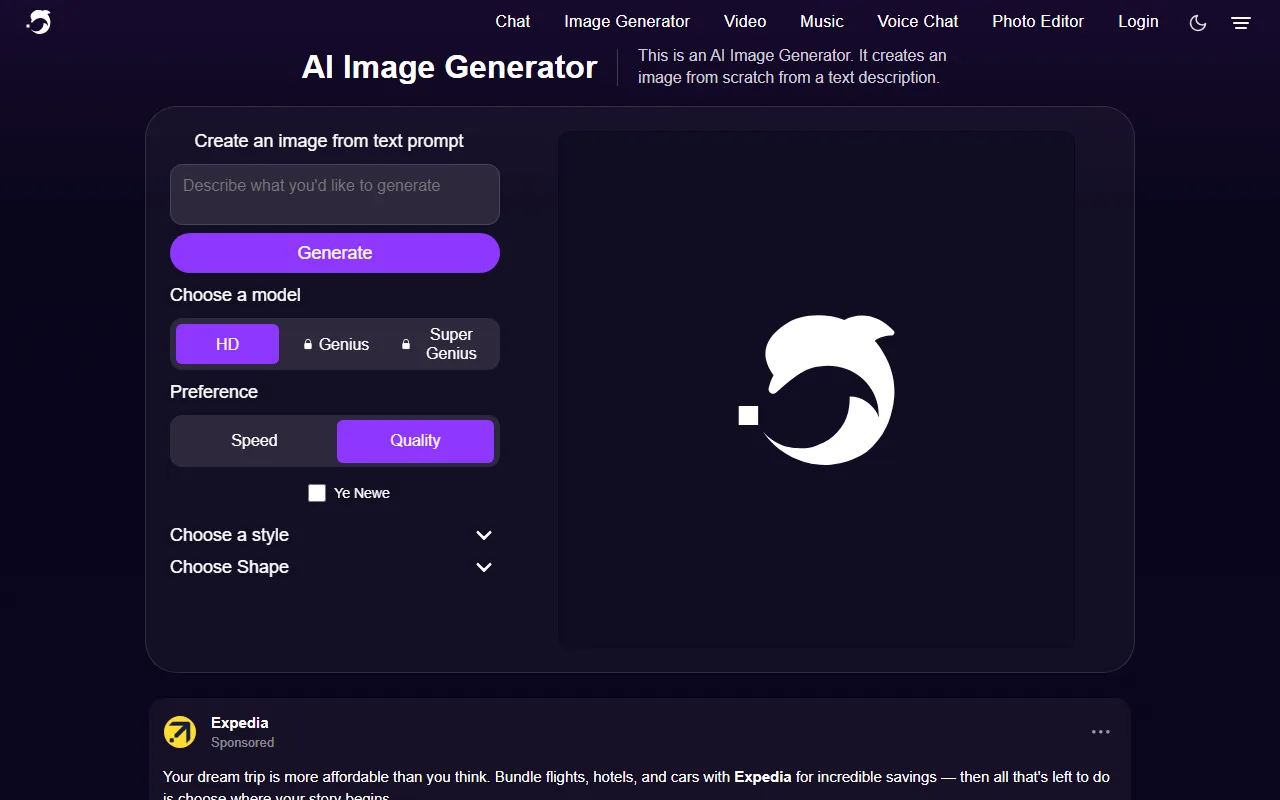 DeepAI lets you generate from a prompt without an account; the sharper Genius models sit behind Pro.
- Pros: No sign-up to try; you keep full commercial rights on free output; bundles other AI tools.
- Cons: Modest free quality and resolution; ad-supported; best models behind Pro.
- Pricing: Free tier with no account needed to try; DeepAI Pro from around $5/month for more models and higher limits.
- Best for: Simple generations with unambiguous commercial rights and no account.
5. Magic Studio: Best for an Image Plus Light Editing
Magic Studio pairs free, no-login generation with a small suite of practical editing tools, and that pairing is what sets it apart. Its AI Art Generator runs in the browser ("type your description, lightning fast, no login needed"), and the company says it powers over a million art generations a month across its users. You're also a click away from a background remover, a magic eraser, and other quick fixes, so you can generate an image and clean it up in one place.
That makes it a natural fit for small-business and marketing tasks, where you rarely want just a raw generation. You want a usable graphic. Generate a product scene, drop out the background, tidy a stray element, and you've got something close to ready for a listing or a post. It also offers ready-made templates for common formats like social posts and product shots, so you're not starting from a blank canvas every time.
The catch is that deeper features and full-resolution downloads push you toward Magic Studio Pro, and an account is required once you want to save or export at full quality. Generation quality is good rather than flagship, and the free experience is clearly the on-ramp to the paid suite.
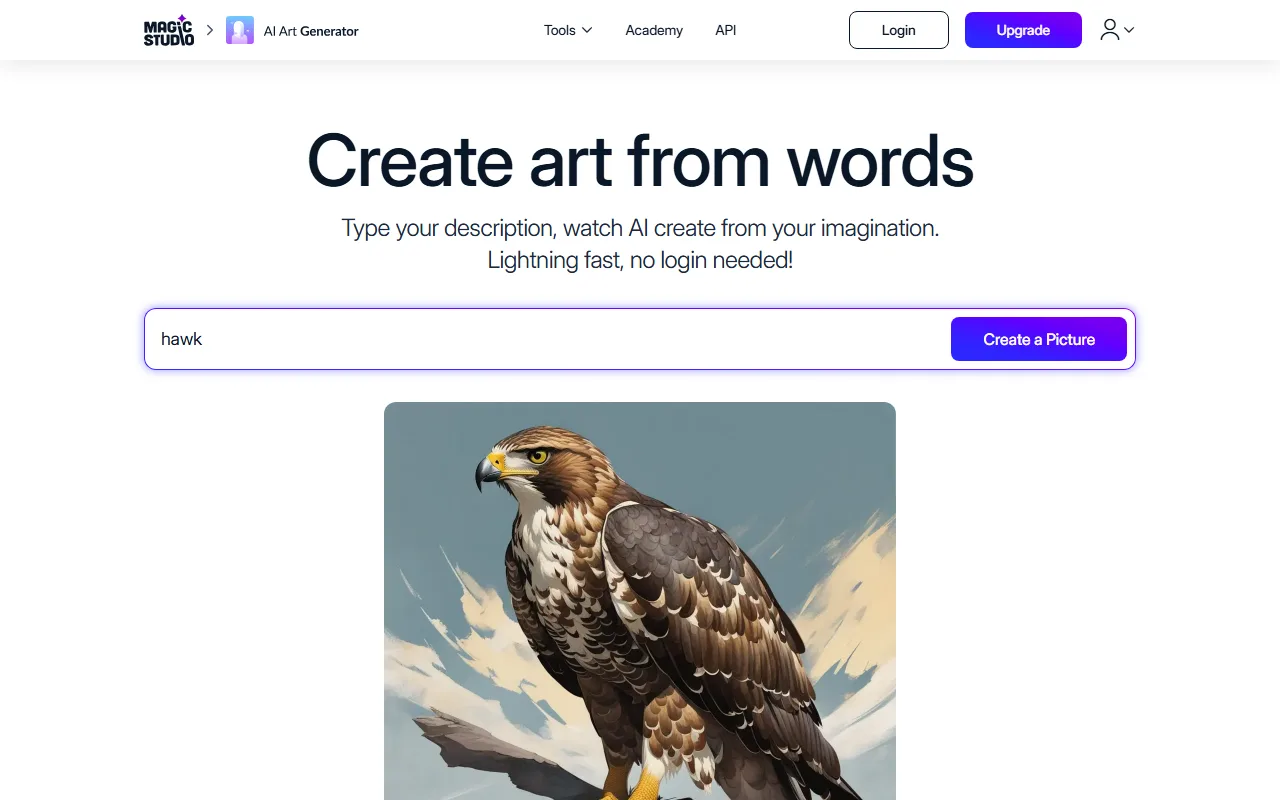 Magic Studio generates without a login and sits alongside its background remover and other quick edit tools.
- Pros: No login to generate; fast; bundled light-editing tools; good for marketing graphics.
- Cons: Full-res export and deeper tools need an account and Pro; quality is good, not flagship.
- Pricing: Free art generation with no login to try; Magic Studio Pro from around $8/month for the full suite and exports.
- Best for: Small-business and marketing users who want an image and quick edits in one tab.
6. Stable Diffusion Online: Best for Open-Model Tinkering
For people who specifically want Stable Diffusion, the open model whose 2022 release made it the most widely adopted open image generator, Stable Diffusion Online is a free web front-end you can use without signing up for basic generations. It's the pick for prompt tinkerers who like the control and the deep community knowledge built up around SD prompting.
Its appeal is direct access to an open-model lineage and the experimentation that comes with it. If you already think in SD prompt syntax, negative prompts, and styles, you'll feel at home, and there's a huge body of community prompts to borrow from. Because the model is open, you'll also find countless community fine-tunes and LoRA add-ons documented elsewhere that you can reference to nail a specific style.
It's also the least hand-holding option here. The basic free tier is rate-limited and can queue, advanced features and higher-resolution models (like SDXL-class generation) sit behind sign-in or paid plans, and there's no conversational guidance, so output quality lives or dies on your prompt skill. It rewards effort more than the plug-and-play tools above.
- Pros: Direct open-model access; great for prompt experimentation; large community knowledge base.
- Cons: Rate-limited free tier; advanced models gated; steep if you don't already prompt well.
- Pricing: Free basic generation without sign-up; paid plans for faster and higher-resolution output.
- Best for: Prompt tinkerers who specifically want the Stable Diffusion family.
How to Choose the Right Free Image Generator
Start with how strict your no-sign-up rule actually is. Every pick here qualifies as no-account, so from there it comes down to the job:
- Throwaway or for fun: Perchance or Craiyon, unlimited and instant.
- Needs to look real: Raphael AI, which runs on FLUX.1 and handles photorealism best among the no-account tools.
- Going on something you sell: DeepAI for its clear commercial rights, and check the free tier's resolution and watermark before you commit.
- An image plus quick edits: Magic Studio, which pairs generation with a background remover and other fixes in one tab.
- Prompt experimentation: Stable Diffusion Online for direct open-model access.
The honest summary: no-sign-up tools are perfect for speed and disposability, but they trade away quality, rights clarity, and anything downstream of the image. If the picture is going somewhere that matters, check each tool's resolution, watermark, and license before you build anything around it. And if you generate a lot, bookmark two of these rather than one, since free tools change their limits and watermark rules more often than paid ones do.
Conclusion
If you want an image right now with no account and no catch, start with Perchance for unlimited freebies, or Raphael AI when it needs to look real. Both are genuinely free and sign-up-free, with no watermark. Craiyon, DeepAI, Magic Studio, and Stable Diffusion Online each win a narrower niche, from familiar meme grids to clear commercial rights to open-model tinkering. Whichever you pick, generate one test image first and check the corners for a watermark and the resolution before you build anything around it.






