ChatGPT
 Perplexity
 Claude
 Gemini
 Grok
Grok



The wide shot shows the whole product. On a phone, the same shot may show a hand and half a label. Plan a vertical video around the detail, action, and next click that must survive the crop.
What changes when a product story goes vertical?
The viewer sees less side-by-side context, so each shot needs a clearer priority. Decide what matters now, then move supporting information to the next shot or the surrounding post.
Before editing, write one viewing sequence: recognize the item, read the label, see the claimed feature, then find the next action. If the source never shows that feature, a closer crop cannot create proof.
Pick one focal point for each shot
Give each shot one job a viewer can grasp at phone size. A product can fill the frame without revealing the detail that matters. Decide where a tighter view or new shot is needed.
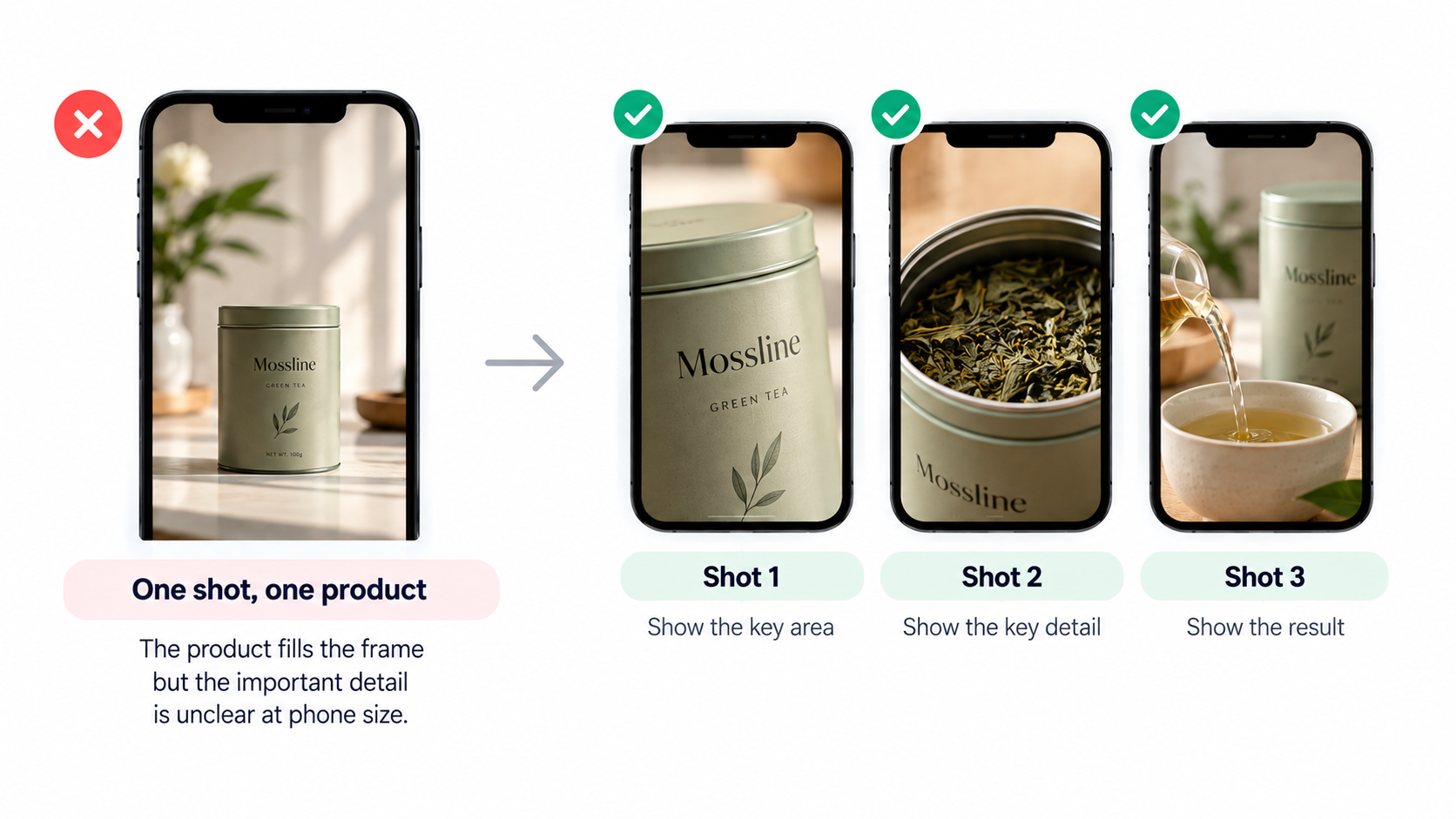
Product silhouette and readable label
Start with a recognizable product shape. Check the packaging name or variant on a real phone; enlarging a blurred label will not make it legible. A close-up may do more work than an overlaid title.
Let the label identify the variant and a short on-screen line name the approved feature. Check both against the product page. Review generated or retouched pack text letter by letter.
Hand, context, and scale
Show a hand when it clarifies use or size. In a vertical crop, it can hide the mechanism. Follow the moving part through the whole shot, from before to after the action.
This fictional editorial storyboard uses an imagined Mossline tea tin. Its approved line is “Hinged lid.” The source pack has a front packshot and wide opening clip; the destination lists tin sizes.
| Shot | What the phone viewer sees | On-screen / spoken job | Pass condition |
|---|---|---|---|
| 1. Identify | Upright tin, full outline, “Mossline Mint” label facing camera | On-screen: “Meet the Mossline tin.” | The name and variant remain readable without zooming. |
| 2. Prove | Hand opens the hinged lid in one uninterrupted action | Spoken or captioned: “Hinged lid.” | The lid and its connection to the tin stay visible from closed to open. |
| 3. Continue | Closed tin beside a second size, with clear space for a closing line | On-screen: “See tin sizes.” | The CTA is readable in the intended placement, and the size options are not misrepresented. |
If shot two loses the hinge, shot one cannot substitute for evidence.
Keep product claims and captions visible
Keep an essential claim visible long enough to read. Captions, packaging, price, and CTA should not fight for the same space. Let the action lead; add text where the image needs explanation.
Mobile video safe zones are placement-specific. YouTube's Shorts guidance shows where controls can cover text. Google Ads says overlays and CTA buttons vary by format and screen. TikTok's TopView guidance says caption length and add-ons change safe areas. Check the actual placement rather than borrowing another platform's margins.
Review the complete screen with account name, buttons, and ad treatment visible. Reserve space and time for required disclosures; confirm them under current rules with the legal reviewer.
Reframe a wide clip without losing product proof
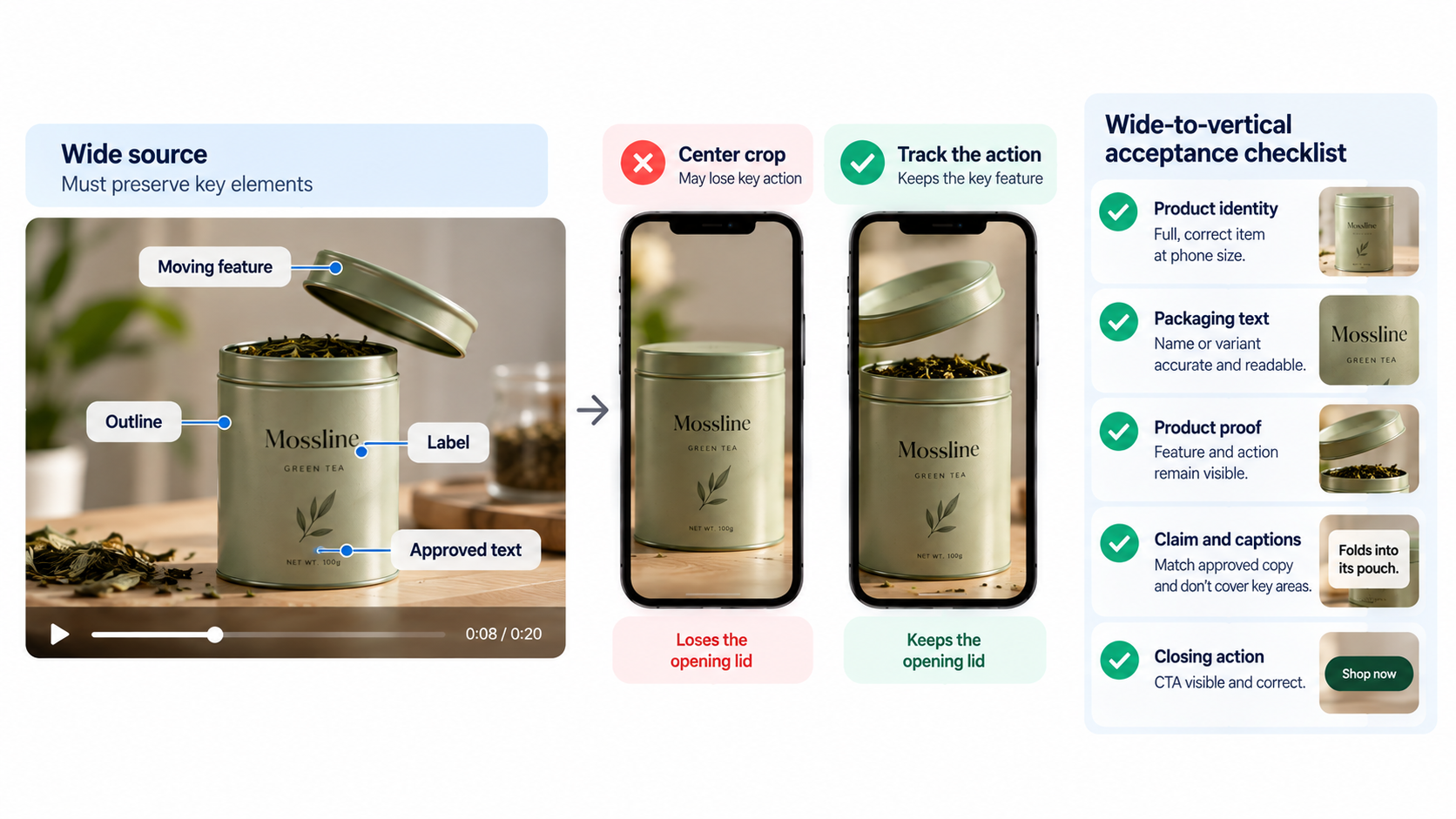
Mark what the wide source must preserve: outline, label, moving feature, approved text. Scrub the proposed vertical crop end to end. A center crop may hold the tin but lose its opening lid. Track the action if the source allows; otherwise split or reshoot.
Use this wide-to-vertical acceptance checklist on the rendered cut:
| Check | Accept when… | If it fails… |
|---|---|---|
| Product identity | The complete, correct item is recognizable at phone size. | Replace the crop with a closer source or a separate packshot. |
| Packaging text | The necessary name or variant is accurate and readable. | Use a legitimate close-up; do not invent sharper lettering. |
| Product proof | The feature and its action remain visible throughout the claim. | Reframe, split the shot, or film the missing action. |
| Claim and captions | Words match approved copy and do not cover the feature or platform UI. | Shorten, move, or retime the copy; recheck the rendered file. |
| Closing action | The CTA is visible and points to the right destination. | Rebuild the closing frame for this placement. |
Pexo publishes this article. Its video-resizer page describes source video, target aspect ratios, visibility priorities, and review of each reframe. Its subtitle page calls for wording, timing, and safe-area checks; its revision guide describes conversational and marked-area feedback. For Mossline: “Keep the hinge visible; retain the first packshot and check the label.” Review the complete next cut. These published workflows do not guarantee accurate text or a successful crop.
Review the cut on the target phone and placement
Watch the export on a phone and in its intended placement. Pause on the smallest pack text, peak action, subtitles, and closing frame. Play with sound and muted. Both views should support the same product claim and next step.
Check current official upload and ad guidance. Record device, placement, version, reviewer, and exact defect. “The hinge leaves the frame as the lid opens” is a useful revision note.
When does a shot need to be made again?
Make a new shot when the source cannot show the approved fact in a vertical frame. For Mossline, film the lid again if no crop shows both hinge and tin. A packshot cannot prove the action.
Replace the scene if tracking makes the viewer chase the product, the label stays unreadable, or text covers the action. Check rights, likeness, and ad disclosures against actual footage and destination. This is general editorial guidance, not legal advice.
If the source has enough detail, bring it and the approved claim to Pexo's video-resizer workflow. Name what must stay visible, preview the result, and request a specific correction. Otherwise, capture the missing shot first.