
Pexo
Veo 3

Veo 3
Give the scene a sound of its own

Veo 3 is Google DeepMind’s video model that brought native sound to generated scenes. It combines visual action with dialogue, effects, and ambience, starting from a written brief or an image in supported workflows.

Google lists the original Veo 3.0 Vertex AI endpoints as discontinued and recommends Veo 3.1.

A watchmaker placing a brass pocket watch on green felt in a warmly lit workshop
Picture + sound

Native audio generation

Text or image

Two ways to establish a scene

Veo 3 / Fast

Standard and faster-generation variants

Core capabilities

A bookseller placing an ochre clothbound book upright on a wooden display table
Scene brief

A bookseller places an ochre clothbound book upright on an oak display table. The camera slowly moves closer. Afternoon window light catches the cover.

01 / Scene direction

Text-to-video generation

Write the action you want to see.

Veo 3 turns a text description into a short scene. Specify who or what is in view, where the action happens, and how the camera follows it. A bookseller placing an ochre hardcover on a display table gives the shot a clear event; a slow move toward the cover gives that event a visual emphasis.

Name the subject, action, setting, and camera move in the same brief.

A botanist watering a fern with a metal can in an old greenhouse
Starting image → motion brief

Continue the gentle pour over the fern. Let water catch the window light while the leaves move slightly. Keep the camera steady.

02 / A visual starting point

Image-guided video generation

Give a still image its next moment.

Google introduced photo-to-video with Veo 3 in Gemini and Flow. The image establishes the person, setting, and composition; the accompanying brief describes what happens next. In this greenhouse scene, focus the movement on the watering can, the stream of water, and the fern leaves.

Keep the requested movement connected to objects already visible in the starting image.

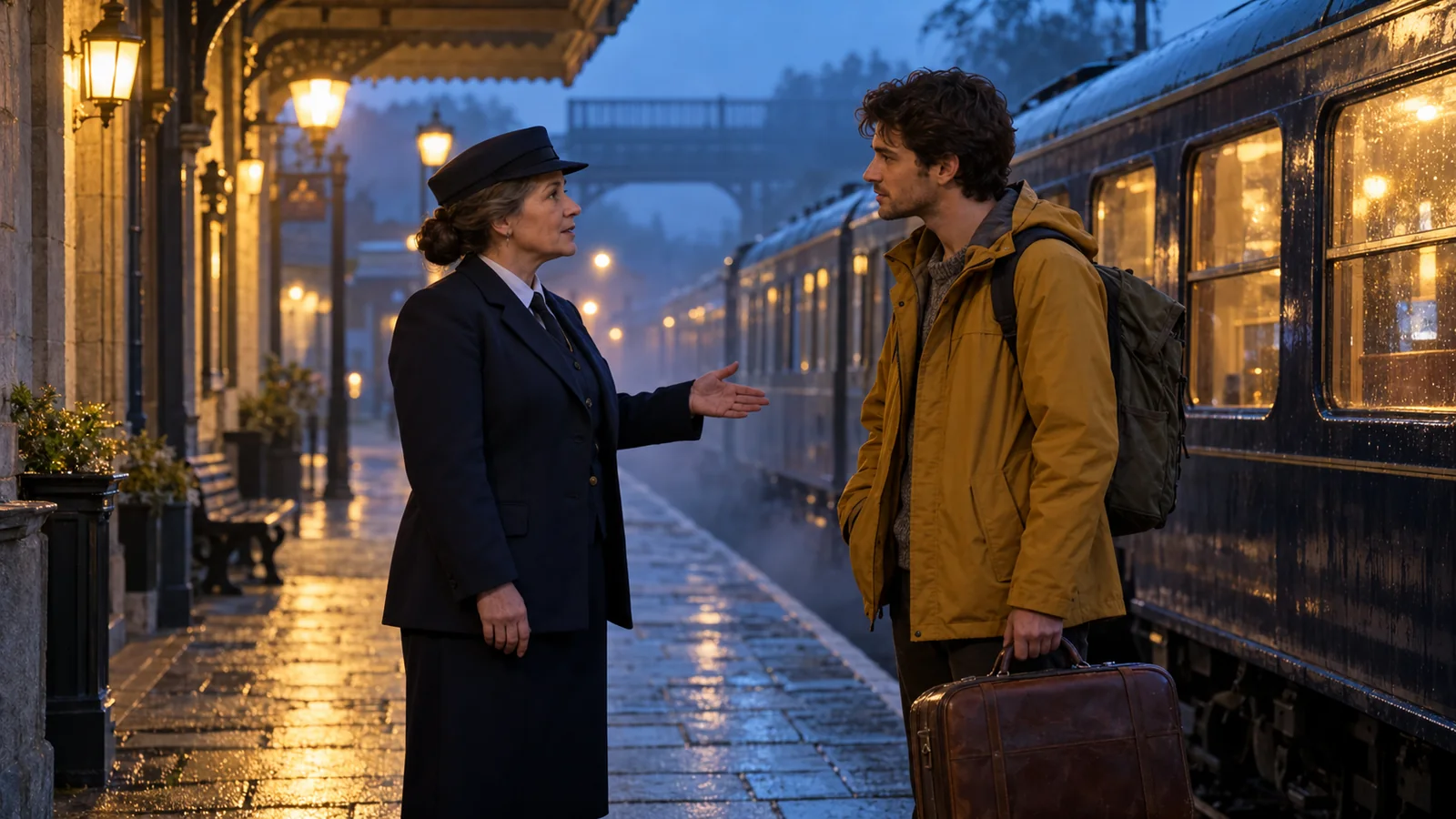
A conductor speaking to a traveler beside a train on a rainy platform
Dialogue + ambience

Conductor: “Your carriage is just ahead.” She gestures toward the train. Soft rain, a low engine hum, and a quiet pause before the traveler nods.

03 / Sound inside the scene

Native sound and dialogue

Describe what the viewer hears as well as sees.

Veo 3 generates audio alongside video, including speech, environmental sound, and action effects. Give each sound a source: a conductor’s line, rain on the platform, or the train’s low idle. Short dialogue leaves room for the characters’ gestures and the surrounding atmosphere.

A single speaker and a short line make the intended exchange easy to follow.

Veo 3 output formats

Google’s original Vertex AI Veo 3.0 model specifications describe the following formats.

Duration

4 / 6 / 8 seconds

Short clips with a defined action.

Orientation

16:9 or 9:16

Landscape and portrait compositions.

Resolution

720p / 1080p

Documented Veo 3.0 output sizes.

Frame rate

24 fps

A fixed frame cadence for the shot.

Veo 3 vs Veo 3 Fast

Both belong to the Veo 3.0 family. Fast was introduced for quicker iteration, while the original model served the standard generation route.

DimensionVeo 3Veo 3 Fast
Text generationWritten scene briefWritten scene brief
AudioNative sound generationNative sound generation
Documented clip lengths4, 6, or 8 seconds4, 6, or 8 seconds
Documented resolutions720p / 1080p720p / 1080p
Workflow emphasisStandard generationFaster iteration
Current Vertex AI replacementVeo 3.1Veo 3.1 Fast

Use cases

Explore Pexo workflows for product stories, cinematic moments, and moving photo sequences.

Connect the picture, movement, and sound

A focused scene is easier to direct when every instruction has a visible or audible role.

A woman placing a brass house key into a cobalt ceramic dish on an oak hallway console

01

Establish the frame

A quiet entrance hall, an oak console, a blue ceramic dish, and a woman holding a brass house key in the morning light.

02

Give the action a pace

She places the key gently into the dish. The camera moves closer and settles on her hand and the ceramic rim.

03

Give sound a source

A small metallic clink as the key touches the dish, the rustle of her sleeve, and quiet room ambience. Leave a short pause after the sound.

FAQ

What is Veo 3?

Veo 3 is Google DeepMind’s video generation model introduced in May 2025. Its defining addition was native audio: it could generate dialogue, effects, and background sound together with the video.

Can Veo 3 animate an image?

Yes. Google introduced Veo 3 photo-to-video in Gemini and Flow in July 2025. A starting image provides the visual composition, while a written description directs the movement and sound.

How long are Veo 3 videos?

The original Vertex AI Veo 3.0 specifications list 4-, 6-, and 8-second clips. Gemini’s Veo 3 photo-to-video launch described eight-second videos with sound.

Does Veo 3 generate speech and sound effects?

Yes. Veo 3 supports native dialogue, environmental sound, and effects. Describe the speaker and words for dialogue, and connect other sounds to the objects or actions in the scene.

Is Veo 3 the same as Veo 3.1?

No. They are different model generations. Google lists the original Veo 3.0 Vertex AI endpoints as discontinued and points developers to Veo 3.1 or Veo 3.1 Fast.

How is a video model different from a video agent?

A video model generates individual clips from inputs. A video agent works across the broader project, helping organize a brief, scenes, assets, revisions, and the finished edit. Choose according to whether you need one shot or a connected video workflow.

Describe your idea and start your next creation.

Start creating

Frequently Asked Questions (FAQ)

What is Veo 3?

Veo 3 is Google DeepMind’s video generation model introduced in May 2025. Its defining addition was native audio: it could generate dialogue, effects, and background sound together with the video.

Can Veo 3 animate an image?

Yes. Google introduced Veo 3 photo-to-video in Gemini and Flow in July 2025. A starting image provides the visual composition, while a written description directs the movement and sound.

How long are Veo 3 videos?

The original Vertex AI Veo 3.0 specifications list 4-, 6-, and 8-second clips. Gemini’s Veo 3 photo-to-video launch described eight-second videos with sound.

Does Veo 3 generate speech and sound effects?

Yes. Veo 3 supports native dialogue, environmental sound, and effects. Describe the speaker and words for dialogue, and connect other sounds to the objects or actions in the scene.

Is Veo 3 the same as Veo 3.1?

No. They are different model generations. Google lists the original Veo 3.0 Vertex AI endpoints as discontinued and points developers to Veo 3.1 or Veo 3.1 Fast.

How is a video model different from a video agent?

A video model generates individual clips from inputs. A video agent works across the broader project, helping organize a brief, scenes, assets, revisions, and the finished edit. Choose according to whether you need one shot or a connected video workflow.