

 ChatGPT
 Perplexity
 Claude
 Gemini
 Grok
Grok

What is Pictory AI?
Pictory AI is a cloud-based AI video generation platform that turns text, scripts, blogs, PPTs, images, URLs, and audio into fully edited videos in minutes.
Unlike traditional video editing tools that require manual cutting, filming, and design work, Pictory AI is built around a simple idea:
turn existing content into ready-to-publish videos automatically.
At its core, Pictory AI removes the technical barriers of video production. You don’t need cameras, editing software skills, or production teams. Instead, it uses AI to structure scenes, match visuals, generate captions, and add realistic voiceovers.
This makes Pictory AI especially popular among marketers, educators, and SaaS teams who need to produce video content at scale without increasing production costs.
maintaining consistent quality.
How Pictory AI Works
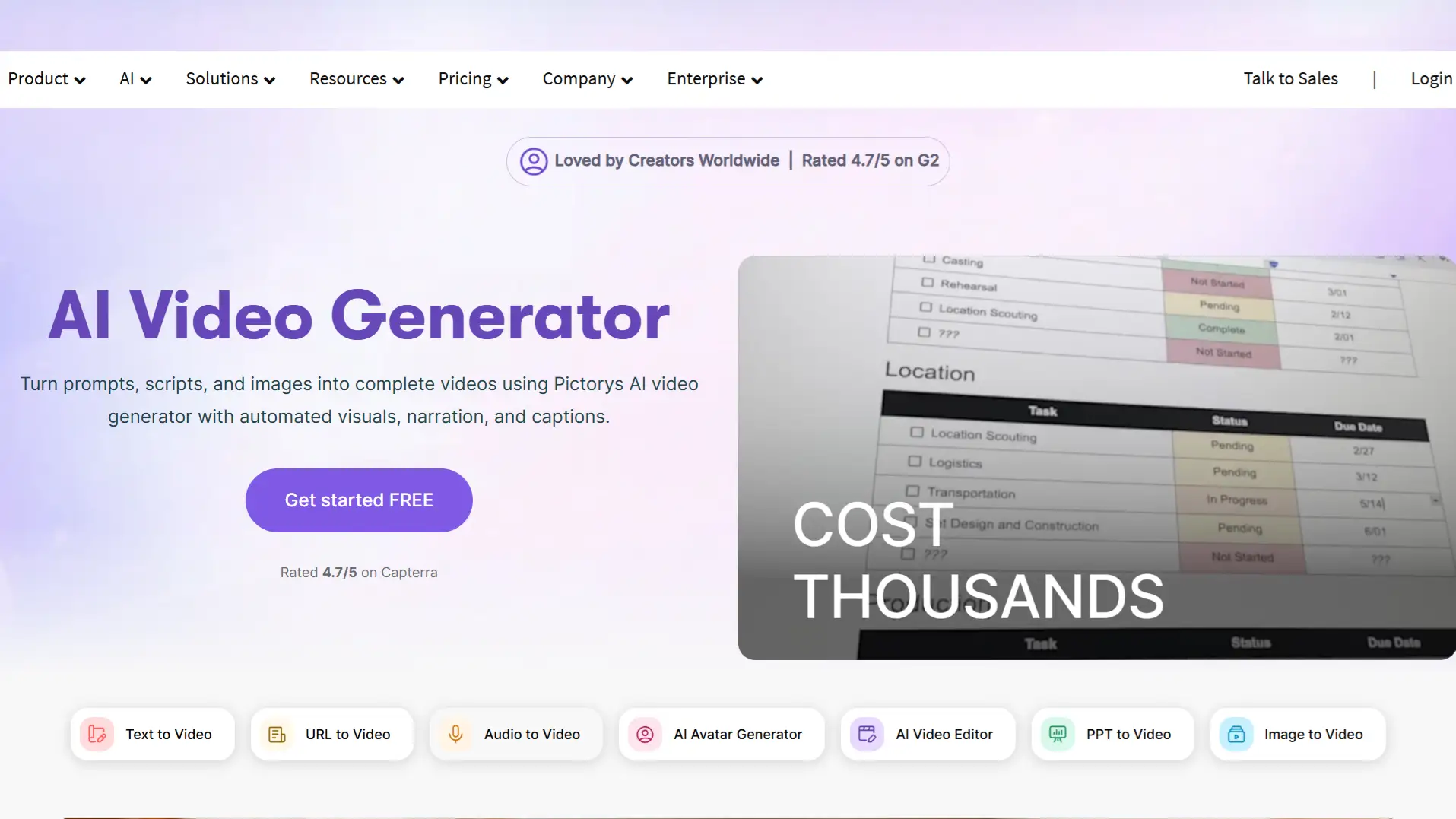
The workflow inside Pictory AI is designed to be simple, automated, and scalable:
-
Input Content – Upload text, scripts, URLs, PPTs, images, or audio.
-
AI Scene Creation – Automatically segments content into structured scenes.
-
Visual Matching – AI selects or generates visuals relevant to each scene.
-
Voice & Captions – Adds AI-generated voiceovers and automatic subtitles.
-
Final Video Output – Delivers a polished video ready for publishing.
This fully automated pipeline replaces the traditional editing workflow, allowing teams to scale content production efficiently.
You can explore how Pictory AI converts text into videos using its built-in workflow here
Key Features of Pictory AI
Rather than offering just one video generation feature, Pictory AI is designed as an end-to-end content repurposing platform. Its biggest strength is allowing users to turn existing assets—such as blog posts, scripts, presentations, and URLs—into polished videos without starting from scratch.
1. Multiple Content-to-Video Workflows
One of the most useful aspects of Pictory AI is the variety of input formats it supports. Instead of forcing users into a single workflow, the platform lets you generate videos from:
-
Text and scripts
-
Blog posts and URLs
-
PowerPoint presentations
-
Images
-
Audio files
This flexibility makes Pictory AI especially useful for marketing and content teams that already have written or visual assets and want to repurpose them into video efficiently.
For example, a SaaS company can turn a product blog post into a short explainer video, while educators can convert lesson slides into teaching content.
You can explore similar text-to-video workflows here:Text to Video
2. AI-Powered Scene Generation
After content is uploaded, Pictory AI automatically breaks information into scenes and structures them into a coherent narrative.
Instead of manually deciding:
-
where scenes should begin or end
-
how long each segment should be
-
which visuals match each idea
the platform handles these decisions automatically.
This significantly reduces editing time, especially for users without video production experience.
3. Automated Captions and AI Voiceovers
Captions and voice narration are essential for modern video content, especially on social platforms where many users watch videos without sound.
Pictory AI includes:
-
Automatic subtitle generation
-
AI voiceover narration
-
Multiple language support
This helps users create publish-ready videos faster while improving accessibility and engagement.
4. Built-In Editing and Branding Tools
Although automation is central to the platform, Pictory AI still allows users to customize outputs.
Users can:
-
Edit text directly inside the video editor
-
Change visuals and layouts
-
Apply brand colors, fonts, and logos
-
Use templates optimized for different formats
This balance between automation and customization makes Pictory AI practical for teams that need both speed and brand consistency.
5. Workflow Automation and Distribution
Beyond video creation itself, Pictory AI also supports workflow automation.
Its ecosystem includes:
-
Chrome extension for turning URLs into videos instantly
-
Make and Zapier integrations
-
Export formats optimized for social media platforms
This is particularly valuable for teams producing content at scale, where speed of publishing matters just as much as creation.
For teams looking to create videos specifically for marketing or product workflows, you can also explore creating product videos to streamline idea-to-video production.
Use Cases of Pictory AI
The real strength of Pictory AI is not just creation—it’s content repurposing at scale.
Marketing Teams
-
Turn blog posts into video ads
-
Create campaign videos from landing pages
-
Repurpose written content into social clips
SaaS Companies
-
Convert product documentation into explainers
-
Turn feature pages into demo videos
-
Scale onboarding content
Educators
-
Transform lessons into video modules
-
Convert slides into teaching videos
Content Creators
-
Recycle long-form blogs into short videos
-
Create social media video variations
Pros and Cons of Pictory AI
Pros
-
Fast conversion from text to video
-
No editing experience required
-
Strong automation for scaling content
-
Supports multiple input formats
-
Good for marketing and SaaS workflows
Cons
-
Limited deep manual editing control
-
AI avatars and advanced customization still evolving
-
Requires internet connection (fully cloud-based)
Pricing of Pictory AI
Pictory AI offers a free trial with no credit card required. Paid plans vary based on features, video length, and team access. Here’s the detailed breakdown:
| Plan | Price (Annual) | Monthly Video Minutes | Best For | Core Features |
|---|---|---|---|---|
| Starter | $25/mo | 200 | Solopreneurs testing the platform | 720p resolution, 5 million stock assets, 5 GB storage, 1 Brand Kit, 5,000 music tracks |
| Professional | $35/mo | 600 | Solo creators, small teams | 1080p resolution, 18 million stock assets, 20 GB storage, 5 Brand Kits, 10,000 music tracks |
| Teams | $119/mo | 1,800 | Agencies, marketing teams | 1080p resolution, Team workspace, 3+ users, 10 Brand Kits, 15,000 music tracks, 100 GB storage |
| API | Custom | Variable | Developers, integrations | Programmatic access, custom workflows |
| Enterprise | Custom | Custom | Large organizations | Dedicated support, unlimited Brand Kits, custom integrations |
Key Takeaways:
-
Starter and Professional plans suit individual creators or small teams.
-
Teams and Enterprise plans are ideal for agencies or organizations needing larger scale, collaboration, and storage.
-
API plans allow developers to integrate Pictory AI into custom workflows.
This table makes it easy for readers to compare plans and understand which plan suits their needs best.
Limitations of Pictory AI
While Pictory AI is powerful for automation, it is not designed for highly cinematic or frame-level editing control.
This means:
-
It is best for structured, content-driven videos
-
It is less ideal for advanced creative film editing
-
It focuses on speed and scalability over fine-grained control
For teams that need faster experimentation or more prompt-driven creation, alternative AI tools such as Pexo can complement or extend workflows by generating demo-style videos directly from ideas or scripts.
Best Alternatives to Pictory AI
-
Pexo – Online AI video creation agent focused on script-to-video automation
-
Lumen5 – Blog-to-video conversion platform
-
Synthesia – AI avatar-based video generation tool
Final Verdict
Pictory AI is one of the most practical AI video generation tools for turning text, scripts, and blogs into professional videos at scale.
Its biggest strength is not just automation, but the ability to convert existing content into video format without requiring editing expertise.
For marketers, SaaS teams, and educators, Pictory AI significantly reduces production time while enabling scalable content output.




