 ChatGPT
 Perplexity
 Claude
 Gemini
 Grok




A solo agent preparing an open house needs the same facts to survive several formats: a social image, a spoken invitation and a short video. Pexo can help develop those creative assets, while the agent keeps control of the property information. This worked example shows where AI for real estate helps production and where a human decision still matters.
The property, event and copy below are fictional teaching examples, not an active listing or a report of generated results. The deliverable is deliberately small: one announcement image and one optional narrated video. There is no need to produce every format before the message works.
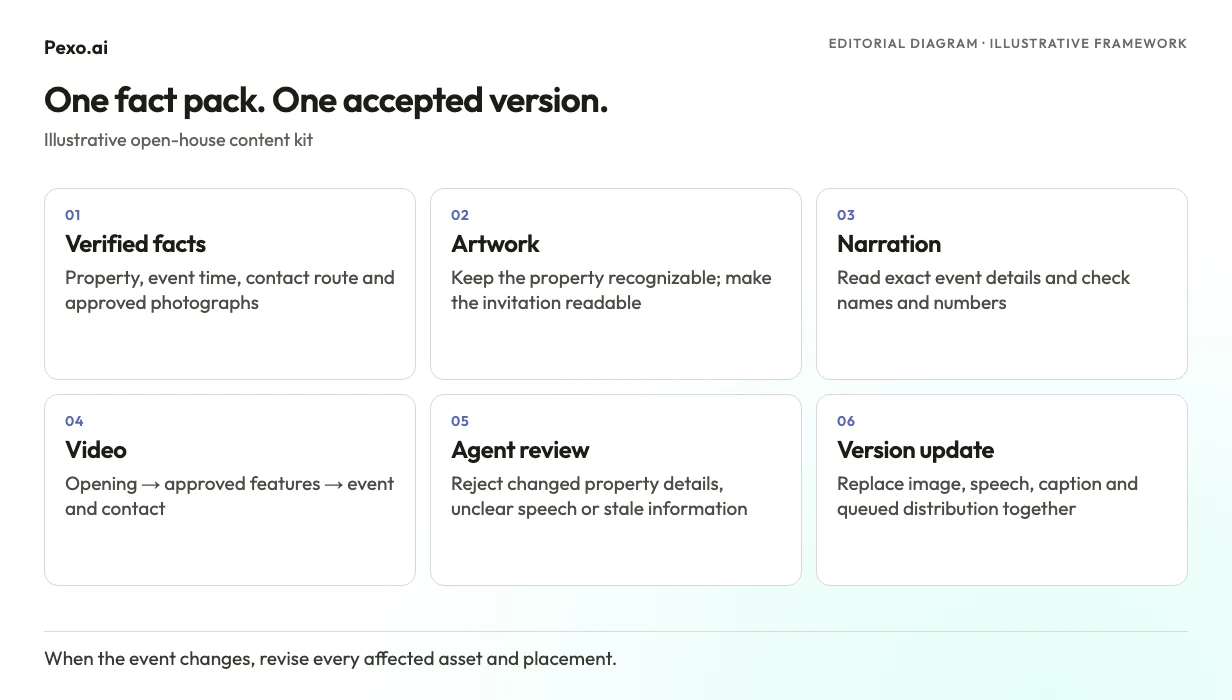 Illustrative open-house workflow: accepted facts stay consistent across the artwork, narration, video and distribution versions.
Start AI for real estate with a completed fact pack
The agent's first job is to decide which information may appear. Use the brokerage's approved listing record and photographs, not private seller notes or a remembered version of the description. A listing URL can provide context, but compare it with the current approved facts. Keep unknown information out of the copy. The fictional source pack below shows the distinction between a fact, a creative direction and an instruction. An actual campaign would replace it with verified listing material and the appropriate brokerage details.
| Source item | Fictional example | Production consequence |
|---|---|---|
| Property reference | Demo Oak House; three bedrooms, two bathrooms | Do not invent floor area, schools, views or other features. |
| Approved features | Covered patio and separate study | Mention only these features unless the source is expanded. |
| Event | Sunday, 2–4 PM; attendance arrangements confirmed by agent | The event time must match the image, speech and closing frame. |
| Photographs | Approved exterior, study and patio originals supplied for a real project | These establish the actual property; retain them for comparison. |
| Contact | Listing agent's verified contact route | An invitation must lead to the actual agent, not a fictional demo address. |
| Visual direction | Clear, restrained, readable on a phone | Creative preference; it cannot change the property facts. |
Give the source a version and an owner: “Oak kit v1, approved by listing agent.” For a solo agent, that may be a simple document rather than a team system. The important part is preserving what was approved. Do not send identification records, seller financial information or transaction documents merely to make a marketing image. NAR's AI overview for real estate provides context for the broader applications and risks. This example stays with a narrower job: an inspectable marketing package made from a checked source.
Write the invitation before developing the artwork
Here is complete fictional announcement copy: “Explore Demo Oak House this Sunday, 2–4 PM. This three-bedroom, two-bathroom example home includes a separate study and covered patio. Contact the listing agent for the confirmed address and attendance arrangements.” For an actual campaign, use the real property reference and approved brokerage wording. The image does not need every sentence. Its hierarchy can be “Open house,” the property reference, “Sunday, 2–4 PM” and a readable contact instruction. The caption carries the brief feature description. A phone viewer should not have to decipher a reduced listing sheet.
A usable Pexo request would be: “Develop a phone-readable open-house announcement using the attached approved property photos and source pack. Keep the property unchanged. Emphasize the event and contact instruction. Show a proposed layout before continuing into a video. Flag missing information instead of adding it.” The benefit of a conversation is the ability to discuss a concrete choice: the event time is hard to see, the study photo is not important enough to lead, or the artwork implies a feature outside the source. Pexo's image-generation workflow can develop appropriate campaign artwork. Keep generated backgrounds and illustrative decoration distinct from the photographs that represent the actual home. A simple layout may be enough; a realistic invented room is unnecessary.
Prepare the spoken invitation and a short scene plan
A spoken version should be written for listening rather than read directly from a dense caption. An illustrative script is: “Visit Demo Oak House this Sunday from two to four. Explore the separate study and covered patio. Contact the listing agent to confirm the address and attendance arrangements.” It deliberately leaves out unsupported claims such as a perfect neighborhood, exceptional investment potential or guaranteed demand. Use Pexo's text-to-speech narration to prepare a spoken draft, then compare every word with the script. In a real campaign, listen closely to the property name, agent name, time and contact instruction. A fluent voice does not establish that those details are correct.
If video adds value, use a scene plan that keeps the source recognizable. The approximate beats below are editorial choices for the example, not a claimed production-time or model-duration specification.
| Beat | Visual purpose | Acceptance test |
|---|---|---|
| Opening | Approved exterior with event information | Property stays recognizable; event is readable. |
| Middle | Approved study and patio images | No invented room connections, expanded space or added features. |
| Closing | Property reference, event time and contact instruction | The next action agrees with the spoken invitation and caption. |
Continue the accepted direction through Pexo's image-to-video workflow. Ask for restrained presentation rather than dramatic movement that invents the route between rooms. Music is optional; it should not obscure the invitation. If the image already communicates the event well, release the image after review and leave the video in development. One accepted asset does not approve the entire packet. Keep the narration text beside the final video so a later change can be traced to the exact words affected.
Reject the attractive result that changes the property
Suppose a proposed visual makes the covered patio look larger and adds a landscaped outlook not visible in the source. That is a rejected concept even if it looks polished. The reason is not merely that it is generated: it represents facts the source does not establish. A suitable correction is: “Return to the approved patio photograph. Do not extend the floor, change the roofline or invent the view. Use layout and readable event information to improve the announcement.” The corrected brief identifies the defect instead of asking for a vaguer “more realistic” result. Compare the returned image with the original, not with the rejected variation.
For a technical review of a property image, ask whether permanent features, apparent dimensions, condition or views have changed. For a process illustration that is not a property representation, make its illustrative purpose clear. NAR's broker guidance on AI and property listings emphasizes accurate representation, supervision and applicable disclosure requirements. Have the responsible broker determine the requirements for the location and channel. Keep approval practical: source facts match, the property is represented accurately, the event and contact details agree, the asset is readable and any required brokerage information is present. Reject the specific failing asset; do not let a correct caption excuse an inaccurate video frame.
Update the whole kit when the event changes
A date change is the best test of whether the workflow is usable. In this fictional example, the agent changes the event from Sunday to Saturday at the same time. First update the source to v2. Then find every place the old day appears, including the spoken audio. The small inventory below prevents a caption correction from leaving a conflicting video in circulation.
| Asset or placement | Required action for the fictional change |
|---|---|
| Announcement image | Replace the day, review readability and save accepted v2. |
| Narration and video | Revise the spoken day and every visible event reference; review the full sequence. |
| Caption and destination | Update the invitation and verify the real contact route. |
| Scheduled distribution | Replace or cancel queued v1 before it releases. |
| Existing live placements | Update, remove or clarify under the channel's capabilities; record what remains. |
Conclusion
The agent then approves the actual v2 files and records where they are used. This is a content-control method, not evidence of a campaign result. Track the things it can establish: which version is current, which asset passed review and which placement still needs action. Wider AI for real estate may include many other applications, but one well-run content kit is a manageable start. Bring Pexo the checked source, develop the visual and spoken treatments, and judge success by a usable, accurate package rather than the number of generations.