
 ChatGPT
 Perplexity
 Claude
 Gemini
 Grok




The best real estate video apps solve different production problems: presenting approved property photos, developing original campaign material or putting a presenter on screen. Pexo fits the original creative workflow, Canva fits template-led assembly and HeyGen is worth considering for presenter-led communication. This three-workflow shortlist is for listing agents preparing a photo-led announcement, an original explainer or a presenter introduction, rather than an exhaustive review of every property-video app.
This is a source-based buying guide from Pexo, researched on November 20, 2026. It is not a same-input performance test, and the recommendations describe workflow fit rather than a measured quality ranking. No application removes the need to check property facts and representations against the actual listing.
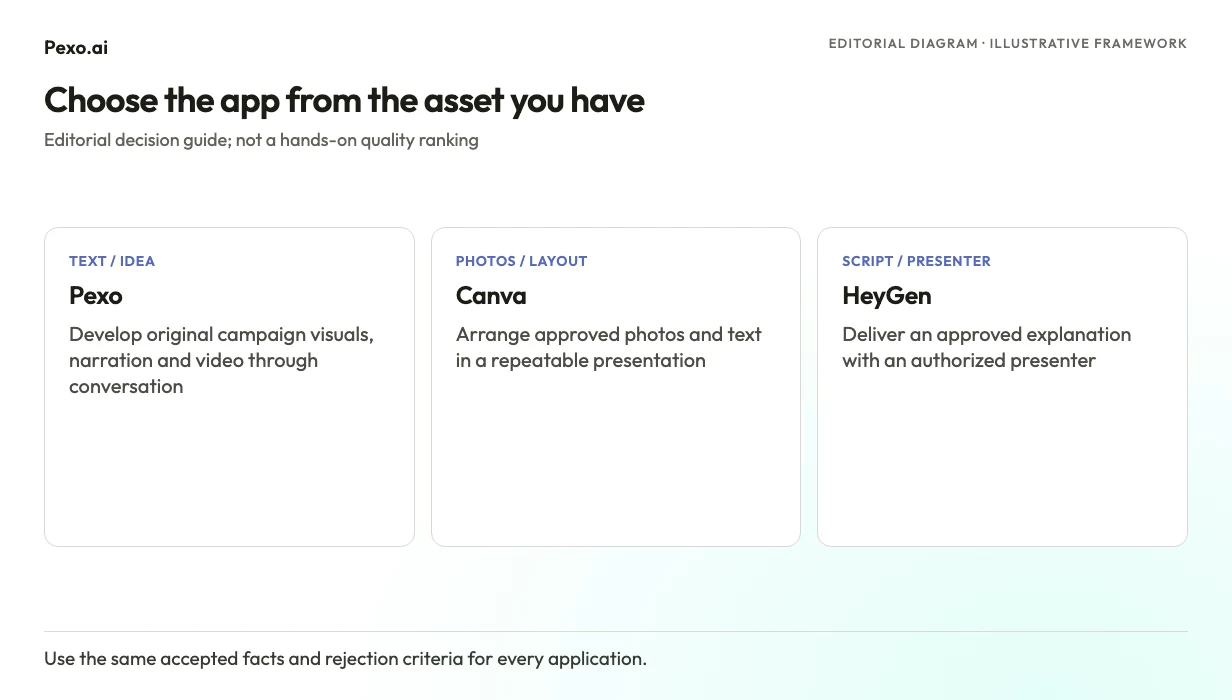 Source-based buying guide: these applications suit different starting materials; the diagram does not report a same-listing performance test.
Evaluation criteria for the three workflows
Start with the asset you already have and the work you still want to do. The three options below cover different approaches, so the first row is not a claim that one application wins every property-video task. Prices are the US public prices observed during research; billing terms and included usage can change.
| App | Best fit in this guide | Starting point | Free access and paid entry |
|---|---|---|---|
| Pexo | Developing original campaign assets through conversation | Approved text, images, URL or audio | Credit-based; paid plans observed from $30/month; check current starter access in the account |
| Canva | Assembling branded graphics and video from a template | Approved photos, text and a chosen layout | Free plan; Pro observed at $144/year for one person, equivalent to $12/month billed yearly |
| HeyGen | Presenter-led explanations and updates | An approved script and authorized presenter choice | Free: 3 watermarked videos/month, up to 1 minute each; Creator observed at $29/month |
We selected one representative route for each of those three jobs. This excludes specialist capture, interactive tours and professional footage-editing systems; they require a different comparison. Canva is the manual template alternative here, not an equivalent claim of autonomous AI production. Ask whether the workflow preserves the information you need, how much manual assembly remains and whether the intended output can be reviewed confidently. For a faithful walkthrough, actual capture or an appropriate documented tour remains necessary. A generated camera move cannot establish an unseen room connection. For an illustrated buyer-process explanation, original creative work may be useful without pretending to document a specific property. Keep that distinction in the brief before trying any app. The source check here establishes published capabilities and pricing, not independently measured output quality.
Pexo: develop the creative package from an approved idea
Pexo is an AI video partner for the agent who has the message and source material but does not want to assemble every creative component manually. Describe the purpose and discuss the direction before full production. Its distinguishing workflow is “No operating. Just directing”: the agent supplies the approved idea and gives feedback in ordinary language. For real estate, the package can begin before video. An explanatory illustration or campaign graphic can establish the visual hierarchy; a spoken draft can establish the message; the accepted direction can then continue into a video. That is useful for an agent introduction, an open-house campaign or an educational explanation whose visuals do not claim to prove unobserved property features.
The main limitation is the need to inspect generated representations carefully. Do not treat an appealing room variation as an accurate listing photograph, or assume every motion preserves the property's geometry. Keep approved originals beside the output and reject changes to permanent features or apparent space. Pexo's image-to-video workflow is a relevant starting point when approved images are part of the brief. The pricing page showed paid entry at $30/month during research, with credit-based usage. The cost of a usable package depends on the work and revisions, so this guide does not invent a per-listing price. Pros: conversational creative direction; related image, audio and video production. Cons: generated property representations require close review; it is not a substitute for factual source capture. Choose it when creative development is the bottleneck, rather than when you need a documented physical tour.
Canva: assemble a repeatable listing presentation
Canva is a sensible shortlist entry when the agent wants direct control over the placement of approved photos, text and branding. The template-led approach can suit a repeatable property-announcement format where much of the layout stays the same. The creative question becomes what to include and how to arrange it. For an illustrative assignment, an agent could prepare a simple sequence using an exterior photo, the approved property facts and an open-house invitation. Keeping the original photos as presentation elements can make comparison with the source straightforward. That does not make the finished video automatically accurate: the selected text, timing and visual context still need review.
The trade-off is that the agent or coordinator remains responsible for assembly decisions. A template cannot know which fact is most important or whether yesterday's event information has changed. If you prefer to direct a developing idea through conversation, compare that working style with Pexo before choosing. For a coordinator who already maintains branded graphics, staying in a familiar design workflow may be more valuable than adding another production application. Canva's official pricing listed a free plan and Pro at $144/year for one person during research. That annual commitment is not a $12 cancel-any-month offer. Pros: direct control of a repeatable layout; graphics and video can share a visual system. Cons: the user still makes assembly decisions; some content and capabilities depend on the plan. Choose it when repeatability and hands-on layout control matter more than conversational production.
HeyGen: put an approved explanation in front of a presenter
HeyGen is relevant when the message benefits from a presenter: an agent introduction, a process explanation or a market update based on checked information. This differs from showing a property's actual condition. A presenter can explain what an open-house visitor should know, but cannot establish a kitchen's dimensions or the view from a bedroom. Decide whether the face on screen represents the actual agent or a clearly appropriate synthetic presenter, and obtain any required authorization. Keep the script as the factual source and listen closely to names, numbers and local terms. A fluent delivery can make an unsupported statement sound more credible, which increases the importance of review rather than reducing it.
The current HeyGen pricing page listed a free plan with three watermarked videos per month, each up to one minute, and Creator at $29/month. Those are plan facts, not a guarantee that every real-estate concept fits the included usage. Evaluate the output using a representative approved script before adopting it for recurring communication. The strongest fit in this shortlist is a presentation centered on spoken explanation; do not choose it merely because an avatar looks impressive in a demonstration. Pros: a presenter-led format for repeated explanations; a public free tier for initial evaluation. Cons: likeness and script accuracy require review; a presenter is not evidence of the property itself. Choose it when the communication depends on a speaking presence, while considering Canva for arranged photo presentations and Pexo for broader original creative development.
Compare the delivery facts before choosing a plan
Official plan and feature pages support the distinctions below. “Not verified” means the buyer should obtain the answer for the intended plan before committing; it is not a claim that a capability is absent. The price sources are linked in the product sections, while the reviewed feature pages are recorded in this guide's research notes.
| Decision | Pexo | Canva | HeyGen |
|---|---|---|---|
| Who develops the presentation? | Agent directs creative development through conversation | User arranges a template and its content | User supplies and reviews presenter-centered script and production choices |
| Source-photo role | Input to a generated creative workflow; inspect changes | Photos can remain separate layout elements | Presenter-led explanation does not establish the property's condition |
| Export fact verified in this research | Common aspect-ratio support; exact plan-specific format/resolution not verified | Official editor page states MP4/GIF export | Creator plan page states 1080p and removal of HeyGen branding |
| Free-output constraint verified | Current starter access must be checked in account | Watermark-free when using free elements; paid elements need appropriate access | Three watermarked videos/month, up to one minute each |
| Identity input | Use appropriate approved source material | No presenter needed for a photo presentation | Authorized presenter or likeness choice and script review |
| Unresolved before purchase | Usage and credit cost for the exact assignment | Rights and plan access for selected elements | Credits and presenter conditions for the intended assignment |
A defined export or allowance is a purchasing fact, not proof of output quality. Confirm music and asset rights for the actual placement in every route. If a property must remain a faithful record, decide that requirement before considering generated scene variation.
How to choose: use one acceptance brief
Use this fictional assignment to evaluate the workflow. It is a complete production brief, not a claim that any app produced the sample. Property: Demo Oak House; three bedrooms, two bathrooms, separate study and covered patio. Event: Sunday, 2–4 PM. Inputs for a real test: approved exterior, study and patio photos, verified contact information and required brokerage wording. Deliverables: one phone-readable image, an optional narrated video and the accepted script. Do not add views, room connections, floor area or neighborhood claims absent from the source.
The scene sequence is exterior and event first, then study and patio, then the invitation. Script: “Explore Demo Oak House this Sunday from two to four. See the separate study and covered patio. Contact the listing agent to confirm the address and attendance arrangements.” In Canva, the agent selects and arranges the photos and wording. In Pexo, the agent supplies the source and directs the proposed creative treatment. In HeyGen, the agent decides whether a presenter actually helps this invitation and reviews the authorized presentation. A presenter is a poor fit when the essential requirement is uninterrupted property evidence; a manual template is a poor fit when nobody will perform assembly; original generation is a poor fit when unreviewed visual changes would misrepresent the home.
Accept the result only if facts match, the property remains accurately represented, time and contact information are readable, speech agrees with the script and intended usage is permitted. Record output version, corrections, actual usage and unresolved delivery questions. If the event changes to Saturday, update the image, speech, video, caption and affected placements together. This brief helps select a real evaluation task without treating published feature information as a measured result.
Conclusion
For original creative material, develop an illustration with Pexo's image-generation workflow or prepare a checked spoken draft with text-to-speech. For hands-on layout control, Canva may fit better; for presenter-centered communication, HeyGen may fit better. These choices can coexist in a team's workflow, but adding subscriptions without a defined job rarely makes production clearer. The best real estate video apps are the ones that turn your actual source material into an inspectable asset with an acceptable amount of work. Select on that basis, preserve the originals and keep final publication subject to brokerage review.