
 ChatGPT
 Perplexity
 Claude
 Gemini
 Grok



The hardest part of maintaining a contractor's feed is often the unfinished queue: a photo without context, a video waiting for one correction and an offer whose dates changed yesterday. Pexo can help develop the creative assets, while a simple weekly control system keeps them moving. HVAC social media management needs both pieces: production and ownership.
This workflow is for an owner or coordinator who shares marketing time with other work. It separates what can be prepared in advance from what needs current information, then makes the next action visible. It does not assume Pexo publishes posts, monitors messages or manages an advertising account.
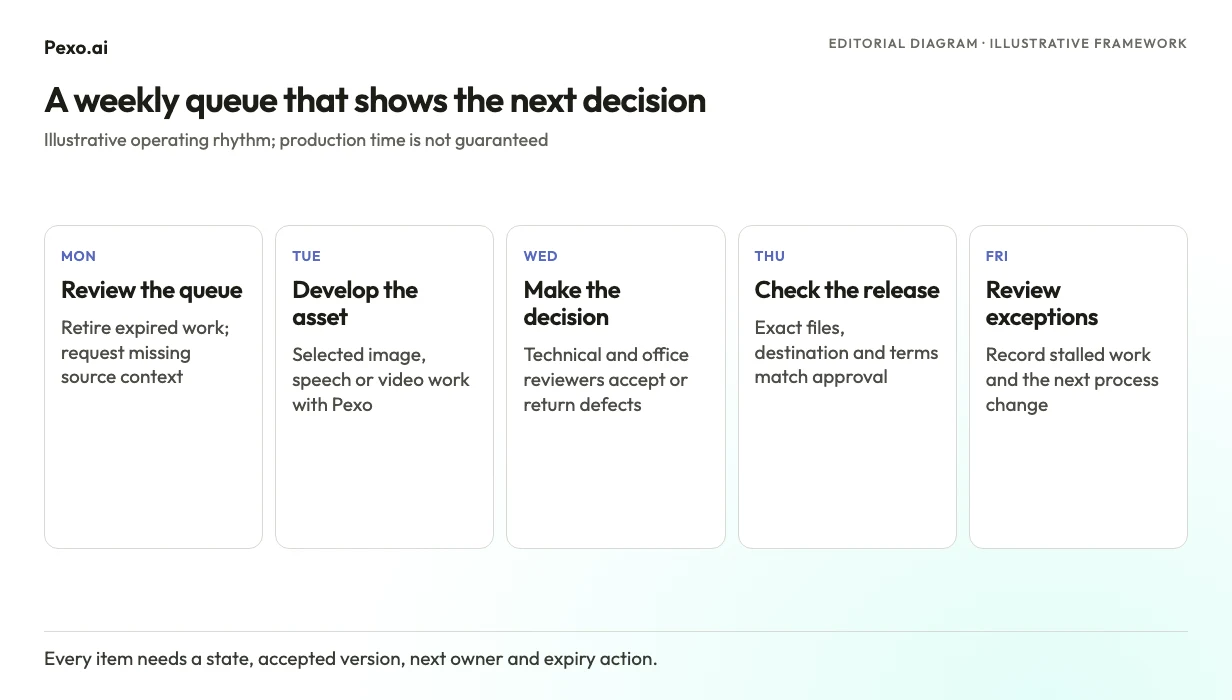 Illustrative weekly rhythm: unfinished work stays in its actual queue state instead of being treated as approved or published.
Make HVAC social media management a visible queue
Start with a record for each content idea, not a folder full of files. The record should identify the purpose, source, intended channel, owner, deadline and status. Add the approved asset only when one exists. A row labeled “maintenance post” is still too vague if nobody knows whether it is an educational explanation or a time-limited promotion. The distinction changes the evidence, approver and refresh date. Keep the queue small enough that the coordinator can explain why every item is there. A long backlog of unapproved ideas creates the appearance of progress while making selection harder.
Here is an illustrative working queue. The reference identifies an internal record, not customer information.
| Item | State and accepted version | Next action and deadline | Expiry action |
|---|---|---|---|
| Q-01: actual repair photo | Source needed; none accepted | Technician explains visible work by Monday review | Hold; do not invent the job story |
| Q-02: booking explanation | Approved v3 | Publisher checks destination before Thursday release | Recheck when office process changes |
| Q-03: seasonal offer | Retired v2 | Publisher removes queued use and checks live placements today | Stop scheduled/paid distribution; update or remove live organic copy where appropriate |
Use statuses that expose the next decision. Pexo can support production revisions, while this queue records which version was accepted and who must act. A new file in a folder does not automatically replace an approved version.
Separate evergreen work from information that expires
Evergreen content can explain a service process, introduce the business or answer a recurring question. It still needs periodic review, but it does not depend on tomorrow's appointment schedule. Time-sensitive content includes available slots, event dates, prices, seasonal offers and weather-related messages. Give those items an owner and a refresh or removal date. An old offer can keep attracting questions after its artwork stops being useful. Do not solve that problem by embedding more small print into every graphic. Make the current terms clear and give the publisher a reliable way to know when the item should stop circulating.
An evergreen reserve is a small set of accepted explanations, not a warehouse of generic graphics. For example, keep Q-02's exact narration and process image with its source. If the office changes how it confirms appointments, revise those affected parts in Pexo, inspect the result and record a new accepted version. An illustration can clarify the process without pretending to document a real service visit. For offers, the expiry action must specify the placement: cancel an unreleased scheduled post, pause relevant paid distribution, and address live organic material separately. These actions are different; “expired” alone does not complete them.
Run the weekly review before producing more content
Begin the week by clearing decisions. Which approved items can still be used? Which offers have expired? Which source material is missing? Which customer question deserves an answer? Ask the office and field team for the specific information needed to unblock those items. A useful review might discover that a strong photo has waited two weeks because the coordinator does not know what work it shows. One short explanation from the technician may be more valuable than commissioning another generic graphic. Resist the urge to start new creative work simply because the existing queue is inconvenient to resolve.
The example week below is a coordinator's planning choice, not a promised production time or universal posting cadence.
| Checkpoint | Illustrative allocation | Owner and output |
|---|---|---|
| Monday queue review | 20 minutes | Coordinator retires Q-03 and requests Q-01 context |
| Tuesday production block | 45 minutes reserved | Coordinator develops the selected asset with Pexo; unfinished work stays in production |
| Wednesday decision deadline | Review time agreed with approvers | Technical and office reviewers accept or return specific defects |
| Thursday release check | 10 minutes reserved | Publisher checks exact files, destination and current terms |
| Friday exception review | 15 minutes | Coordinator records stalled work and next week's change |
Use Pexo narration only when speech improves the selected message. Music generation is optional, not another weekly requirement. Reserve time is a staffing decision; actual generation and revision time varies.
Create an approval packet the publisher can trust
The final packet should contain the exact file, the accompanying wording, destination link, intended placement and any expiry condition. For a video, include the approved narration so a reviewer can compare what is spoken with the business facts. For a service image, keep the original photograph available if it documents actual work. Label generated illustrations appropriately when they could otherwise be mistaken for job evidence. The FTC's small-business advertising guidance is a useful primary reference for the person checking claims and endorsements. The approval process should verify the whole message, including what the visual implies, rather than only checking the caption for spelling.
Review in the environment where the viewer will see the content. Check mobile readability, the time an offer stays visible, audio balance and whether the linked destination completes the promised next step. Make corrections specific in the Pexo conversation, then identify the accepted version in the queue. If the publisher finds an error later, return the item to review instead of quietly changing an approved claim. For an illustrative example, a seasonal graphic and its narrated video may both mention the same appointment deadline. Changing the date on the graphic alone leaves the package inconsistent. The control record should make that relationship obvious. A small amount of version discipline prevents a busy publisher from picking the most recent-looking file and assuming it is the right one.
Close the loop on HVAC social media management
Assign response coverage by question. An out-of-area inquiry goes to the office for a clear coverage answer. A technical question goes to a qualified person rather than receiving a guessed public diagnosis. An existing customer's complaint enters the company's actual customer-service route. An after-hours request receives only the response the business can genuinely support; a scheduled content post does not imply live monitoring. Record who owns each route and who covers absence. Keep customer details in the appropriate system, and bring only an anonymized communication issue back into Pexo when an explanation needs revision.
Conclusion
At the end of the week, inspect the work that stalled. Repeated missing photos suggest an input problem. Repeated factual corrections suggest a weak brief. Approved files that never get published suggest a distribution problem. Each requires a different fix. Save the visual directions and wording that work, together with their limits, so the next Pexo request starts from a sound reference. The Pexo social-media use case can support the next production packet once its purpose is clear. Effective HVAC social media management means knowing what is true, what is ready, who must act next and what happened after release. A modest queue that closes those loops is more useful than an ambitious calendar that nobody can maintain.