
 ChatGPT
 Perplexity
 Claude
 Gemini
 Grok



An idea becomes useful when someone can explain what to show, what to say and which facts need checking. Pexo can help develop the images, narration and video around that brief. The HVAC social media posts below include all three decisions, so your team can move from a blank calendar to a specific production request.
These are original planning examples, not claims about a real contractor's work. Adapt the wording to your actual services and review it before use. A generated illustration can explain a concept; photographs of completed work and customer statements must come from genuine, authorized sources.
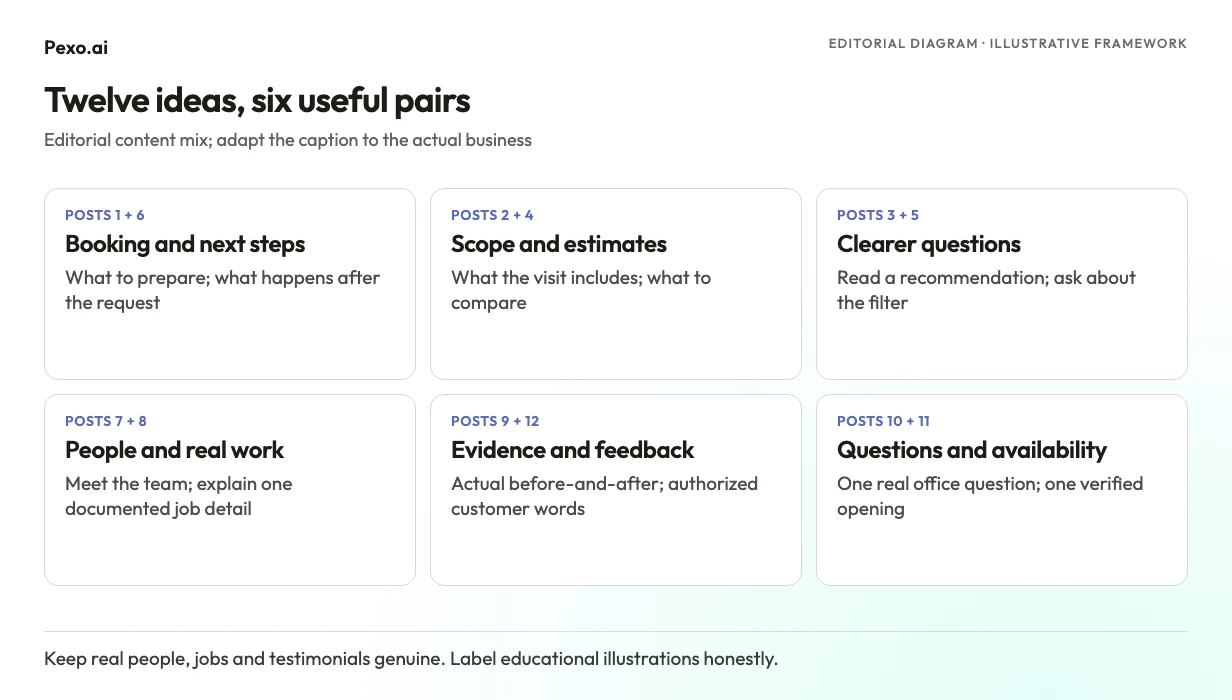 The twelve post ideas cover different customer questions; genuine job and testimonial evidence cannot be replaced by an invented image or voice.
Choose HVAC social media posts by the question they answer
A useful feed contains different kinds of answers. Some posts help a visitor understand the business. Others explain a service, show real work or help someone take the next step. Select the question first, then the format. A technician introduction needs a genuine photograph and a few approved details. An explanation of how to request an appointment may work as an illustrated card. A short sequence can help when the order of events matters. Pexo's creative conversation can develop those formats from a normal description rather than requiring the owner to design the entire asset beforehand. The practical principle is “No operating. Just directing”: describe the communication problem, then review whether the result solves it.
A first-week selection could be one homeowner explanation, one genuine job detail, one team introduction and one service invitation. That is an editorial choice, not a frequency benchmark. Publish a good photo and caption when they do the job; add speech or motion only when they improve understanding. For claims and endorsements, the FTC's advertising guidance is a relevant review reference. Keep the source attached to each post.
Six posts that make the service easier to understand
Use these ideas when homeowners need a clear explanation rather than another discount. The caption starters intentionally avoid diagnosing a household or promising an outcome. Each has one communication job and one production direction.
| Post | Caption starter to adapt | Source and asset brief |
|---|---|---|
| 1. Booking preparation | “Booking a visit? Have your service address, a short description of the problem and any equipment details you can safely read ready for our office.” | Dispatcher approves the actual intake needs. Ask Pexo for an illustrated information card; keep personal information out of public replies. |
| 2. What a maintenance visit covers | “A maintenance appointment and a repair call serve different purposes. Here is what our maintenance visit includes, and what needs a separate discussion.” | Service manager supplies the exact scope. Develop a simple visual sequence in Pexo, then a narrated explanation if useful. |
| 3. Reading a service recommendation | “If a recommendation is unclear, ask what was observed, what work is proposed and which options you have. A clear explanation should connect the three.” | Use the company's real explanation process. Ask Pexo for three labeled panels, without invented diagnoses or prices. |
| 4. Understanding an estimate | “Two estimates are easier to compare when you know what each includes. Ask about the proposed work, equipment and any exclusions before comparing totals.” | Owner verifies the information normally supplied. Develop an illustrative estimate layout, not a fake customer document. |
| 5. Filter questions | “Unsure which filter your system takes or how to check it? Follow your equipment instructions and ask your service professional when the details are unclear.” | Technical reviewer approves wording. Use a real, relevant photo or a clearly illustrative diagram; do not invent a universal size or replacement interval. |
| 6. What happens after a request | “Sending a request starts a conversation with our office. We will confirm the service details and appointment arrangements through our usual booking process.” | Dispatcher confirms what actually happens. Prepare a short Pexo narration and matching process graphic. Do not imply instant confirmed availability. |
Three sample captions and one job template show how to fill the ideas. These are writing examples, not reports of actual people or work.
- Filter question: “Need help identifying a filter? If safe to read, note the size printed on its edge and your equipment model. Send that information privately to our office. Please do not open unfamiliar equipment just to take a photograph.” Technical review and equipment instructions still apply; ENERGY STAR's checklist is a supporting reference.
- Fictional team sample: “Meet Alex, our service coordinator. Alex helps callers describe the issue and checks appointment arrangements. Their tip: have your service address ready when you contact the office privately.” Replace this invented person with a real approved portrait, role and answer.
- Job template: “At this [town] home, our technician found [documented issue]. With the homeowner's approval, we [actual agreed work]. These photos show [specific visible change].” Each bracket needs evidence; Pexo must not invent the work.
- Invitation: “Planning a maintenance visit? Read our current service details and contact the office privately to request an appointment. We will confirm availability and arrangements.” Use only when it matches the actual process.
Each can begin as one image. Pexo's text-to-image workflow can develop an information card; genuine people and work still need genuine sources.
Six posts that show the company and invite a sensible next step
These ideas rely more heavily on your own material. A generated picture should not replace the people, completed jobs or customer experience the post claims to show. Pexo can still help with supporting artwork, narration and the overall presentation.
| Post | Caption starter to adapt | Source and asset brief |
|---|---|---|
| 7. Meet the person | “Meet a member of our service team. Here is their role, the work they handle and one question they wish more customers would ask.” | Use a genuine photograph and approved details. Pexo can develop the surrounding graphic, not a fictional employee portrait. |
| 8. A detail from real work | “This detail matters because it helps explain the work we completed. Here is what changed and why it was part of the agreed scope.” | Technician supplies the explanation and original job photo. Keep claims within what that source establishes. |
| 9. Before and after, with context | “These two photos show the same job before and after our agreed work. The change shown here is the one described in the caption.” | Use actual matching photographs and permission. Ask Pexo to help plan the presentation without inventing missing areas. |
| 10. One customer question | “A question our office hears: how do I know which appointment to request? Start by describing the issue; the office can explain the next step.” | Dispatcher checks the answer. Develop an illustrated question card and a spoken version with Pexo. |
| 11. A verified opening | “We currently have appointments available for this service in our service area. Contact the office to check the latest availability and details.” | Office confirms dates, capacity and service. Create the graphic only after those details are fixed; record when to remove it. |
| 12. An honest customer story | “A customer shared this feedback about their experience. We have kept their words intact and shared them with permission.” | Actual authorized feedback only. Use a quote graphic; never generate a customer voice to imply a real testimonial. |
For post 8, the detail is more valuable than a dramatic claim. A close-up accompanied by a technician's accurate explanation can show care without promising lower bills or a particular lifespan. For post 11, a clear expiry owner matters more than visual novelty. Keep the offer and availability outside any evergreen template so they can be refreshed. When a video is appropriate, Pexo's image-to-video workflow can help develop the visual presentation, but check that motion does not alter what the original image establishes. A genuine job story should remain genuine after production.
Produce the packet, then use the response to choose the next post
Take one idea into Pexo with the source, intended viewer and exact message. Review the proposed visual before requesting extra formats. If narration helps, use text-to-speech and listen to names, numbers and technical terms. A soundtrack can establish tone when the piece calls for one, but it should not distract from the explanation. Save the accepted wording with the final image or video. The person publishing should have the destination link, accompanying caption and any expiry condition. That is a complete packet; a folder of attractive files without approved copy is unfinished work.
Conclusion
After release, ask what viewers needed next. If a booking-preparation post still prompts people to place addresses in public comments, revise the contact instructions. If a maintenance explanation attracts repair requests, make the distinction clearer. If a team post starts a useful conversation, identify what made it useful before producing another. The Pexo social-media use case can support the next creative request once that question is clear. Effective HVAC social media posts do not all need to be original productions from scratch. They need a useful purpose, truthful material and a next step your business can handle.