
 ChatGPT
 Perplexity
 Claude
 Gemini
 Grok
Grok


Vidnoz Image to Video is a browser-based AI generator that turns a single still photo into a short animated clip, with an optional text prompt to steer the motion. After testing the feature and reading through its pricing and public reviews, here is the short answer: it is a genuinely fast, low-friction way to add movement to a photo for social posts, and the daily free generation makes it easy to try, but the short clip length, the credit system, and a confusing gap between its "no watermark" marketing and its actual free-plan limits keep it from being a serious tool for polished, longer video work.
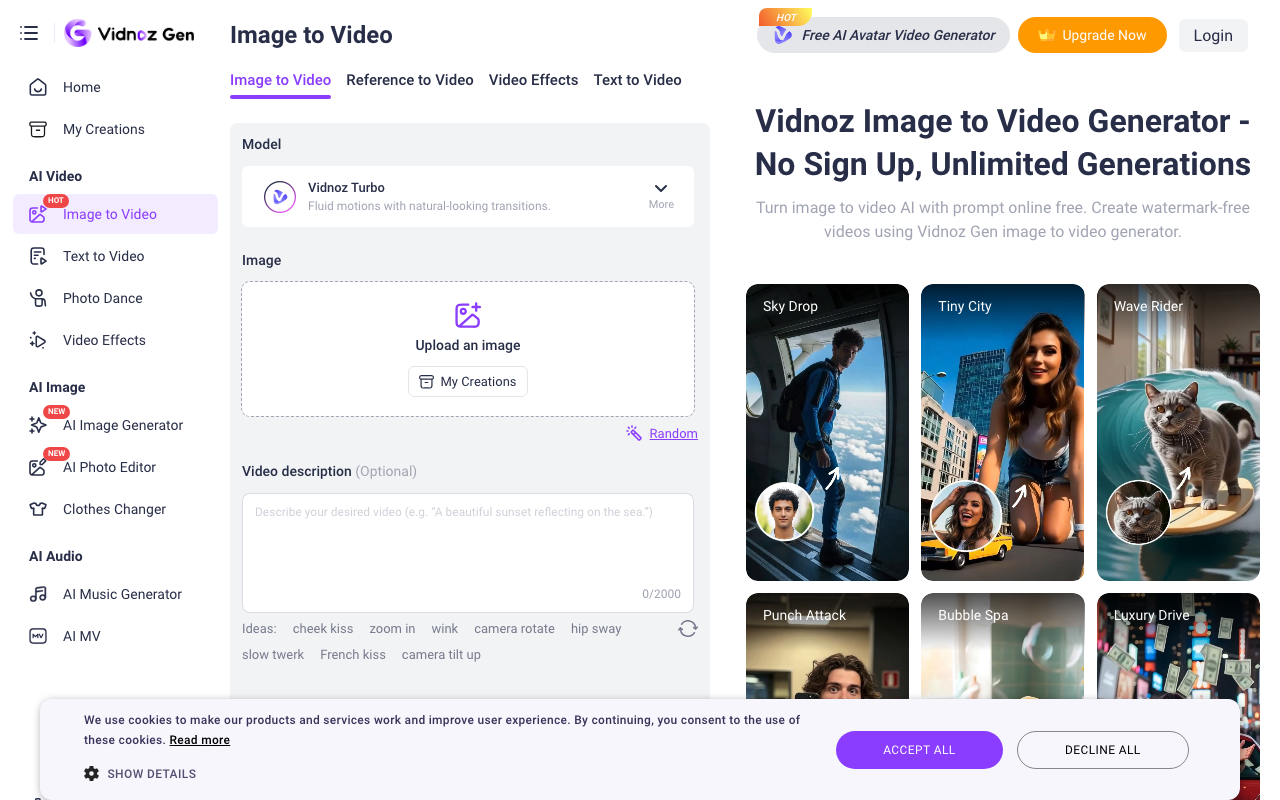 The Vidnoz Image to Video workspace, with the Vidnoz Turbo model, an image drop zone, and one-tap motion ideas like zoom in, wink, and camera rotate.
Quick Verdict
Here is the at-a-glance picture before we get into the details.
| What it is | AI image-to-video generator, part of the wider Vidnoz AI platform |
| Best for | Quick social clips and casual animations from a single photo |
| Free tier | One free generation per day; pricing table lists 720p with a watermark |
| Paid entry | Paid plans unlock 1080p and watermark removal (confirm current price on the official site) |
| Biggest limitation | Short clips only, credits do not roll over, and mixed messaging on watermarks |
| Our take | 3.6 / 5, weighing output quality, pricing clarity, ease of use, and support reputation |
What Is Vidnoz Image to Video?
Vidnoz Image to Video is one feature inside Vidnoz AI, a broad video platform built by a company founded in 2016, with the Vidnoz AI product line launched in 2023. The platform is best known for its AI avatars and text-to-speech, and by early 2024 the company reported passing three million users across its tools. Image to Video sits alongside those features as the "animate a photo" option: you give it a picture, it produces a moving version.
Under the hood, Vidnoz does not run its own generation model. Its official page says the feature is powered by third-party engines including Google Veo, Kling, Hailuo, Pixverse, and Luma, and the default option is labeled Vidnoz Turbo for "fluid motions with natural-looking transitions." That is worth knowing up front: the output quality you get is largely the quality of whichever underlying model handles your clip.
Public sentiment is genuinely split. Vidnoz holds a high 4.9 out of 5 on G2, though from only a small number of reviews, while its Trustpilot rating sits near 2.3 out of 5 across a larger pool, with most complaints about billing rather than the generator itself. Keep both numbers in mind as you read on.
How Vidnoz Image to Video Works
The workflow is deliberately simple, and this is where Vidnoz is at its strongest. There are three real steps.
- Upload your image. Drag in a JPG, PNG, or WEBP file. The tool accepts standard photo formats and a range of aspect ratios, from original and 16:9 down to vertical 9:16 and square 1:1 for social feeds.
- Describe the motion, or pick a preset. You can type a short description of what should move, or tap one of the built-in motion ideas such as zoom in, wink, camera rotate, or hip sway. Vidnoz also offers 30-plus stylized filters (oil painting, Pixar-style, cyberpunk, and similar) if you want a look rather than a specific motion.
- Generate and download. Click Generate Video, wait for processing, then download or share the result. Reviewers testing the feature reported generation taking roughly one to five minutes per clip, so it is quick but not instant.
There is no timeline, no keyframing, and no manual editing. That makes it approachable for a first-time user, and it is a big part of why the tool feels effortless for a quick post.
Output Quality, Length, and the Watermark Question
Output is where the honest caveats start. On the free plan, Vidnoz's pricing table lists a 720p export ceiling; 1080p is reserved for paid tiers, and there is no native 4K for image-to-video (Vidnoz sells a separate Video Enhancer to upscale afterward). For casual social clips, 720p is usually fine. For anything you want to run as a polished ad or on a large screen, the 1080p upgrade is close to mandatory.
Clip length is short. Vidnoz does not publish an exact per-generation duration on either its landing or pricing page, and independent reviews place a single image-to-video clip in the range of a few seconds. That fits the format's purpose, a quick loop or reveal, but it rules out anything approaching a full narrative video from one generation. Reviewer accounts converge on the same quality pattern: clean, high-resolution source photos hold up well on simple motion prompts such as a slow zoom or a gentle camera pan, while busy scenes and low-resolution inputs are less reliable, with warping reported around edges and hands. That pattern is typical of this class of one-shot generator rather than a Vidnoz-specific flaw. If you want a broader sense of how these engines differ, our comparison of AI image to video tools covers the trade-offs across several of them.
The watermark situation deserves a direct flag, because Vidnoz's own surfaces contradict each other. The Image to Video landing page markets the tool as "watermark-free" with "unlimited generations" and "no sign up." The platform pricing table, however, describes the Free plan as 720p with a Vidnoz watermark and a per-video cap. Both are official Vidnoz pages. I could not reconcile the two, so treat the "no watermark, unlimited" language as marketing you should verify on your own account before relying on it.
Pricing and Free Limits
Vidnoz runs on a credit system, and its plans are platform-wide rather than image-to-video specific. The public tiers are Free, Starter, Business (marked most popular), and a custom Enterprise plan, with annual billing advertised at 25 percent off. Paid plans unlock 1080p output and remove the watermark.
One honest wrinkle: Vidnoz's official pricing page renders its dollar figures dynamically, and they did not load on a plain fetch, while third-party listings quote conflicting numbers (Starter has appeared around 20 dollars per month billed annually in some snapshots and higher in others). Because of that spread, the responsible thing is to check the live pricing page for the current figure rather than trust any single blog's snapshot. Two limits are confirmed and worth planning around: the free plan gives roughly one generation per day, and credits do not carry over to the next billing period, so unused credits are lost.
Pros and Cons
No tool is all upside. Here is the balanced view from Vidnoz's own documentation, a walk through its interface, and a read of public feedback.
Pros
- Genuinely easy. Upload, prompt or tap a preset, generate. There is nothing to learn, and a first clip takes minutes.
- A real free daily generation. You can test the output on your own photos without paying, which many rivals do not allow.
- Flexible inputs and styles. Common image formats, many aspect ratios, 30-plus filters, and a menu of motion presets cover most casual needs.
- Backed by strong models. Access to engines like Kling, Google Veo, and Hailuo means the ceiling on quality is high when the underlying model performs well.
Cons
- Very short clips. A single generation produces only a few seconds, not a complete video.
- Watermark and resolution locked on free. The pricing table caps free output at 720p with a watermark, despite landing-page claims to the contrary.
- Credits expire. Unused credits do not roll over, which pressures you to burn them or lose them.
- Billing complaints. The low Trustpilot score clusters around unexpected renewals and cancellation friction, so watch the subscription terms.
Who Should Use It, and Who Should Skip It
Use Vidnoz Image to Video if you want a fast, cheap way to animate a photo for an Instagram or TikTok post, you are happy working in short clips, and you value a one-click flow over fine control. It is also a reasonable pick if you are already on Vidnoz for its avatars and want photo animation in the same place.
Skip it if you need longer, connected video with a real storyline, you want reliable 1080p or higher without immediately subscribing, or you are producing branded product ads where precise motion and clean output matter. Users have also noted that low-resolution source photos can come out with soft or distorted motion, so it is weakest exactly where polish counts most.
Alternatives to Vidnoz Image to Video
If Vidnoz's short clips or credit limits do not fit, a few options are worth a look. For a wider shortlist, our roundup of the best AI image to video tools compares more of them side by side.
- Pexo is the strongest fit if the thing that frustrates you about Vidnoz is stitching short, one-off clips together by hand. Pexo is an AI video agent: instead of generating an isolated few-second loop, you describe the finished video you want in plain language, and it plans a complete piece with a coherent storyline, then delivers it. It handles image-to-video inside that same conversation, works with Seedance 2.0, Kling AI, and more, and picks the right model for the shot so you are not guessing. Pexo runs on credit-based pricing, and it suits people who want a finished video from a single description rather than a manual clip-by-clip workflow.
- Runway is a good match if you want frame-level creative control and are comfortable with a more advanced, editor-style interface for precise motion.
- Kling AI stands out for cinematic, longer-duration image animation and is worth trying directly when raw motion realism is your priority.
If your main constraint is budget, it is also worth browsing dedicated free image to video generators before committing to any paid plan.
The Verdict
Vidnoz Image to Video is worth using for what it is: a quick, approachable way to put motion on a photo for short social content, with a genuine daily free generation that lowers the risk of trying it. The friction shows up when you push past that. Short clips, a 720p and watermark cap on free, credits that expire, and marketing that overstates the free experience all mean it is a casual tool, not a production one.
If your job is a full, structured video rather than a three-second loop, that gap is exactly where Pexo's conversational, describe-it-and-get-a-finished-cut workflow fits better. For casual photo animation on a budget, though, Vidnoz earns its place on the shortlist. Verify the current price and watermark behavior on your own account first, and it is a reasonable, low-cost entry point.