 ChatGPT
 Perplexity
 Claude
 Gemini
 Grok




Keep characters consistent in AI videos by supplying approved images with each request, separating identity from scene changes, and reviewing neighboring shots. This five-step workflow uses Pexo, an AI video partner you direct through conversation, to develop character stills and video around actual reference assets.
The goal is recognizable continuity, not an identical face through every angle or movement. Pexo accepts image inputs, but that does not establish permanent character memory or a reference-lock feature. The instructions below describe what material to supply and how to judge it, without assuming particular buttons or reference counts. If your available generation workflow cannot accept the relevant reference image, stop at that handoff rather than expecting text alone to preserve identity.
What you need before generating
Prepare a short story outline, a consistent visual style, and a folder for approved assets. Use images you own or have permission to use. If the character does not exist yet, Pexo's image generation workflow can help develop the initial appearance before moving scenes.
The worked example is a fictional production plan: Mara, a bicycle courier with a dark bob haircut, a mustard raincoat, and a blue delivery bag. She parks outside a bakery, collects a brown parcel, then waits beneath its awning. No generated result or completed test is claimed. Proposed filenames below make the handoffs reproducible; they are names you assign to saved files, not existing assets.
Step-by-step continuity workflow
Work from identity to stills to movement. Each stage needs an actual image handoff and an approval decision before its output becomes the next input.
Step 1: Separate identity from scene state
Record stable identity features: face shape, hair silhouette, adult appearance, body proportions, and illustration style. Wardrobe and equipment are continuity commitments for this sequence. Scene state includes location, pose, expression, and parcel possession. A new pose is expected; a different face is a failure.
Reuse this identity brief with Mara's approved image: “Use the attached image as Mara's identity reference. Preserve her face shape, dark blunt bob, adult proportions, mustard raincoat design, and blue delivery bag at her right hip. Keep the same illustrated style. Change only the scene and pose described below.” The attached image supplies visual information the name Mara cannot. Keep the coat dry throughout this example: she remains under shelter, so a sudden wet coat would be an unexplained change.
Step 2: Save and resupply approved references
Choose an identity image with a clear face and readable hair and clothing. Save the actual approved image using the available download or export method, and name your local copy Mara-ID-v1. Keep the file extension supplied by the download. Store the identity brief beside it. If you develop extra views, check that they agree before adding them to your production folder.
For each new shot still, attach or reuse the actual approved identity image in the image-input request and state its role using the brief above. Do not rely on earlier conversation context or a named character. If multiple relevant images are accepted, label their roles in ordinary language: “identity reference” and “composition to revise.” If only one image is accepted, use the image relevant to the current task; for motion, that is the approved shot still, as described next.
Step 3: Approve each composition as a still
For Mara's first shot, supply Mara-ID-v1 with the identity brief and add: “Medium view outside a bakery. Mara stands beside her parked bicycle under shelter, both hands visible, no parcel.” For the counter shot, supply the approved identity image again and add: “Medium view at the counter. Mara faces the baker's hands; a brown parcel rests between them. Keep the blue bag at her right hip.”
Compare each result with the identity image before saving it as an approved shot still. A hypothetical failure: the counter still has the bag on her left and a longer hairstyle. Supply that failed still for revision, identify it as the composition to preserve, and request: “Keep this framing, face, counter, and parcel. Restore the blunt bob and move the blue bag to her right hip.” Include the identity image separately if supported. Otherwise make the correction against the failed image, then compare the replacement with Mara-ID-v1 yourself. Approve neither change by description alone.
Step 4: Supply the shot still for motion
Save each approved composition, then attach that actual shot still as the starting image for image-to-video production. State its role: “Use this approved shot still as the visual starting point. Preserve Mara's identity, clothing, bag position, and this framing.” When only one image input is available, supply this composition rather than substituting the identity portrait and expecting the planned scene to survive.
Add one clear motion instruction. For shot one: “Mara steadies the parked bicycle; camera stays still.” For shot two: “The baker slides the parcel toward Mara; she takes it with both hands.” For shot three: “Mara waits under the awning holding the parcel; rain falls beyond the shelter.” A simple action is easier to review, but is not a guaranteed preservation setting. Check the returned movement before approving the clip.
Step 5: Review and repair the failed layer
Inspect each clip throughout, then compare its ending with the next clip's beginning. A correct opening frame can still develop a changed face or disappearing bag during movement. Check face, hair, raincoat design, bag side, parcel possession, and movement direction at normal playback speed and at questionable frames.
If the still is wrong, revise that actual still and save a new version. If an approved still produces facial drift during motion, reattach that approved still and request a simpler action or more restrained framing; do not use the drifting clip as a new identity reference. Recheck the replacement against both the still and its neighboring accepted clip. Retain rejected versions for diagnosis, but keep them outside the approved input folder.
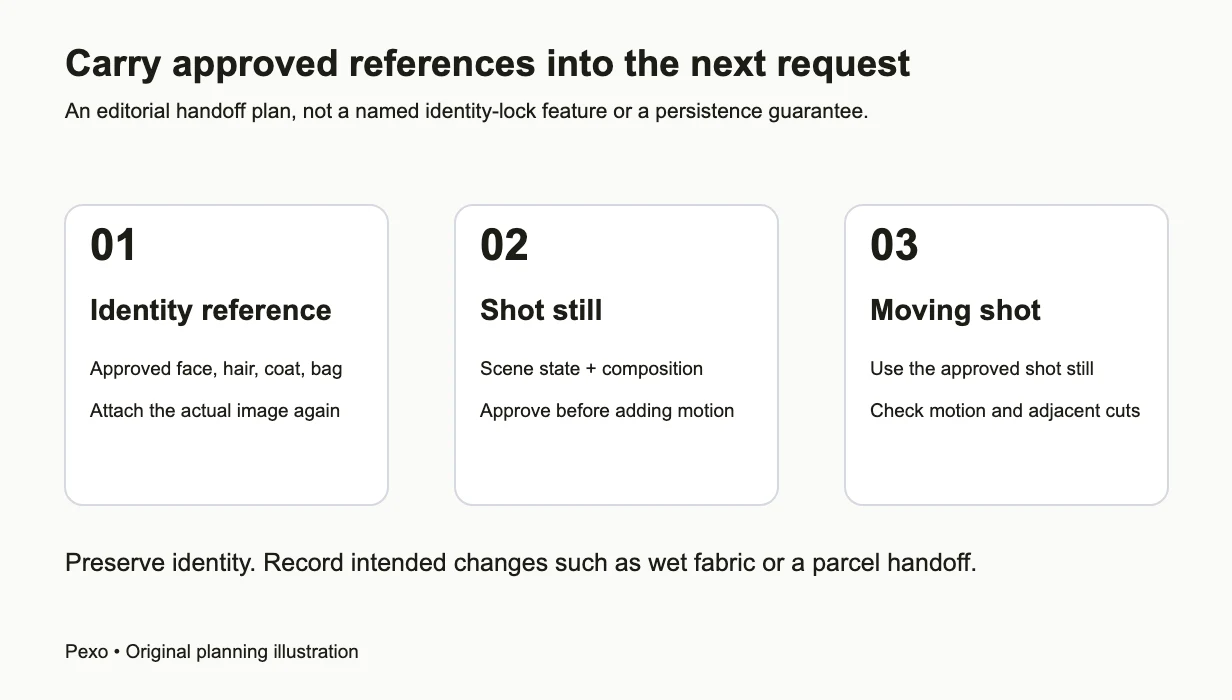
Carry the actual approved reference into each request, then use the approved shot still for motion.
Mara's transfer brief and asset ledger
Use the identity brief above, the scene addition below, and the listed input for each request. The filenames are a proposed plan; mark acceptance only after inspecting your actual output.
| Shot | Still request input and scene addition | Motion request input and action | Required continuity |
|---|---|---|---|
| S01 | Mara-ID-v1; bakery exterior, parked bicycle, no parcel | Approved S01-still-v1; steady bicycle | Dry mustard coat, blue bag at right hip |
| S02 | Mara-ID-v1; bakery counter, parcel between Mara and baker | Approved S02-still-v1; receive parcel | Same identity and wardrobe; parcel ends in hands |
| S03 | Mara-ID-v1; awning, parcel already in hands | Approved S03-still-v1; wait beneath shelter | Same identity; parcel retained; coat stays dry |
For each real result, record shot ID, input filename, output filename, version, decision, and correction. A hypothetical ledger entry is: “S02; input Mara-ID-v1; output S02-still-v1; revise; bag on left, hair too long.” Its replacement becomes S02-still-v2; only an accepted replacement may feed S02-clip-v1. The clip entry must name S02-still-v2 as its input. This prevents an approved revision from being lost when an older file is accidentally reused.
Apply a clear acceptance rubric
Use four decisions before advancing: identity, wardrobe and props, story state, and cut continuity. These are editorial checks rather than a numerical similarity score.
- Identity: Face shape, bob silhouette, proportions, and drawing style remain recognizable through movement.
- Wardrobe and props: Coat design, bag color and side, and parcel possession match the ledger.
- Story state: Each change follows an event: the parcel enters Mara's hands during S02 and remains there in S03.
- Cut continuity: Adjacent shots agree on carried objects and readable movement; the setting change is understandable.
Mark each check accept, revise, or cannot judge in the ledger. Release a shot only when all applicable checks pass; an obscured detail that matters requires a clearer view. For optional dialogue, Pexo can create spoken audio materials, but a direction such as “calm adult voice” alone does not establish speaker reuse. Use one approved continuous narration recording where suitable, or verify a supported voice-reuse workflow before claiming matching dialogue across separate generations.
Avoid fixes that multiply uncertainty
Repeating new variations without correcting the source leaves the underlying conflict unresolved. Rewriting the identity description each scene introduces ambiguity. Choosing a beautiful result despite a changed face quietly replaces the design. Instead, identify one failed feature, revise the actual asset, and compare it against the original approved identity before advancing.
Plan difficult views early. For 2D character animation, check line weight and body proportions as well as the face. Review the three-shot sequence before expanding it, and keep its accepted input chain intact when adding new scenes.
Other approaches and their limits
Runway's separate Gen-4 Image References guide recommends clear character imagery and explains how introducing variables creates more opportunities for variation. Its reference controls belong to Runway, so do not transfer those controls to Pexo. A manually drawn storyboard or rigged character may suit work needing deliberate pose control.
Research such as Motion by Queries examines interactions between identity and motion in video generation. It provides context for the difficulty, not evidence that this editorial workflow guarantees results.
Conclusion
For your first animated short film, start with three connected scenes: resupply the right image at each handoff, save approved versions, and expand only after the sequence passes review.