
 ChatGPT
 Perplexity
 Claude
 Gemini
 Grok




To create animated teaching videos, choose one learning goal, plan a visual explanation, then build and review the images, narration, and motion in Pexo. This guide uses seven steps to explain why one half equals two quarters, including a complete script and a question that checks whether students understand the relationship.
Pexo is an AI video partner you direct through conversation. For this lesson, that means discussing the explanation, reviewing a plan before production, and giving specific feedback on the pictures, spoken audio, and animation. The teacher remains responsible for the mathematics. A slide reveal may suffice when motion adds little. Choose conversational production when you also need narration and want to refine the explanation together.
What you need before you start
Prepare a learning objective, the vocabulary students already know, and a way for them to respond afterward. Here, assume students recognize halves but are still learning quarters. The objective is: “Students will explain why 1/2 and 2/4 represent the same amount of an equal-sized whole.”
Choose a simple rectangular fraction bar. Unlike a spinning pizza or moving character, its boundaries can stay visible throughout the explanation. Keep a teacher-checked sketch as a reference.
The lesson design follows Cynthia Brame’s guidance to manage cognitive load, support engagement, and include active learning. Her educational video paper recommends focused segments, visual cues, and questions. These principles do not guarantee results in your class.
Step-by-step lesson production
Work through the explanation in order. Approve the representation before spending time on decorative details.
Step 1: Describe the learning problem
Start the Pexo conversation with the misconception you need to address, rather than only naming the topic:
Create a short animated explanation for students who think two quarters must be more than one half because two is bigger than one. Use one rectangular whole. Show that dividing its existing halves into quarters changes the number of parts, not the amount shaded. Help me plan the explanation before producing anything.
Add the learners’ age range, language, and prior knowledge. Ask for a calm visual style and plain spoken language. Pexo’s educational video workflow fits this kind of lesson built from an idea; you do not need recorded classroom footage.
Reject any proposed story with unrelated counting, extra characters, or several new fractions. This video has one job.
Step 2: Review the script and shot plan
Ask Pexo to propose a scene sequence, narration, and visible labels. Review those together before requesting production. A sentence can be mathematically correct while the accompanying motion implies something different.
Use this six-shot example as the working plan. The pauses are part of the teaching, so allow time to inspect each state rather than assigning an arbitrary total runtime.
| Shot | Picture and motion | Spoken script | Visible text |
|---|---|---|---|
| 1 | One unshaded rectangle remains still. | “This rectangle is one whole. Keep watching its outside edge.” | One whole |
| 2 | A vertical line divides the rectangle into equal halves. Shade the left half. | “Divide the whole into two equal parts. One part is shaded: one half.” | 1/2 |
| 3 | Hold the image before the next change. | “What if we divide each half into two equal parts? Will the shaded amount change? Pause and predict.” | Pause and predict |
| 4 | A horizontal line appears across the full rectangle. The outside edge and shading stay fixed. | “Each half now has two equal parts. The whole has four equal parts.” | Four equal parts |
| 5 | Indicate the two shaded quarters in turn, without moving them. | “Two of those four parts are shaded. That is two quarters. We added a dividing line, but no shading.” | 2/4 |
| 6 | Hold the completed bar with both fraction labels beside it. | “One half and two quarters name the same shaded amount of this whole.” | 1/2 = 2/4 |
Check that shot four divides both halves. Dividing only the shaded half leaves unequal parts across the whole and breaks the explanation.
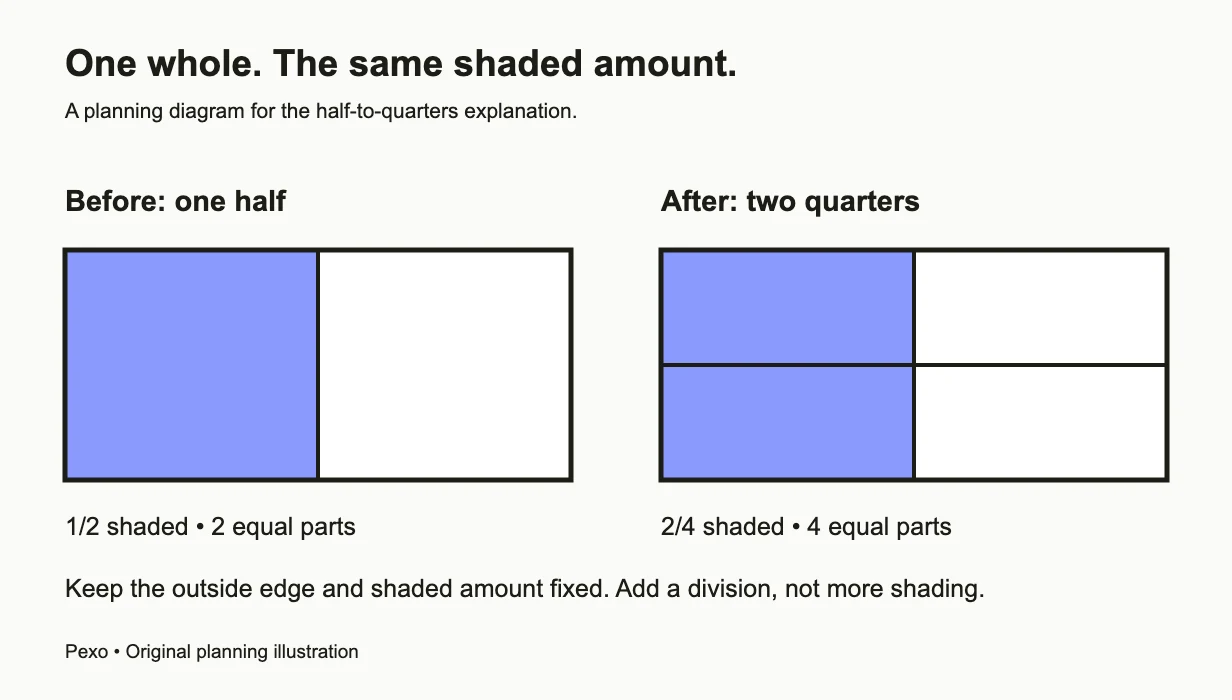
The outline and shaded area remain fixed while the whole changes from two equal parts to four.
Step 3: Create and check the reference images
Ask Pexo to create still images for the half-shaded bar and the same bar divided into four equal parts. Image generation is useful here because you can inspect the mathematical states before adding motion.
Describe the geometry precisely: a fixed rectangular outline, a centered vertical division, left-half shading, and then a centered horizontal division across the entire bar. Keep both images at the same scale, with the same outline and shading. Request large labels outside the diagram.
Inspect every part. Are the four areas equal? Does the shading stop at the middle? Are the numbers legible and correct? If the geometry is wrong, supply your checked sketch and describe the correction. Do not approve an attractive picture with inaccurate proportions.
Step 4: Produce spoken narration
Ask Pexo to create the spoken audio from the approved script. Specify a clear voice, natural pronunciation of “one half” and “two quarters,” and room for the prediction pause.
Listen for pronunciation, wording, and pause lengths before provisionally approving the audio. The phrases “equal parts” and “same amount” need to be audible. Check synchronization in the assembled animation; if speech runs ahead of a visual change, ask it to slow down or wait.
Leave music out of this example. The narration already gives students a sequence to follow, and the dividing line is the event they need to notice. Keep the recording simple enough to hear through classroom speakers.
Step 5: Animate the change that explains the idea
Use the checked images to direct the image-to-video sequence. Ask Pexo to preserve the rectangle’s outside edge and shaded area while introducing the horizontal division. The important motion is a new boundary appearing within an unchanged whole.
Give feedback in observable terms:
Keep the camera and rectangle still. In shot four, reveal the horizontal line across both halves. Do not stretch, rotate, duplicate, or separate the rectangle. Keep the left half shaded throughout. After the line appears, hold the four equal parts before counting the shaded quarters.
Review the transition itself, not just its first and last frames. A bar that briefly grows or gains shading can teach the wrong relationship even if the final equation is correct. If that motion remains unreliable, use a clear cut between the two checked states and explain the added line verbally.
Step 6: Check access and comprehension
Watch once without sound. Can students identify the whole, the shaded amount, and the new divisions? Then listen without looking. Does the narration explain what stays fixed? Provide the approved transcript alongside the lesson and check any captions you use against the spoken audio.
CAST’s UDL Guidelines support multiple ways to perceive information and express understanding. For this lesson, keep outlines visible, use shading plus labels rather than color alone, and let students answer by speaking, drawing, or writing.
Follow the video with this task: “Draw a different rectangle, shade one half, then add lines to show the same amount as quarters. Explain what changed and what stayed the same.”
A sufficient response shows four equal parts, two shaded parts, and an explanation that the whole and shaded amount stayed unchanged. “Both numbers doubled” alone is incomplete. If students shade extra area, return to the fixed outline; if their parts are unequal, revisit equal partitioning.
Step 7: Review the result and request the download
Before requesting a download from Pexo, watch the complete result at the size students will see. Check labels, narration, pauses, and the moment the line appears. Review the mathematics once more without judging the visual style.
Ask for targeted changes, such as “hold the prediction question longer” or “keep the shaded area identical during the transition.” After checking those changes, request the finished video download. Open that file outside Pexo, then test audio, any captions, and playback through the full ending where students will watch it. Keep the script, sketch, transcript, and response task together for other teachers.
Common mistakes to catch
Most problems in this example come from changing something that should remain fixed:
- Different-sized wholes: matching fractions on mismatched bars obscures the comparison. Keep the outline identical.
- Unequal quarters: four regions are not automatically fourths. Check their areas before animation.
- Shading that expands: adding a partition must not add shaded material. Inspect the transition closely.
- An answer revealed too early: the prediction question loses its purpose if the final equation is already visible. Reveal it afterward.
Small improvements for classroom use
Make a second version only when it serves a teaching need. A slower explanation might hold the divided bar longer; a review version might shorten the narration while retaining the prediction.
After using the lesson, note the specific responses students give. Revise the confusing shot or phrase rather than adding more movement to the whole video. Animation earns its place when students can explain the change it shows.
Other ways to show the same relationship
A slide sequence can reveal the extra division with a simple appearance effect. Paper fraction strips under a document camera let students see a teacher add the line physically. A board drawing works well when students need to interrupt and discuss each partition.
Conclusion
Use whichever method keeps the whole fixed and makes equal parts clear. The finished lesson succeeds when students can explain why the shaded amount stayed the same, then demonstrate that idea themselves.