 ChatGPT
 Perplexity
 Claude
 Gemini
 Grok



To make a proof of concept film, choose one question about a larger project, build a short scene that can answer it, and screen the result against that question. The useful outcome is a production decision: develop the idea, change the approach, or stop spending on the current version.
A beautiful montage can establish a look while leaving the difficult question untouched. Decide what this particular film needs to prove before choosing its length, making images, or recording sound. This guide follows an original speculative-drama example from that decision to a reviewable screening package.
Before you start: Define the test
A proof of concept is a focused demonstration for a proposed film, series, or other larger production. It might test a visual world, a dramatic relationship, a practical effect, or whether an audience understands an unusual premise. A teaser can serve that purpose, but promotional excitement and evidence of feasibility are different outcomes.
Screen Ireland describes The Leviathan as a proof-of-concept teaser supported during development. That is one example of the form, not a prescribed runtime or a promise of financing. Choose the format that exposes your own project's uncertainty.
| Question | Useful evidence | What it does not establish |
|---|---|---|
| Can viewers understand the premise? | A scene showing its rule, consequence, and choice | That the entire feature sustains the idea |
| Does the central relationship work? | Performances with a meaningful change between characters | That an animated stand-in proves live casting |
| Can the world feel coherent? | Connected shots with consistent setting, scale, and sound | That every planned location is affordable |
| Can a specific production method work? | Material made using that method under relevant conditions | That a different technique will perform identically |
For the running example, an archivist discovers that an unplugged radio plays conversations before they happen. The question is whether viewers understand the warning and the archivist's decision to prevent a door from locking.
Design a scene around a consequential choice
Write a one-sentence premise, then identify the moment when the premise forces a decision. Keep the scene's geography understandable. A viewer should know where the radio sits, what the archivist can hear, and why a closing door would separate the characters from their keys. If understanding depends on a separate explanation from the director, that explanation belongs in the scene or the test needs a narrower question.
This proposed 75-second plan gives each shot a specific job. Its timings are a starting allocation for planning, not a tested recommendation. The intervention changes the closing door’s outcome, not the spoken line, which has already recurred.
| Planned time | Image or action | Sound | Evidence the scene should provide |
|---|---|---|---|
| 0–10 seconds | Archivist sets keys on the desk; a door marked “automatic lock” and unplugged radio are visible | Room tone and tape cases | Establish the space, keys, door mechanism, and disconnected device |
| 10–23 seconds | Radio plays a voice saying, “Wait. The keys are inside” | One clear spoken warning | Introduce an event that should be impossible |
| 23–37 seconds | Archivist checks the loose power lead | Warning stops; footsteps approach | Show that the disconnection is real within the story |
| 37–52 seconds | Archivist carries a tape case into the corridor behind the colleague; both are outside as the door swings shut, keys visible on the desk inside | The colleague repeats the radio’s exact words | Connect warning to event and show the approaching lockout |
| 52–65 seconds | Archivist wedges a tape case into the doorway before the latch catches | Door stops against the case | Show a choice that prevents the visible lockout |
| 65–75 seconds | Radio starts a different warning; archivist turns back | A new unfinished sentence | Establish the continuing dramatic problem |
Before production, remove anything that does not help this chain. A futuristic city exterior might look impressive, but it does not help prove the radio's rule. A close view of the unplugged cable could. Choose the smallest scene that still makes the cause and effect visible.
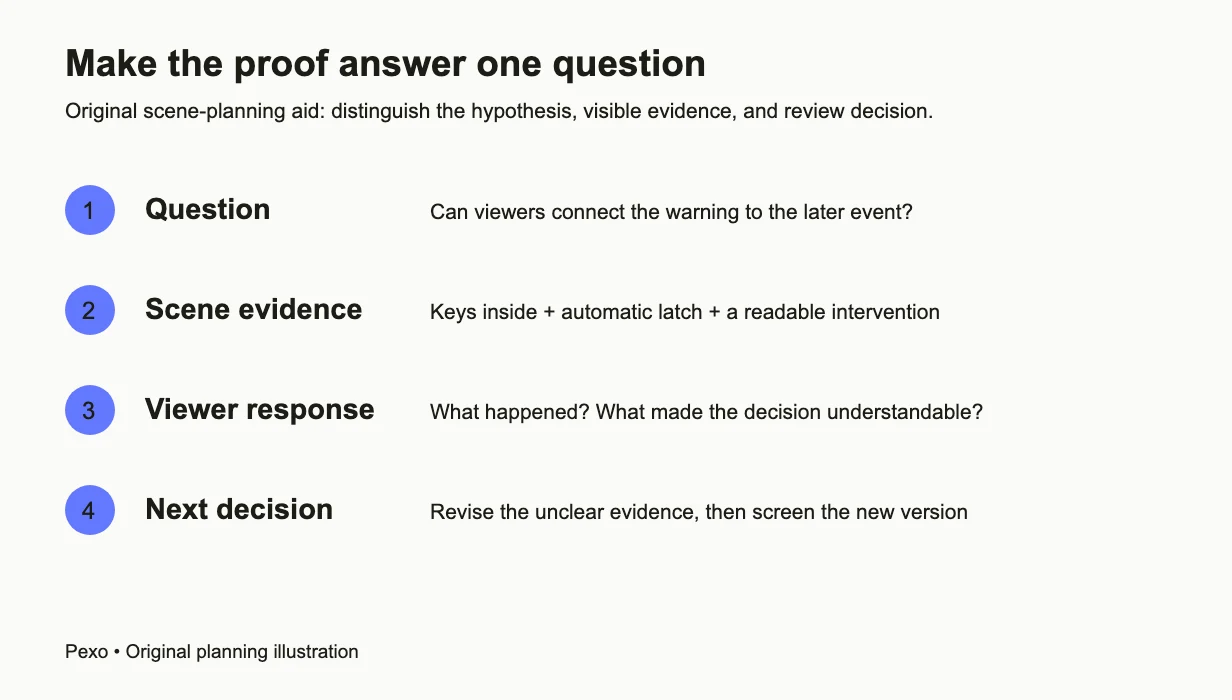
Planning aid: connect one question to visible scene evidence, viewer responses, and the next production decision.
Step-by-step production guide
Choose a production route that matches the question. Use actual performers when acting or chemistry is the uncertainty. Use an animatic when timing and coverage are unresolved. Use generated material when the immediate question concerns a proposed visual direction. Label those different kinds of evidence clearly.
Step 1: Prepare the brief and reference packet
Keep the premise, test question, shot plan, and a small set of approved references together. Define what must remain fixed: the archive room, radio, door position, and archivist's clothing. Separate those constants from changing actions. In a conversation with Pexo, an AI video partner, provide this packet and ask for a proposed production direction before full production. Review that direction against the scene's evidence requirements. A plan that replaces the unplugged radio with a glowing futuristic device changes the question, even if it looks more cinematic.
Step 2: Resolve missing visual information
If the room or prop design is unclear, use Pexo's image-generation workflow to develop the missing reference stills. Describe the practical relationship: the door must be visible from the desk, and the radio's loose cable must be readable in close view. Compare candidate images with the same spatial plan. Save the selected reference and its description together. These stills are design decisions to carry into later shots, not proof that a physical set has already been built or filmed.
Step 3: Check the scene with provisional speech
Read the dialogue aloud before committing the images to motion. Record a temporary reading, or develop provisional spoken material with Pexo, and listen for whether the repeated warning remains recognizable. The spoken words should match when repetition is the story's evidence. A more dramatic rewrite can accidentally remove that match. Leave silence where the archivist needs to react. Avoid filling every pause with narration explaining what the audience should infer; the screening must reveal whether the scene communicates that information itself.
Step 4: Produce connected shots
For a generated visual version, bring the checked scene description into the script-to-video workflow. Ask Pexo to work from the approved references and the shot purposes, then inspect the proposed sequence before approving production. State which details cannot change between shots. When a specific approved still needs movement, the image-to-video route gives that discussion a concrete starting image. Neither route guarantees continuity. Reject a moving result that reconnects the cable or reverses the doorway: those changes undermine the premise rather than merely altering the style.
Step 5: Assemble the screening version
If working with filmed material, assemble it in your existing editor. If Pexo provides a complete generated sequence, review that sequence and request corrections through the conversation. Use a timeline editor when the test requires exact repetition, frame-specific cuts, or precise audio alignment; do not assume a conversational workflow supplies those controls. Place temporary and finished elements deliberately, retain shot identifiers, and remove irrelevant opening logos. The viewer needs to encounter the scene's information in order, not watch a separate advertisement for the project.
Step 6: Check the delivered file
Request the finished version's download and open the actual file outside the production conversation. Confirm that speech is audible, the final shot is present, and the warning repeats at the intended point. Keep an accessible dialogue transcript with the screening version. A preview that played correctly inside one workspace does not establish that an exported file or a shared link works elsewhere. For remote review, test the exact viewing link and permissions that reviewers will receive. Send one clearly named version so responses do not mix different cuts.
Screen for evidence rather than general approval
Ask reviewers to watch before you explain the premise. Then ask what happened, which detail connected the warning to the later event, and what choice the archivist made. “Did you like it?” can start a conversation, but it cannot distinguish a story problem from a sound or continuity failure.
Record the moment where each interpretation diverges from the intention. If reviewers never notice the cable, revise its presentation. If they understand the rule but cannot explain the choice, revise the action or stakes. If dialogue is masked, correct the mix before rewriting the premise. Change the smallest relevant variable, then screen the new version. Keep the responses as qualitative development notes; a handful of reactions is not a reliable forecast of market demand.
Package the result and the next decision
Deliver the viewing file or tested link, a short premise, the question tested, and a compact account of what remains unresolved. For an AI-assisted visual version, identify generated and temporary material so a collaborator understands what the film demonstrates. A visual concept is not evidence that named performers, physical effects, locations, or final production resources are secured.
The BFI's short-form animation application guidance illustrates how a fund's process can require a wider project package. Check the actual recipient's current requirements instead of treating your clip as a complete application. Keep the next decision proportionate: commission another scene, test performers, revise the script, or investigate the production method that remains uncertain.
Conclusion
An effective proof of concept makes a specific uncertainty easier to judge. Keep the original question beside the shot plan, produce only the material needed to answer it, and revise from what viewers actually understood. When the remaining task is developing a generated visual scene, continue through the short-film creation workflow with the approved references and review notes. When the uncertainty is performance or physical production, carry the same test into a practical shoot.