ChatGPT
 Perplexity
 Claude
 Gemini
 Grok
Grok



UPDATED: 2026-09-07
To make videos with Codex using GPT-6 Astra, install the Pexo skill into OpenAI Codex, select GPT-6 Astra as your model, then describe the video you want in plain language. Codex plans and dispatches the job, and the Pexo skill generates and edits a finished clip. Astra reasons, Codex orchestrates, and Pexo makes the video.
There is no "make video" button inside Codex, and GPT-6 Astra does not render footage either. Keeping that split straight is the whole trick: Astra is OpenAI's reasoning model, OpenAI Codex is the coding agent that runs commands, and Pexo is the installable skill that adds video generation. GPT-6 Astra shipped on September 3, 2026 as OpenAI's frontier model for reasoning, computer use, and software engineering, and because it is OpenAI's own model it is native to Codex — no provider block, no third-party API key, and none of the Responses-API workarounds that a non-OpenAI backend needs. This guide walks the five steps end to end, in about 15 minutes.
How to make videos with Codex using GPT-6 Astra: the quick version
- Install OpenAI Codex — install the CLI and run
codexonce so it writes~/.codex/config.toml. - Select GPT-6 Astra — on Codex v0.153.1 or later it is the bundled default; otherwise pick
gpt-6-astrafrom the model picker. - Install the Pexo skill — run
npx skills add https://github.com/pexoai/pexo-skills --skill pexo-agent. - Describe the video — type a plain-language brief; Codex plans on Astra and the Pexo skill renders.
- Iterate and export — request changes, pick 16:9, 9:16, or 1:1, and download the finished video.
The five steps in full
Step 1: Install and launch OpenAI Codex once
Install OpenAI Codex and run it a single time so it creates its config file. Install the CLI with npm install -g @openai/codex (or use the official installer for your platform), then run codex in a terminal once. That first launch writes ~/.codex/config.toml on macOS and Linux, or %USERPROFILE%\.codex\config.toml on Windows. Keep in mind that Codex is a coding agent that writes and runs commands, not a video engine, so this install gives you the orchestrator, not the generator.
Step 2: Select GPT-6 Astra as your Codex model
Select GPT-6 Astra as the model Codex reasons on. Because Astra is OpenAI's own model, there is nothing to configure the way a third-party backend would need: no provider block, no external API key, no base-URL swap. On Codex CLI v0.153.1 or later, gpt-6-astra is the bundled default when no model is set, so a fresh install often already runs it; otherwise open the model picker and choose it, or pin it in ~/.codex/config.toml with model = "gpt-6-astra". Access depends on your plan and rollout stage — Astra is available on the OpenAI API and the ChatGPT Plus, Pro, Business, and Enterprise plans — so if it is missing from the picker, that is an access or version issue, not a config one.
Step 3: Install the Pexo skill into Codex
Install the Pexo skill into Codex so the agent can actually generate video. Run npx skills add https://github.com/pexoai/pexo-skills --skill pexo-agent, then add your Pexo credentials when the skill prompts for them. This is the layer that does the rendering: Codex and GPT-6 Astra handle the reasoning and command execution, and the Pexo skill turns the plan into finished footage. Pexo is an installable skill you add to Codex, not a feature built into Codex or into Astra, so this step is what unlocks video output in the first place.
Step 4: Describe the video you want in plain language
Describe the video you want to Codex in plain, conversational language. Type a brief such as: "Make a 20-second vertical promo for a cold-brew coffee brand, upbeat, with a voiceover and background music." Codex, reasoning on GPT-6 Astra, plans the job and dispatches it to the Pexo skill. Pexo auto-routes each shot across models like Seedance 2.0, Kling AI, and more, layers in voiceover, music, and Foley sound effects, and assembles a coherent cut. You do not write model prompts or open an editing timeline — you describe the outcome and Pexo builds it.
Step 5: Iterate on the result, then export
Review the first cut, ask Codex for changes in the same conversation, then export. Tell it what to fix in plain language — "make it shorter", "swap the opening shot for the product close-up", "add captions" — and the Pexo skill re-renders the affected parts. When the cut is right, choose your aspect ratio (16:9 for YouTube, 9:16 for Shorts and TikTok, or 1:1 for feed posts) and download the finished video. Because the whole loop runs inside Codex, you iterate by conversation instead of re-editing in a separate app.
How to get more out of the Pexo skill in Codex
Once the workflow runs, the Pexo skill is where the quality lives, and it repays knowing what it can do beyond a single line. Pexo works from more than text: you can hand Codex an image, a URL, an audio file, a PDF, or a slide deck and ask for a video built from it, which helps when you already have source material and do not want to start from a blank brief. Under the hood it draws on capabilities like text-to-video and script-to-video, so a rough outline or a finished script both become valid starting points.
The multi-model routing is the point. Instead of committing to one generator, Pexo spreads shots across Seedance 2.0, Kling AI, and more, and chooses per shot, so you get breadth without picking models yourself and without switching apps. To see the entry point the skill mirrors, the social media video use case shows the same description box and preset chips you drive through Codex.
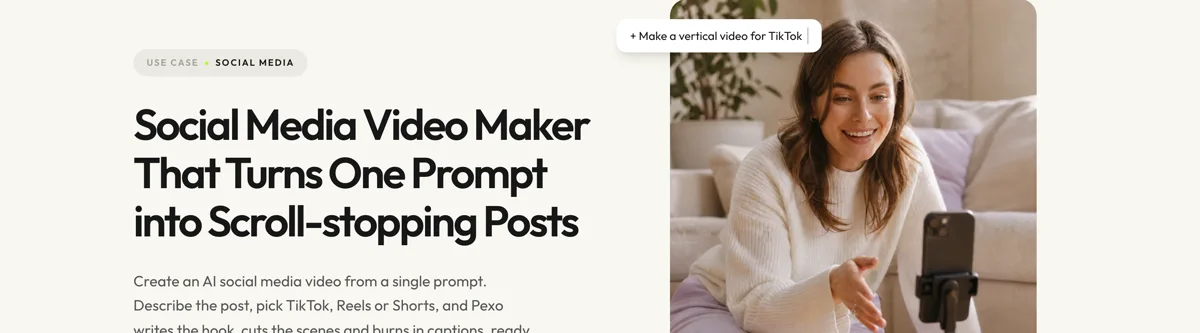
Because everything happens inside Codex, you never leave the agent to make the video: no separate account tab, no export-and-reimport shuffle. That single-surface loop — describe in Codex, get a finished video back — is what separates this from wiring a video API into your own script by hand.
Common pitfalls
- Expecting Codex or GPT-6 Astra to render the video themselves. They plan and reason; only the Pexo skill generates footage. Astra takes text and image in and returns text, so if you skip Step 3 there is no video capability to call and the job stalls — install the Pexo skill and let it handle generation.
- Astra is missing from the model picker. Model access depends on rollout, account, sign-in method, and client, so a missing entry is usually an access or version issue. Update Codex to v0.153.1 or later and confirm your plan includes Astra; on an enterprise workspace, ask an admin to enable it rather than forcing a provider block.
- Treating Astra like a third-party backend. Unlike a non-OpenAI model, Astra needs no
model_providerblock, nobase_url, and no external key. If you copy a custom-provider config from another guide, you will break a setup that should require nothing. - Ignoring the price tier. Astra is priced at the premium end ($10 input / $50 output per million tokens). A single video brief is cheap, but a long, chatty iteration session adds up — keep prompts tight and let Pexo, not extra reasoning turns, do the heavy lifting.
- Assuming a bigger model means better footage. The reasoning model plans the job; the Pexo skill and the video models it routes to decide how the footage looks. Swapping to Astra sharpens the planning, not the pixels.
Related tutorials
- How to make videos with OpenAI Codex — the same skill running on Codex's default model.
- How to make videos with Codex using Grok 4.6 — the same workflow with a third-party backend that does need a provider block.
- How to make videos with Codex using DeepSeek V4 Flash — the same workflow on another custom backend model.
- How to make videos with Claude Code — the Claude Code version of this setup.
Start making videos with Codex using GPT-6 Astra
The setup is a one-time cost: install Codex, select GPT-6 Astra, add the Pexo skill, and from then on every video is a conversation. Because Astra is native to Codex, there is no provider wiring to maintain — Astra handles the planning, and Pexo's AI video generator turns the plan into a finished cut with no timeline to operate and no model prompt to engineer. Open the social media video workspace and describe your first video.