 ChatGPT
 Perplexity
 Claude
 Gemini
 Grok



A useful Arcads budget follows the versions your team will review: the actor takes, supporting footage, translations, and caption passes. Those jobs draw on the same credit balance, including completed drafts you decide to replace.
For Arcads pricing, estimate one batch before choosing a subscription. The worksheet below shows how the pieces add up and where a revision can push the batch beyond its allowance.

Which Arcads Plan Fits an Ad Batch?
Choose a plan that covers the expected generations and gives your team the features and spending controls it needs. Credit capacity alone does not settle the choice.
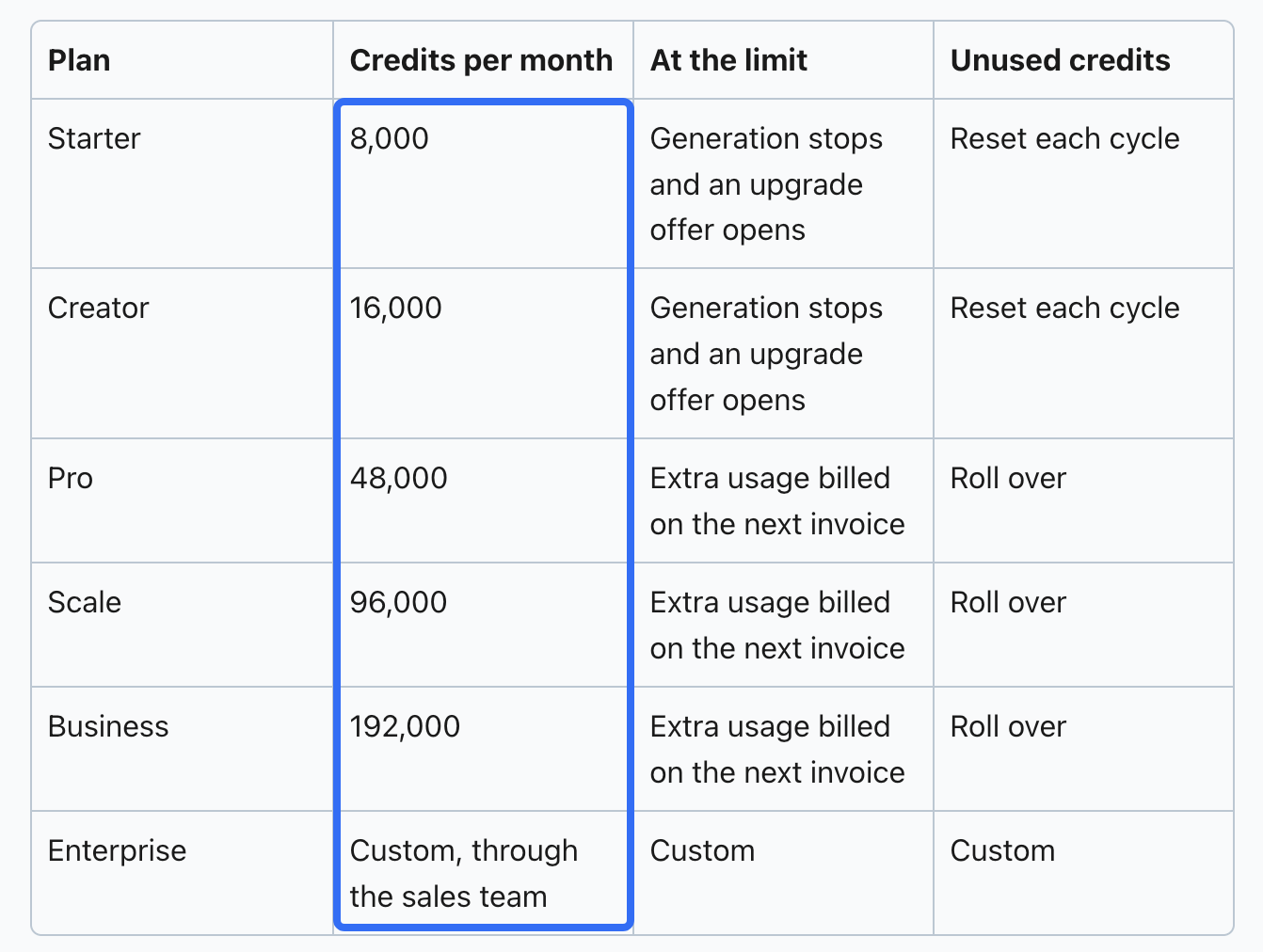
As checked on November 5, 2026, Arcads' pricing guide lists these monthly allocations:
| Plan | Monthly credits |
|---|---|
| Starter | 8,000 |
| Creator | 16,000 |
| Pro | 48,000 |
| Scale | 96,000 |
| Business | 192,000 |
| Enterprise | Custom |
Workflows and AI captions start at Creator; team seats and custom actors are among the features listed for Pro and above. Confirm the entitlements in your offer before sizing the batch around them.
Copy the subscription charge, billing period, currency, and taxes from the in-app offer. Arcads directs customers there for current cash prices and notes that account rates or plan sizes can differ. Use the allocation to plan capacity and the offer to price it.
What Happens When the Trial Ends?
The trial requires a payment card. Arcads' pricing guide lists 1,000 credits for 72 hours, with all features unlocked but no free daily images. The card is not charged during that trial.
Unless you use Cancel free trial before it ends, the Starter monthly subscription starts automatically after 72 hours. Arcads says it sends a reminder email 24 hours before the trial ends. Cancelling during the trial ends access immediately; cancellation of an active paid subscription takes effect at the end of its billing cycle.
What Uses Credits in One Campaign?
Generation costs depend on the model, duration, settings, and tool. Record each action separately so an inexpensive-looking actor draft does not hide the work needed to finish its variants.
Actor, Model Clip, Translation, and Captions
The guide also lists these standard rates:
-
Actors: Arcads 1.0 uses 800 credits for a video up to two minutes. Audio-Driven and OmniHuman 1.5 use 800 per started minute.
-
Model clips: an eight-second Veo 3.1 clip uses 800 credits; other models have their own settings and rates.
-
Translation: 240 credits per started 30 seconds, per target language.
-
Captions: Insta/TikTok styles use 8 credits, Classic uses 80, and Animated uses 48 per started minute.
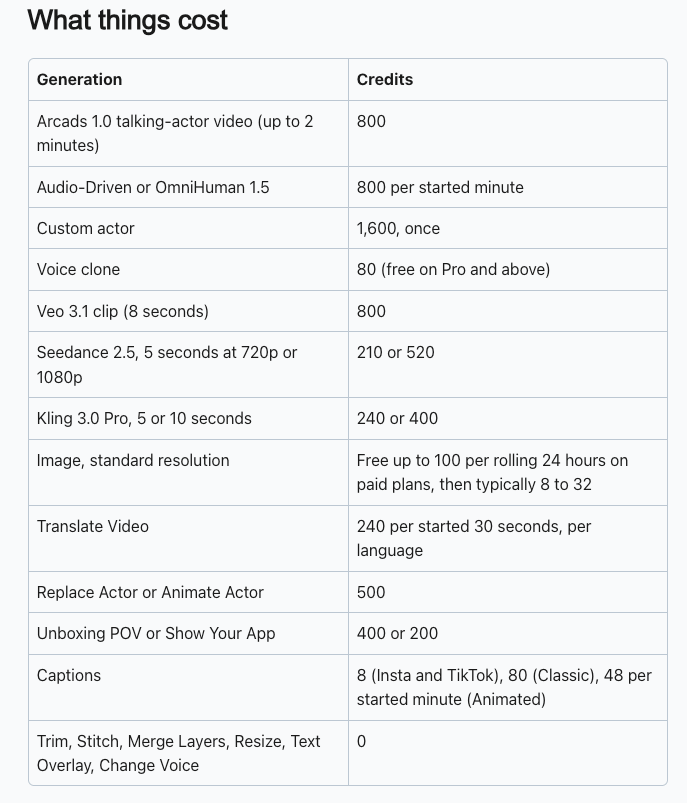
The older credit-counting article describes Arcads 1.0 by the minute, so confirm the displayed quote before budgeting longer actor videos. The example below uses 30-second takes. Creating a custom actor, if needed and available on your plan, costs 1,600 credits at the standard rate; confirm the displayed account quote before generating.
Translation has a useful boundary: under the published rule, 31 seconds uses two 30-second units. Read the finished script aloud before producing every language version. A longer delivery can change the estimate.
A Fillable Ad Batch Cost Worksheet
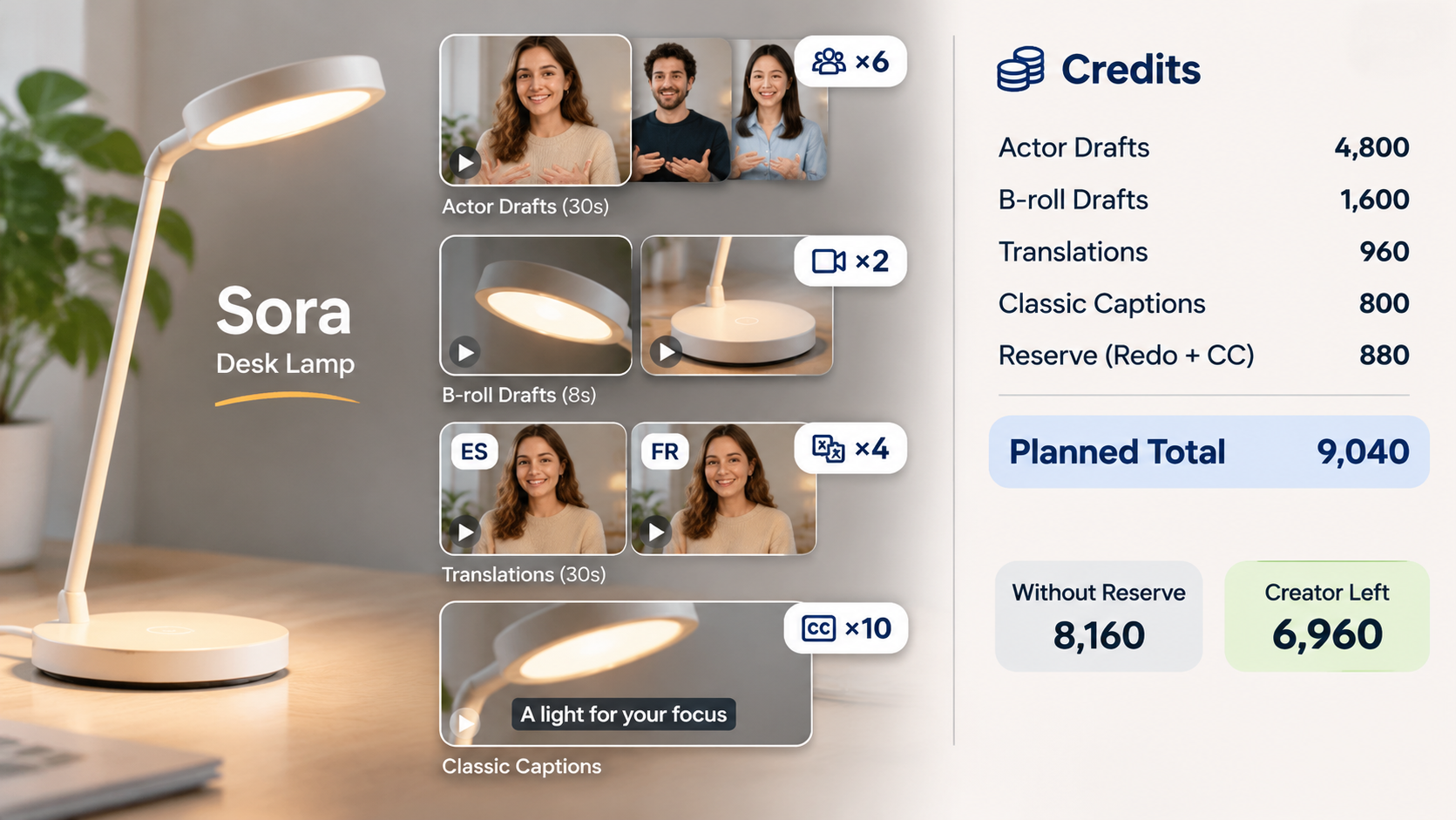
This hypothetical batch promotes a fictional desk lamp called Sora. It uses approved product photographs and two scripts, each generated with three library actors. Two accepted actor drafts are translated into two additional languages.
The plan assumes two shared B-roll drafts, Classic captions on six original and four translated videos, and one actor/caption redo. These are planning quantities, not production results. No custom actor, voice cloning, enhancement, or other paid action is included.
Replace the rates with your account quotes and fill in the actual usage after generation:
| Action | Assumed quantity | Public rate used | Estimated credits | Actual net credits |
|---|---|---|---|---|
| 30-second Arcads 1.0 actor drafts | 2 scripts × 3 actors = 6 | 800 each | 4,800 | ___ |
| Eight-second Veo 3.1 B-roll drafts | 2 | 800 each | 1,600 | ___ |
| Translate two 30-second drafts into two languages | 4 language outputs | 240 each | 960 | ___ |
| Classic captions | 10 versions | 80 each | 800 | ___ |
| Reserve: one actor redo and its Classic captions | 1 pair | 800 + 80 | 880 | ___ |
| Additional tools or attempts | ___ | ___ | ___ | ___ |
| Planned total, including reserve | 9,040 | ___ |
Without the reserve, the batch uses 8,160 credits. With it, the plan exceeds an untouched Starter allocation by 1,040 credits. A fresh Creator allocation would leave 6,960, assuming no other spending.
Use the available balance when scheduling the batch. Other campaigns may already have used part of this month's allocation. Record rejected completed drafts as spending, and reconcile failed-job credits separately. Keep advertising spend and human review time outside the generation subtotal.
When Can Overage Change the Bill?
Overage matters when generation can continue after included credits run out. Arcads' help center says Starter and Creator stop at the limit, while Pro, Scale, and Business bill extra usage on the next invoice.
There is a contract detail to resolve: the Arcads terms describe overage by Standard versus Customized Offer. Confirm which offer governs your workspace and obtain its extra-credit rate before relying on continued generation.
For the worksheet, calculate:
Expected excess = max(0, planned credits − available eligible credits).
If overage applies at a single agreed rate, multiply that excess by the quoted price per extra credit. A tiered agreement needs its own calculation. Keep this estimate separate from the subscription charge and taxes.
With a stopping plan, the excess signals a production interruption or upgrade decision. Approve the first script and actor treatment before launching the rest of the batch.
What Should Be Checked Before Paying?
Check the offer against the actual deliverable: model settings, required tools, renewal date, extra-credit rate, and the person allowed to approve further spending. Save the displayed quotes beside your worksheet.
Approve the claims before multiplying them. For Sora, an actor can describe a verified lamp feature; presenting the actor as a real satisfied customer introduces a different problem. Check actor restrictions, product imagery, music, and intended ad use under the applicable agreements. This article does not provide legal advice.
If the assignment needs a complete story built around your own product footage, you can take that brief to Pexo's product-video workflow. Budget its production and conversational revisions separately. Resolve promotional-use consent under Pexo's terms, and keep Arcads-generated actor videos out of another AI workflow unless the applicable permissions expressly allow it.
Conclusion
Price the batch your team expects to approve, including translations, captions, and a defined revision allowance. Then match it to the available credits and the account's stop or overage rule. For Sora, the useful planning number is 9,040 credits; the cash decision still depends on the actual offer.