 ChatGPT
 Perplexity
 Claude
 Gemini
 Grok



A web subscription and an API balance can both sit under the Pika name while paying for different work. For recurring product videos, decide where each scene will be generated before comparing monthly allowances.
Use the Pika Labs pricing worksheet below to choose between a subscription and an extra credit purchase. It counts attempts at specific settings, then checks which balance can pay for them.

What Does Each Pika Plan Include?
Current individual plans share model access but differ in credits, concurrency, and other benefits. Free has no recurring monthly credits; buying a pack does not turn it into a paid subscription.
The Pika pricing page, checked on November 6, 2026, lists:
| Plan | Monthly billing | Monthly equivalent on annual billing | Monthly credits |
|---|---|---|---|
| Free | $0 | $0 | 0; packs available |
| Starter | $10 | $8 | 600 |
| Creator | $35 | $28 | 2,600 |
| Fancy | From $95 | From $76 | 8,550+ |
Prices are in USD; check applicable taxes at checkout. Annual plans are paid upfront, while their credits refresh monthly. Fancy has adjustable capacity, so its starting price does not cover every allowance shown on its slider. Enterprise uses custom pricing.
All current individual plans list watermark-free downloads. Starter, Creator, and Fancy include commercial use; Free does not, even with purchased credits. Source-media rights and the selected model's terms still matter. A clean export alone does not clear an image, likeness, or product claim.
How Many Credits Does One Scene Use?
It depends on the app, model, duration, resolution, and other settings. Read the estimate after selecting those settings, then record it beside the scene's purpose.
For five-second generations, the current pricing examples include:
| Model and resolution | Credits per generation |
|---|---|
| Pika H3 Flex, 768p | 10 |
| Pika 2.5, 720p | 20 |
| Seedance 2.5, 720p | 122 |
| Seedance 2.5, 1080p | 299 |
These are specific settings, not universal prices for those models. One initial generation, an alternative, and a product-detail correction are three attempts. A scene you discard still belongs in the cost record unless a credit return is confirmed.
Keep resolution decisions tied to the delivery. An inexpensive draft can help judge the camera move, but changing settings for the final attempt requires a fresh quote. Do not assume an upscale, extension, or edit is included in the initial charge.
A Monthly Scene Budget Worksheet
Consider Rill, a fictional cable pouch offered in four colors. The hypothetical monthly plan requests two opening scenes and one detail scene per color: twelve intended usable scenes.
For this exercise, each opening and detail gets two candidates. Four further Pika 2.5 attempts are reserved for corrections. Those quantities express the team's proposed review allowance; they do not predict how many generations will pass.
| Scene work | Planned attempts | Rate used | Planned credits | Actual net credits |
|---|---|---|---|---|
| Eight openings, two candidates each; Pika 2.5, five seconds, 720p | 16 | 20 | 320 | ___ |
| Four details, two candidates each; Seedance 2.5, five seconds, 720p | 8 | 122 | 976 | ___ |
| Reserved Pika 2.5 corrections at the same settings | 4 | 20 | 80 | ___ |
| Other quoted actions | ___ | ___ | ___ | ___ |
| Total before other actions | 28 | 1,376 | ___ |
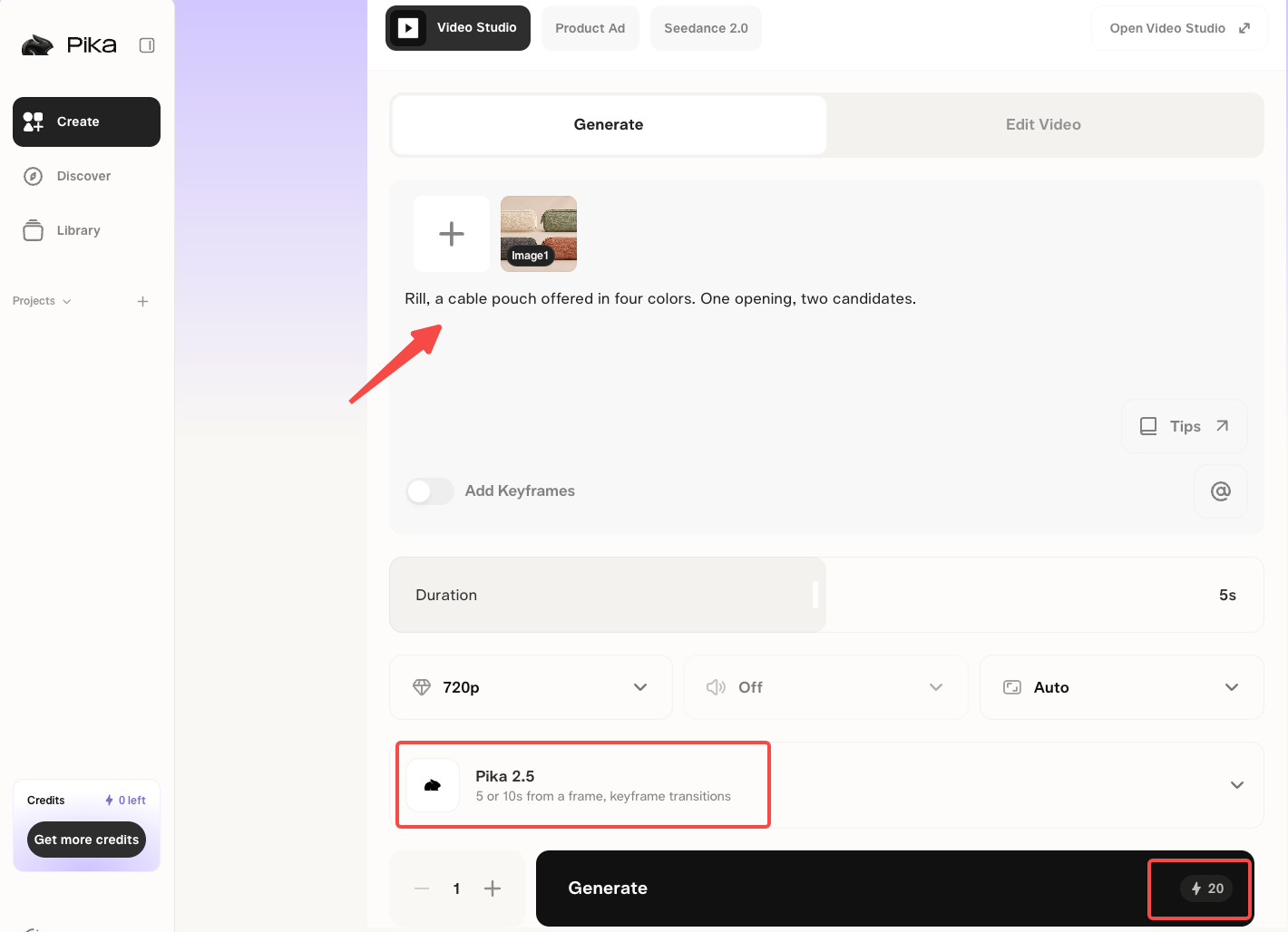
Replace each rate with the current account estimate. The example excludes separately charged image, audio, extension, and finishing work. Record the selected output for each scene so the month ends with both a spending total and a usable shot list.
With these assumptions, Starter falls short by 776 credits, and Creator has 1,224 credits left before other spending.
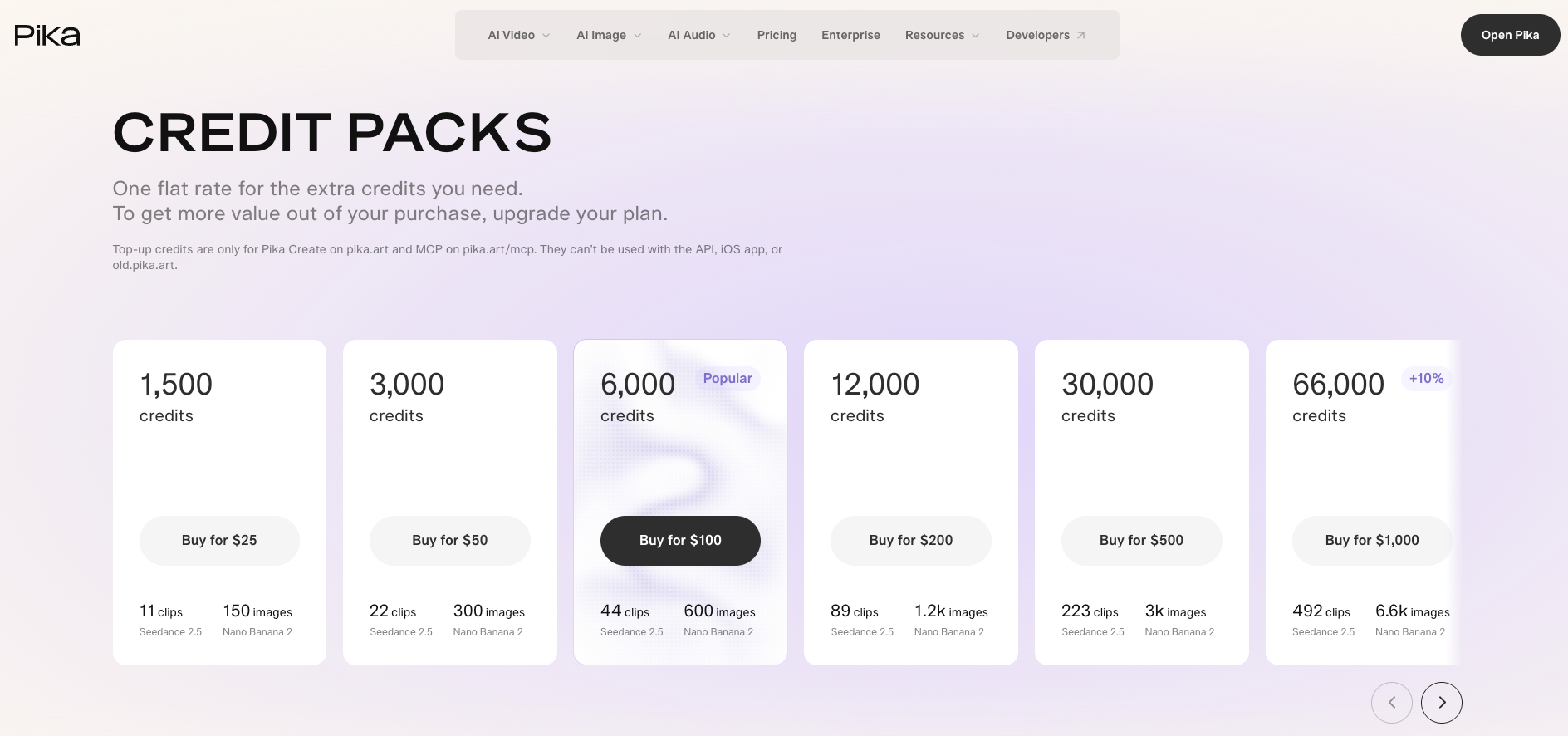
The page also lists a 1,500-credit pack for $25. With monthly billing, Starter plus that one-time pack costs $35 for the purchase month, matching Creator's monthly price. Creator supplies more credits for the current month; the pack has a different expiry schedule. Check which balance is spent first before buying credits you hope to save for later.
Which Balances and Limits Are Separate?
Keep a separate record for each purchase source and eligible service. Pika's current account and credit guidance distinguishes these routes:
-
Monthly allowance: refreshes monthly, including on annual subscriptions. Unused credits do not roll over.
-
Web top-ups: work in Pika Create and its MCP. The pricing page excludes API, iOS, and old.pika.art use.
-
API: has separate billing and does not use the consumer Pika credit balance.
-
iOS purchases: are managed through Apple. Verify their own balance and purchase conditions; a web pack does not fund iOS generation.
-
Legacy subscriptions and balances: need their account-specific terms. Transition access to both current Pika and old.pika.art does not establish that new top-ups work on the old site.
Track the purchase date, expiry, and eligible destination beside each balance. If a legacy allowance or promotional purchase is unclear, leave it out of the available total until confirmed. Subscription access, credit eligibility, and parallel-generation limits are separate checks.
When Does a Pika Plan Fit a Video Workflow?
It fits when the chosen apps can produce the required material and your team can review it within the credit allowance. Pika also supports editing and multi-shot video with supported models; quote those tasks separately when they replace individual scene requests.
For Rill, compare the zipper, seam positions, color, and label against approved photographs before accepting an opening. If the same detail keeps changing, improve the reference or simplify the scene before funding more attempts.
If your main assignment includes developing the entire product explanation, you can bring approved brand materials to Pexo's product-video workflow and review the direction through conversation. Give that assignment its own quote and check its promotional-use terms. Pika's scene-credit calculation does not establish its cost. This article does not provide legal advice.
Conclusion
Choose around the scenes, attempts, and eligible balances your month actually needs. For the hypothetical Rill schedule, compare Creator with Starter plus a pack, then decide how much purchased credit you expect to use before expiry. Keep API, iOS, and legacy balances outside that calculation until their eligibility is clear.