

 ChatGPT
 Perplexity
 Claude
 Gemini
 Grok
Grok



How to Make a Kissing Video
UPDATED: 2026-08-04 By Lan He, Senior Video Producer at Pexo
Making a kissing video takes six steps: choose and prepare your photos, describe the kiss and setting, pick a visual style, generate the video, review and refine the motion, then export for your platform. Generation itself takes 30 to 60 seconds, and a first video takes about 10 minutes including setup.
Quick Version: How to Make a Kissing Video
- Pick clear, front-facing, well-lit photos of yourself or people who have agreed to it.
- Describe the kiss and the setting in plain language.
- Pick a visual style: cinematic, anime, watercolor, or anything you can name.
- Generate the video and wait 30 to 60 seconds.
- Review the faces and motion, then refine by describing what to change.
- Export in 9:16 for social or 16:9 for YouTube.
How to Make a Kissing Video Step by Step
Step 1: Choose and prepare your photos
Use photos of yourself or of people who have explicitly agreed to appear in the video. Generating intimate video of someone from their photo without their knowledge violates their privacy, breaks every major platform's terms of service, and is illegal in a growing number of places. This is the one rule that matters more than any technique below.
For quality, pick front-facing photos in good light where each face is large in the frame and unobstructed. Sunglasses, heavy shadows, extreme angles, and faces turned away all degrade the result. A single photo of a couple works, and so does one portrait with the partner described in text.
Step 2: Describe the kiss and the setting
Write the description in ordinary language rather than prompt keywords. Name the kiss type, the setting, and the mood in a sentence: "A slow forehead kiss on a rainy balcony at dusk, warm light from inside the apartment." Platforms built for this parse plain descriptions, so keyword stuffing and bracket syntax make results worse rather than better.
Be specific about the things that change the shot: time of day, weather, indoor or outdoor, and how long the moment should feel. Vague inputs produce generic output. "Two people kissing" gives the model nothing to distinguish this video from any other.
Step 3: Pick a visual style
Name the visual treatment in the same description. Cinematic realism suits photos of real people and keeps faces recognizable. Anime and manga styles suit stylized source art and original characters, and a motion model tuned for stylized work handles them better than a photoreal one would. Watercolor, claymation, Pixar-style animation, and 8mm film each change the entire look.
Pick the style before generating rather than trying several afterward. Style changes require a full regeneration, so a decision made up front saves the credits that trial-and-error spends. For stylized character work, the anime video page covers the same pipeline with animation-first defaults.
Step 4: Generate the video
Upload the photos, paste in the description, and generate. Most kissing videos finish in 30 to 60 seconds. Multi-character scenes and 4K renders take a couple of minutes. With clear front-facing source photos, most results land at 85 to 95 percent realism, with natural head movement and believable lip contact.
Image-to-video conversion is what does the work here: the still photo supplies the identity and the model supplies the motion. Videos arrive finished rather than as raw frames, with music, ambient sound, and captions already in place, so there is no assembly step afterward.
Step 5: Review and refine the motion
Watch the result at full size and check three things: whether both faces stay recognizable throughout, whether the head movement looks natural rather than rubbery, and whether the lip contact reads as contact rather than overlap. Most defects trace back to the source photo rather than the description.
Refine by describing the change in the chat instead of regenerating blind. "Make the movement slower" or "keep more distance before the kiss" adjusts that element specifically. If faces distort no matter how the description changes, the fix is a sharper source photo, not a better prompt.
Step 6: Export for your platform
Export 9:16 at 1080x1920 for TikTok, Instagram Reels, and YouTube Shorts, which is where most of this content is shared. Export 16:9 for YouTube or website embedding. Generate the ratio you intend to post rather than cropping afterward, because cropping cuts into exactly the faces the video is built around.
Pexo packages the output for export with captions, music, and ambient sound already mixed. Watermark removal is included on paid plans. Before sharing anything featuring another person, confirm one more time that they are comfortable with it being posted, not just with it being made.

How to Make an AI Kissing Video with Pexo
The kissing video page runs the whole sequence above in one conversation.
Upload one or two photos, or paste a link to a character. Describe the kiss in plain language: "A first kiss under streetlights in winter, cinematic, snow falling." Pexo generates the motion, adds synced music and ambient sound, burns in captions, and packages it sized for vertical or horizontal export.
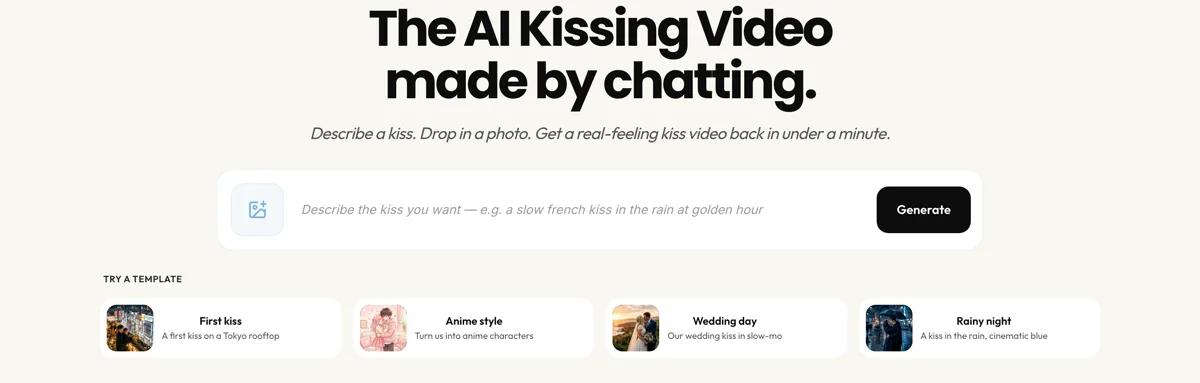
Kiss types cover French, cheek, forehead, first kiss, rain, wedding, anime, same-sex, and most variations you can put into words, with new ones added regularly. Styles work the same way, described rather than picked from a menu.
Edit through the chat rather than a timeline. Uploads are encrypted in transit, used only to generate your video, and never sold or used to train public models, and any file can be deleted from the account in one click. For scenes built entirely from a written description rather than a photo, text-to-video generation handles it, and cinematic video generation covers heavier camera work.
5 Common Mistakes That Ruin a Kissing Video
1. Using a photo where the faces are small or angled. The model can only work with what the source photo shows. A face turned three-quarters away, partly hidden by hair, or occupying a tenth of the frame produces distortion no description can correct.
2. Making a video of someone who has not agreed to it. Beyond the legal and platform-policy exposure, this is a serious violation of the person in the photo. Use images of yourself or of people who have said yes.
3. Writing a vague description. "Two people kissing" leaves every meaningful choice to chance. Name the kiss type, the setting, the light, and the mood, and the output stops being generic.
4. Expecting a long scene from one generation. These videos are built around a single moment. Asking for an extended sequence in one pass produces drift, where faces gradually stop matching the source. Generate short and combine if more runtime is needed.
5. Mixing incompatible source photos. Two portraits shot in different lighting, at different resolutions, or in different styles fight each other in the composite. Match the source photos as closely as you can before uploading.
Related Tutorials
- How to make an anime video for stylized character animation
- How to make a short video for vertical social formats
- How to make YouTube Shorts for YouTube-specific formatting
- How to make an Instagram video for Reels and feed posts




