
 ChatGPT
 Perplexity
 Claude
 Gemini
 Grok




You send the product ad to the client, and the questions start: “Is this the latest version?” “Why does the preview look blurry?” “Did the download finish?” The edit may be done, but the handoff isn't. I'll show you how to package review copies and final masters, share them with the right permissions, and make sure everyone receives the approved file.
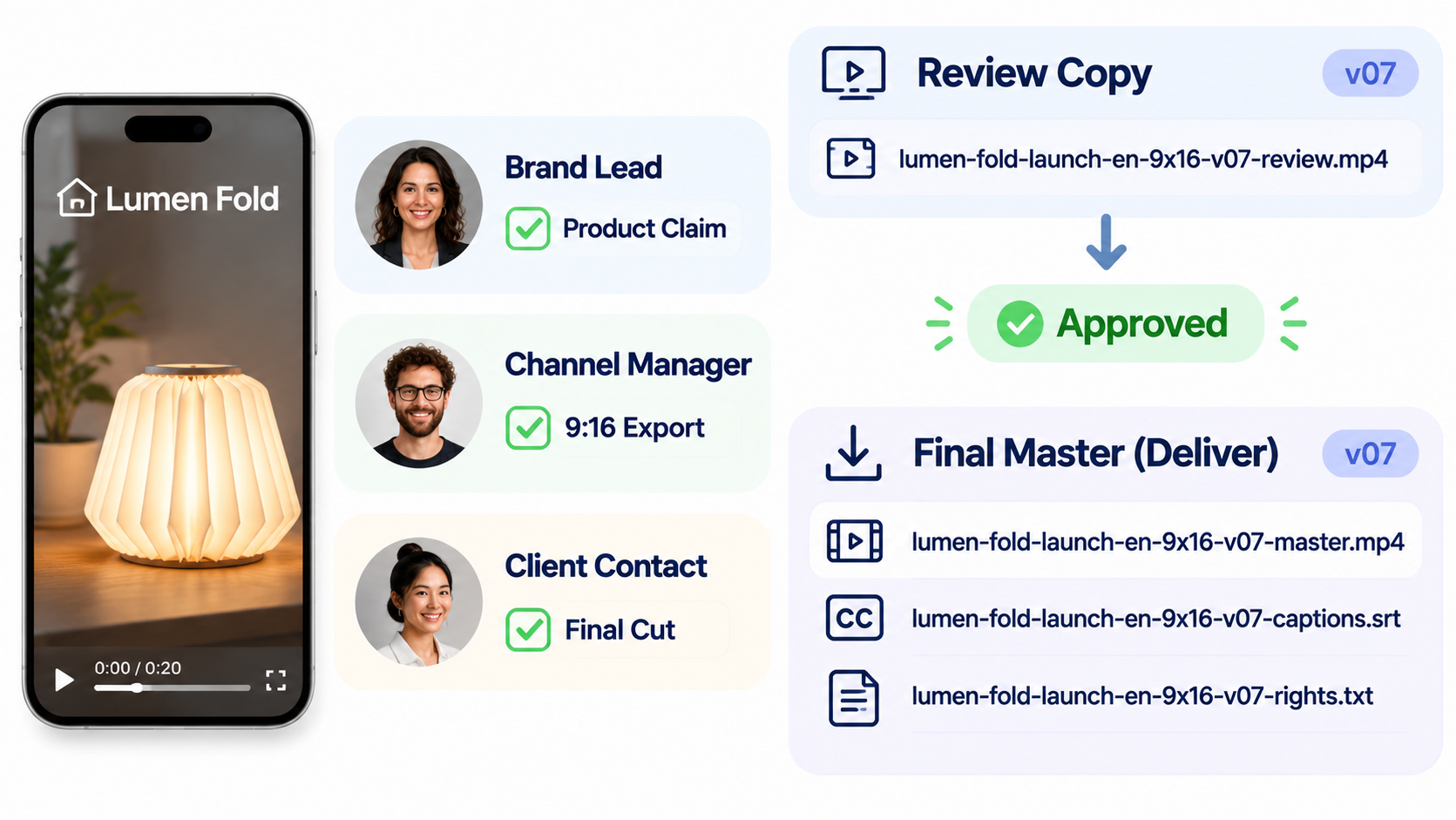
Take Lumen Fold, an invented home-goods brand with three people reviewing a 20-second product ad. Each person needs something different, from checking the product claim to approving the final social export. The challenge is getting the right file to the right person without another round of confusion.
What does each product campaign reviewer need?
Decide between a review copy and the final file
A reviewer usually needs two files:
-
a smaller review copy for quick playback and comments
-
a final master for download, archive, and channel delivery
The review copy can use a broadly compatible export and a clear version label. The master should preserve the approved resolution, audio, captions, and required delivery settings.
For the fictional campaign, Lumen Fold, an invented home-goods brand, has three people reviewing a 20-second product ad:
-
the brand lead approves the product claim
-
the channel manager checks the 9:16 social export
-
the client contact approves the final cut
Send the review file first when feedback is still open. Send the master after the team has agreed on the version, filenames, captions, and destination.
A streaming preview helps reviewers comment quickly. It does not prove that the downloaded file has the same resolution, audio track, or frame rate. Treat the preview as a review surface and the download as a separate delivery item.
Package the product ad versions
Name the file and include version details
Use filenames that answer the recipient’s first questions. Include the brand, product, channel, language, ratio, version, and file role.
For Lumen Fold:
-
'lumen-fold-launch-en-9x16-v07-review.mp4'
-
'lumen-fold-launch-en-9x16-v07-master.mp4'
-
'lumen-fold-launch-en-9x16-v07-captions.srt'
-
'lumen-fold-launch-en-9x16-v07-rights.txt'
Keep the version number consistent across the file, message, review note, and approval record. Do not call a file “final” if the client can still request a revision. Use 'master' after the approval decision.
Place related files in one delivery folder only when they share the same access rules. A preview link should not accidentally expose raw footage, internal notes, or an older export.
Check size, playback and intended recipient
Open the exact files from the delivery folder. Check the duration, resolution, audio, captions, and first and last frames. Confirm that the review copy and master have different roles.
Write down:
-
file size
-
format and resolution
-
version
-
recipient
-
download permission
-
link expiry
-
checksum method, if used
-
approval status
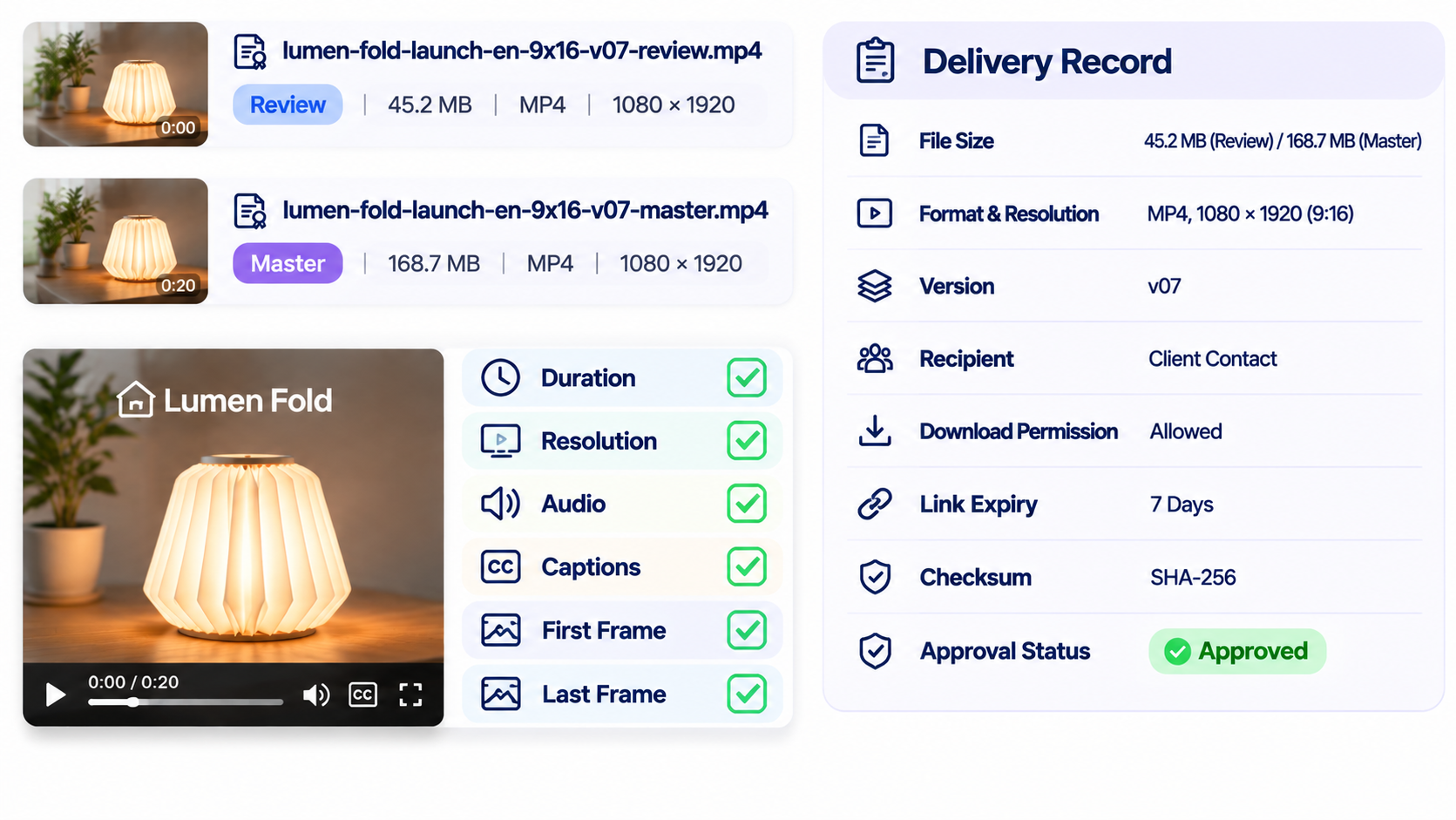
A checksum can show that the recipient downloaded the same bytes as the sender. It does not show whether the file is the right version or whether the recipient’s editor can play it. The team still needs a playback check.
Send a download link and test access
Set permissions and an appropriate expiry
Choose the sharing method based on the recipient and the sensitivity of the file.
An email attachment can work for a small review copy. A cloud folder works when reviewers need several versions or captions. A dedicated transfer link can suit a large master when the recipient only needs to download it.
Use the smallest access level that supports the handoff. Google Drive allows owners to share with specific people or by link, assign Viewer, Commenter, or Editor roles, restrict downloads, and add an expiry date for eligible accounts. The Google Drive sharing guide explains how folder permissions can override a file’s individual settings.
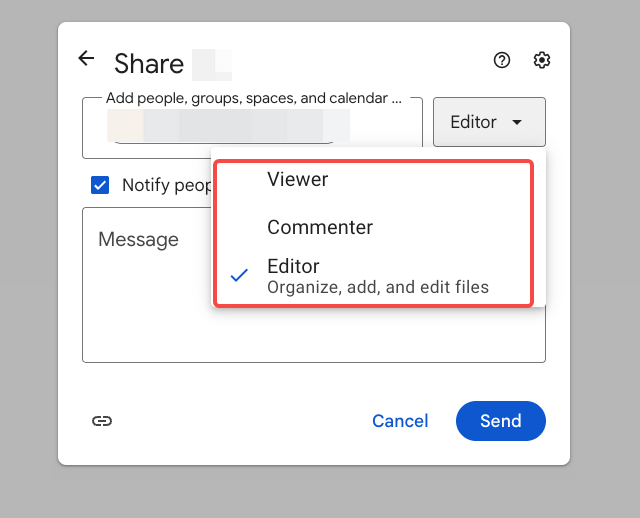
For Lumen Fold, the brand lead can comment on the review copy, while the channel manager receives download access to the master. The client contact receives the review link until approval, then a separate master link with the required expiry.
A password-protected link still can be forwarded by someone who has the password. Expiry limits future access. It does not recall a file that someone already downloaded.
Verify the recipient can download the intended file
Test the link in a private browser window or with a test account that has the same role as the recipient. Confirm:
-
the link opens the correct folder or file
-
the recipient sees the intended version
-
the download button is available
-
the file name remains unchanged
-
the downloaded file opens and plays
-
the recipient can access captions or a checksum when required
Before asking the recipient to retry, check whether downloads are disabled for the file or whether a browser or temporary service limit is blocking the transfer; Google’s download troubleshooting guide covers these failure points.
Ask the recipient to reply with the exact filename they downloaded. This catches a surprising number of version errors.
Confirm which campaign version is approved
Keep the approval attached to the master, not only in an email thread. A short decision record can say:
Approved for Lumen Fold paid social, English 9:16, version 07 master. Captions included. Review copy comments resolved by the brand lead and channel manager.
If the campaign has multiple ratios, approve each file separately. A 16:9 master and a 9:16 cut can have different framing, captions, or CTA placement.
Pexo offers video-creation workflows for product and social campaigns, but it is not a file-transfer service. Its Create page lists video production workflows for different campaign formats, while the Pexo Gallery provides examples of product and social-video formats. Use the client’s delivery system to transfer approved exports, manage revision files, and maintain the final handoff record.
Handoff checklist
-
The review copy and master have separate filenames.
-
The version number matches the approval record.
-
The intended ratio, resolution, audio, and captions are checked.
-
The recipient list is correct.
-
The link permissions match the recipient’s job.
-
The expiry date is recorded.
-
The download works in a recipient-like test.
-
The downloaded file plays from start to finish.
-
The recipient confirms the exact filename.
-
The approved master and rights record are archived.
-
The delivery message states which version is approved.
This article does not provide legal or information-security advice. Confirm the current storage, access, expiry, retention, and download terms for the service you use.