ChatGPT
 Perplexity
 Claude
 Gemini
 Grok




One editor cuts the product footage. The other also retouches packshots and makes motion titles. Should both get the same Adobe plan?
I'm June Vale, and I would price those two jobs separately. Adobe currently lists Premiere for teams at $37.99 per seat per month and Creative Cloud Pro for teams at $99.99. Both prices assume an annual contract billed monthly. This guide turns those rates into a two-editor budget and shows what to check before renewing. The US prices were checked November 10, 2026; they are not a 2027 quote.
What Does a Premiere Pro Subscription Cost?
For a US team, Adobe's Premiere pricing page lists one Premiere seat at $37.99 per month. That seat includes the desktop editor, Adobe Express Premium, Frame.io for Creative Cloud, 1 TB of cloud storage, and 25 monthly generative credits. Creative Cloud Pro costs $99.99 per seat per month and adds more than 20 apps and a larger, 4,000-credit monthly allowance. Both listed rates require an annual contract billed monthly.
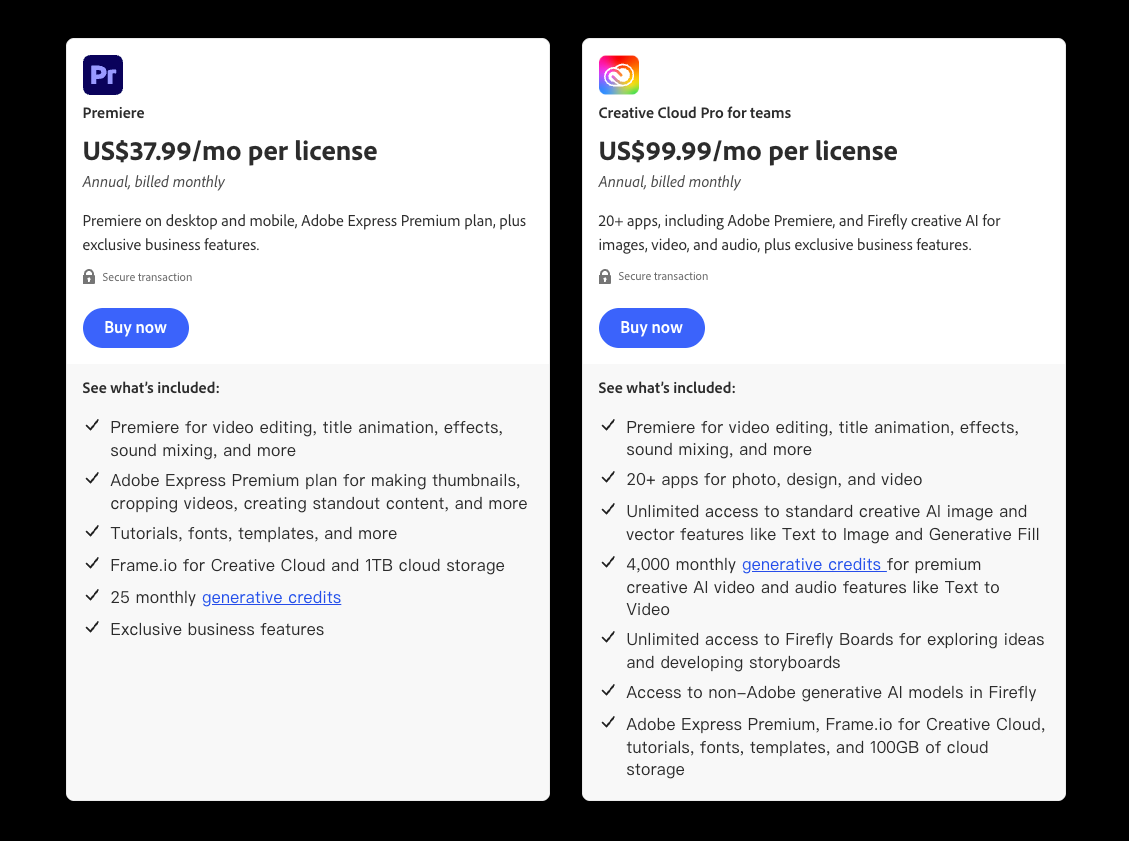
You may also see $22.99 per month on Adobe's individual plan page. That is the personal annual-plan rate, billed monthly. If the company needs to manage seats, reassign them, or keep assets under a team account, use the team price in the budget.
Adobe now calls the desktop app Premiere on its plan pages. Premiere Pro remains a common search name; Creative Cloud Pro is the multi-app subscription.
Single App or Creative Cloud Bundle?
The editor cutting filmed ads may only need Premiere. The editor making titles in After Effects and fixing product images in Photoshop may need Creative Cloud Pro. Match the plan to each person's regular work, rather than buying two bundles because both touch the same ad.
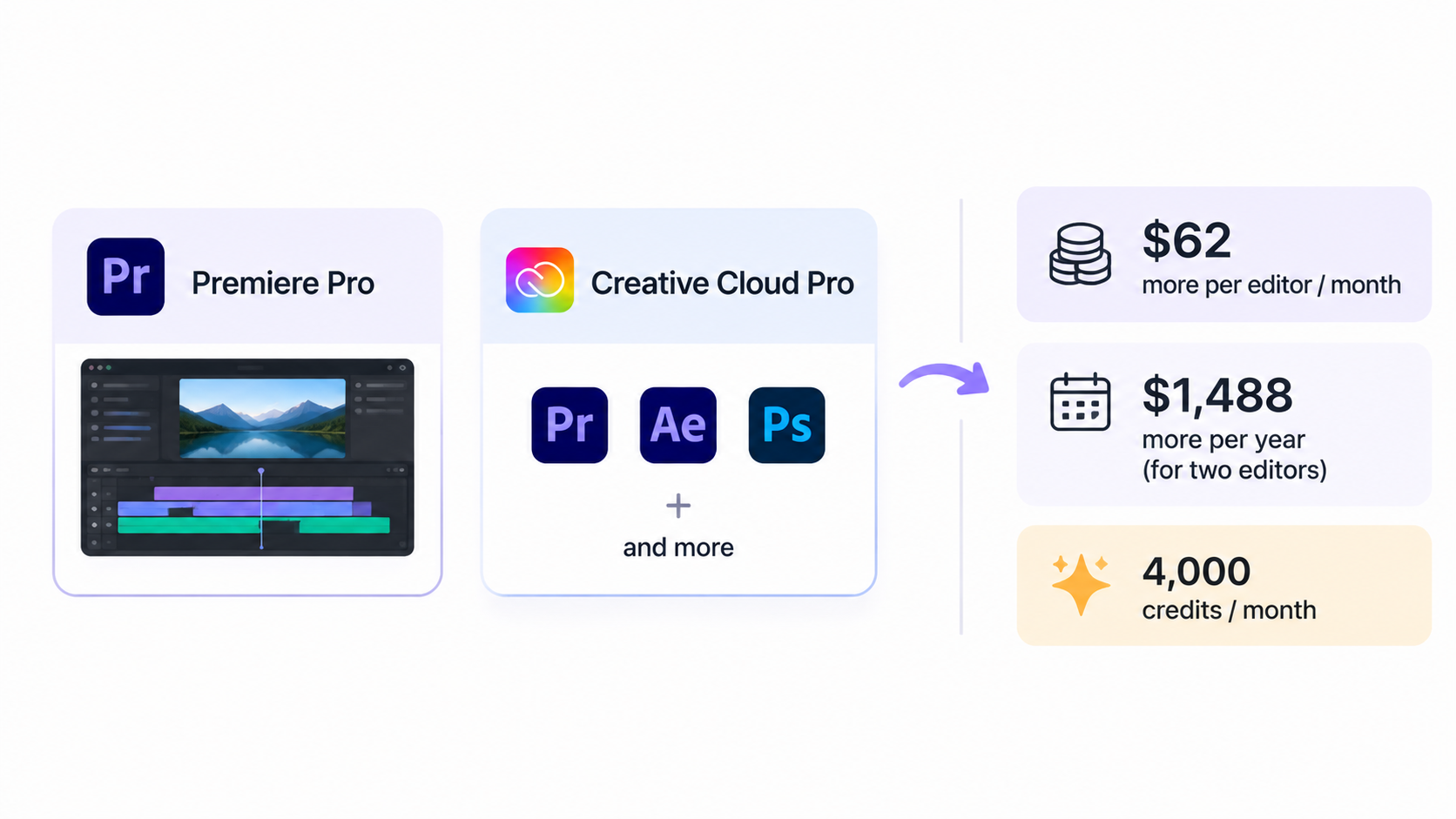
At posted rates, the bundle costs $62 more per editor per month. Two bundles cost $124 more per month than two Premiere seats, or $1,488 more over a year. If only the second editor opens those extra apps, the mixed-seat option in the worksheet is the more useful comparison.
The credit difference may matter if your team uses Adobe's AI features. It will matter less if both people mostly edit real footage. Features consume different amounts of credits, and Adobe's credit FAQ says the allowance resets monthly. Ask which feature the team will use before treating 4,000 credits as added value.
Annual Commitment, Monthly Payment, and Renewal
The monthly charge can look flexible on a pricing page. Here it pays down an annual commitment. Adobe's subscription terms set out cancellation conditions and renewal rules, including possible price changes. Read the terms attached to the actual checkout offer before approving the seats.
If Adobe offers an introductory rate, count the discounted months first, then the months at the regular rate. A first-three-month discount does not make all 12 months cheaper. Keep the renewal estimate separate until Adobe gives the team its next rate.
If headcount may change, confirm when added seats begin billing. Reassigning a seat to another person does not cancel the underlying contract.
A Two-Editor Marketing Team Budget Worksheet
Suppose two people edit filmed product ads all year. Each needs a seat. The worksheet uses Adobe's regular US team rates for 12 months, with no promotion. Tax, Stock licenses, plug-ins, outside storage, contractors, and extra AI purchases are outside the totals.
| License mix | Monthly calculation | 12-month calculation | When it makes sense |
|---|---|---|---|
| Two Premiere team seats | 2 × $37.99 = $75.98 | $911.76 | Both editors mainly work on the timeline. |
| One Premiere + one Creative Cloud Pro team seat | $37.99 + $99.99 = $137.98 | $1,655.76 | Only one editor needs the wider app set. |
| Two Creative Cloud Pro team seats | 2 × $99.99 = $199.98 | $2,399.76 | Both editors repeatedly use the other apps or their included allowances. |
The mixed row often deserves a closer look. One person can cut the ad in Premiere while the other uses the wider app set. A single named seat cannot cover both editors at once.
In the real budget, add the accepted offer's first-year total and a separate renewal estimate. Leave an unknown future rate open.
When Does a Timeline Editor Fit the Workload?
Premiere makes sense when the team often has to work inside filmed footage. Say the demonstration is approved, but the opening and on-screen disclaimer change for a second ad. An editor can adjust those parts on the timeline, keep the demonstration in place, and check the export. The subscription pays for access to that control; the editor's hours still belong in the budget.
If the team has a product photo and needs someone to shape the first video, that is a different job. Pexo's product-video page describes making a cut from a photo or store URL. Pexo does not give the editor Premiere's detailed timeline controls. Compare the cost of getting an acceptable video for that job; a subscription price alone cannot settle it.

Look at one recent campaign. How many times did someone fix a caption, replace a take, or adjust a product detail? If those edits recur every week, a dedicated Premiere seat has a clearer role.
Conclusion
For the two editors in this example, the annual illustration ranges from $911.76 for two Premiere seats to $2,399.76 for two Creative Cloud Pro seats. The mixed option costs $1,655.76. I would start there if only one editor needs Photoshop or After Effects, then replace every example figure with the team's checkout price, tax, and renewal terms.
Review one campaign's actual edit log: footage, versions, caption fixes, product-detail corrections, and handoff. Repeated precise changes strengthen the case for Premiere.