 ChatGPT
 Perplexity
 Claude
 Gemini
 Grok



Filmora makes the most sense when a small team already has footage and wants to turn it into a product ad with a familiar timeline. The purchase decision changes once AI captions, text-to-video, voice tools, image-to-video, or other add-ons become part of the monthly workload.
Use one brief to keep the review practical. Morrow Carry, a fictional travel-accessories brand, has a 25-second product demonstration, a packshot, a voiceover draft, and three approved claims for a compression pouch. The team needs a clean product ad, captions, a 9:16 cut, and a version without a watermark. It also wants to test AI scene cleanup and a short voice pickup.
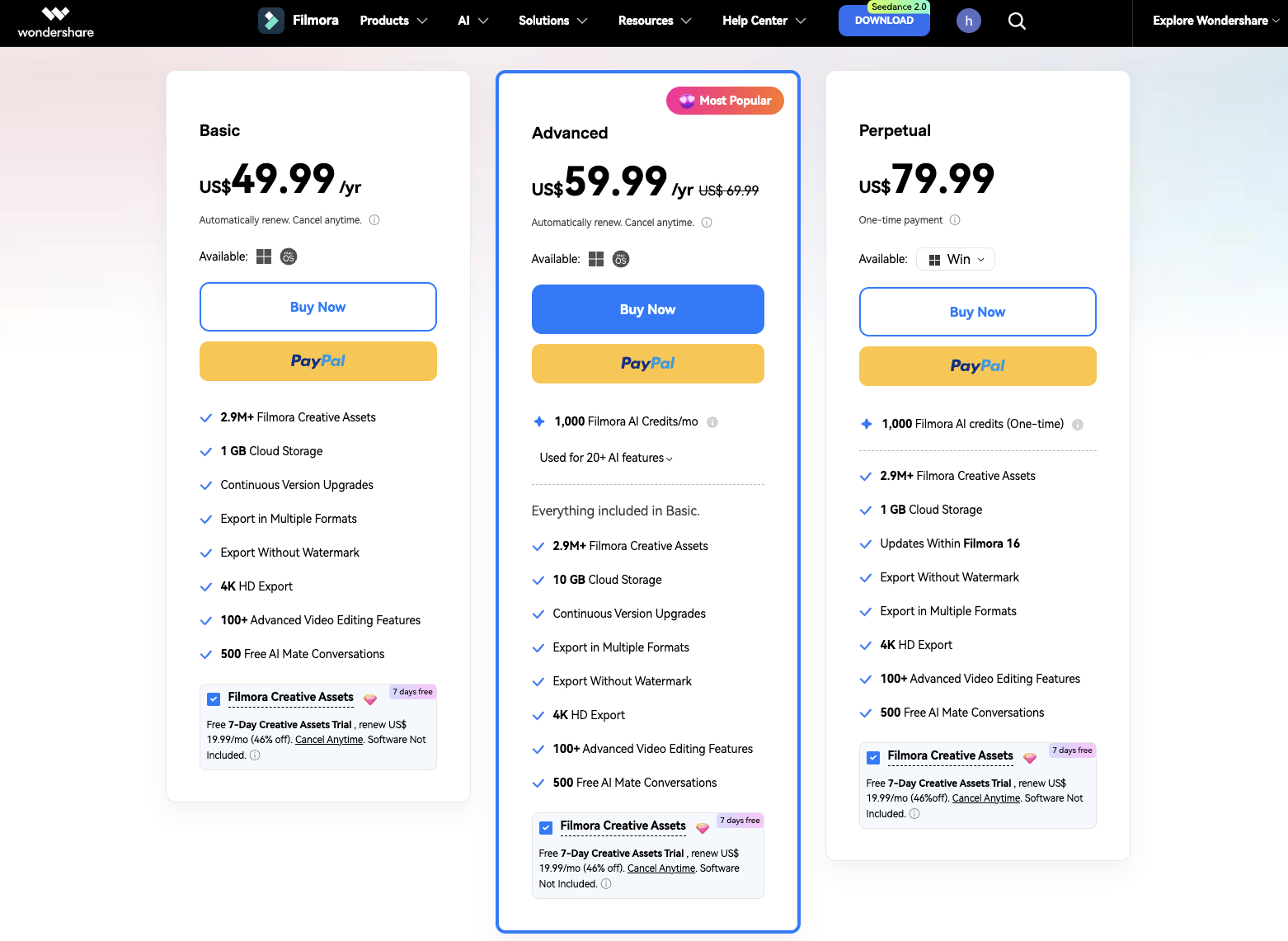
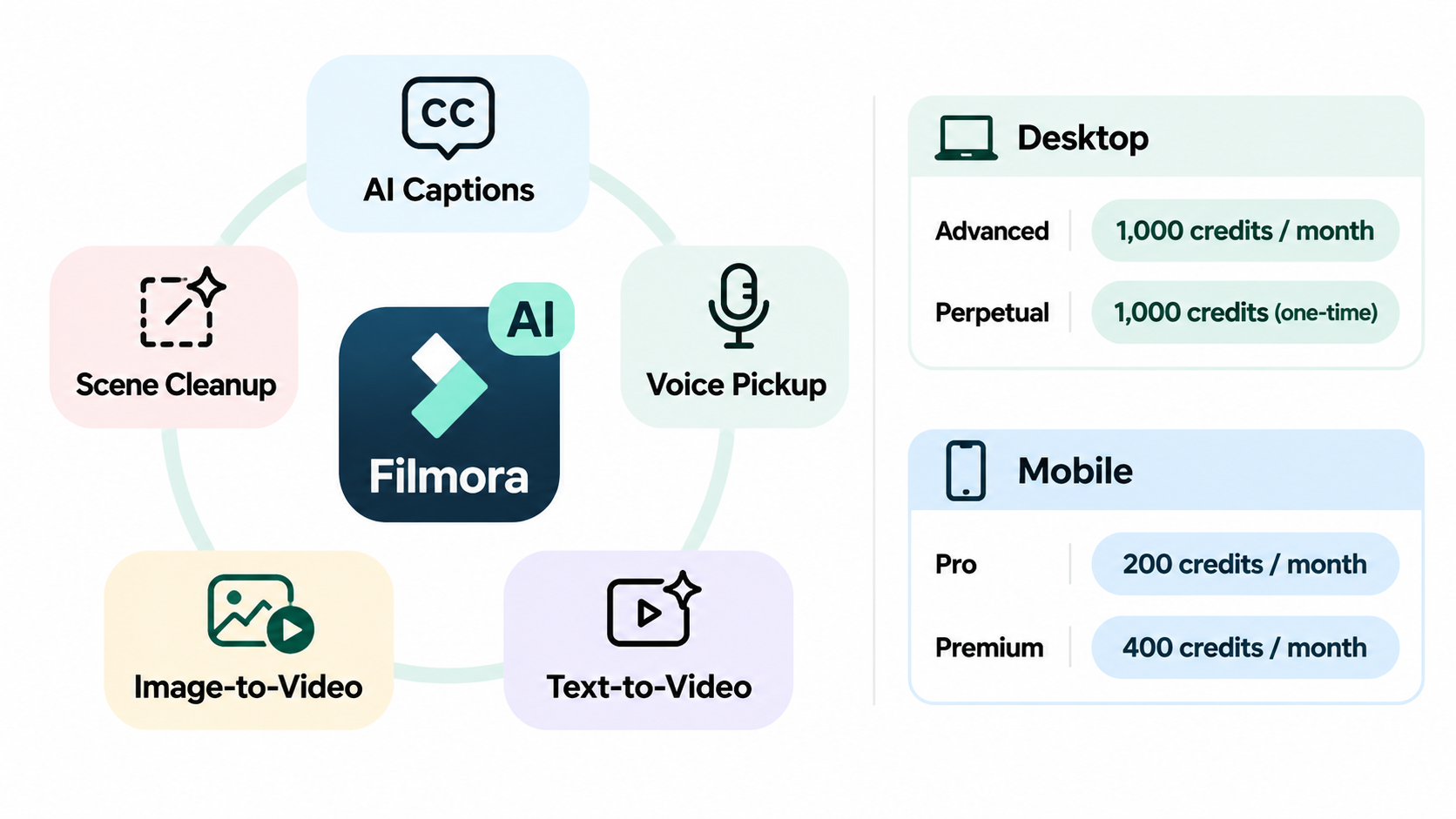
The current Filmora pricing page separates Basic, Advanced, and Perpetual desktop plans. Advanced lists 1,000 AI credits per month. Perpetual lists 1,000 credits as a one-time allowance and updates within Filmora 16. Mobile Pro and Premium use different credit rules. Confirm the plan, platform, currency, and checkout terms that apply to the account before purchase.
What Is Filmora Built to Edit?
Filmora is built around an editable timeline. You import footage, arrange clips, trim pauses, add text and transitions, mix audio, apply color adjustments, and export a finished file. That footage-first model suits Morrow Carry because the pouch demonstration already contains the product evidence.
Use the timeline to separate three sources: filmed proof, the packshot that controls appearance, and the claims sheet for voiceover, captions, and end cards.
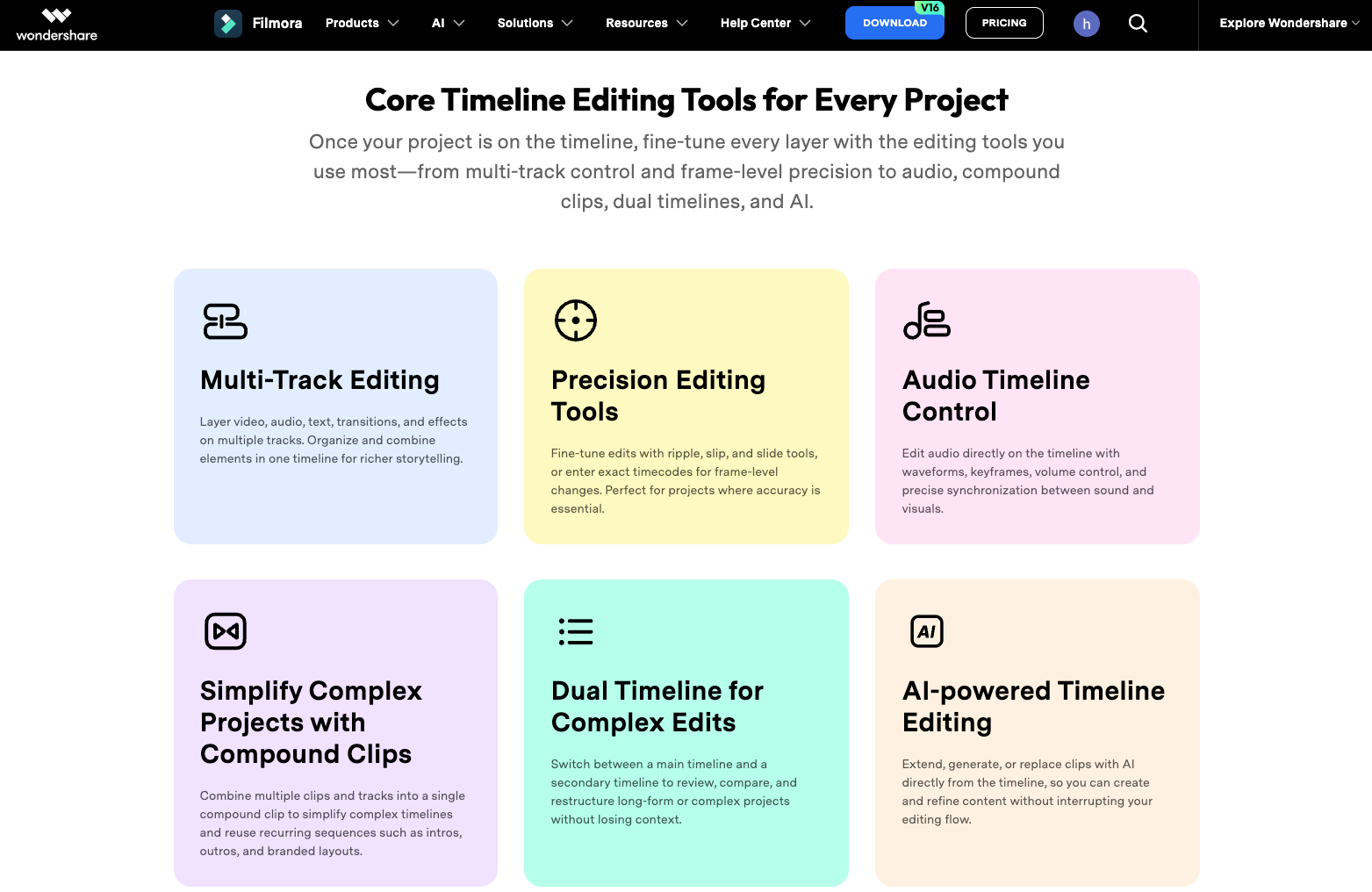
With those sources beside the project, the editor can replace a claim, adjust caption timing, and return a new version without rebuilding the concept.
Filmora also includes AI-assisted features. Their value depends on how often the team needs them and whether the output is an edit to approved footage or a new generated element. Count those actions separately from ordinary cuts, transitions, and exports.
A Product Ad Workflow From Footage to Export
Start with the product evidence. Put the clearest pouch action on the timeline first, then build the opening, proof moment, and CTA around it. For Morrow Carry, the sequence might be:
-
Open on the pouch compressing a jacket.
-
Hold on the zipper and interior panel.
-
Add the approved line about the packed size.
-
Show the packshot and the final call to action.
Make sure the demonstration is understandable before spending credits on refinements. Add captions after the spoken timing is stable and compare them with the approved claim sheet.
Create the 9:16 version from the same evidence, but reframe it deliberately. Keep the hands, pouch, and label inside the safe area. Do not assume a center crop will preserve the zipper action. Export the clean cut, the captioned cut, and any required alternate ratio as separate versioned files.
The trial version can save projects and let the team work through the edit, but Wondershare’s current support guidance says trial exports include a Filmora watermark. The paid desktop versions include watermark-free export. That makes a free draft useful for internal review and unsuitable as the final ad file.
If Morrow Carry later needs a product-page cut with a different opening and CTA, keep the editable project and the source footage together. A finished MP4 is a delivery file. It does not preserve the timeline, layers, or settings for the next editor.
Which AI Add-Ons Affect the Editing Budget?
Filmora’s AI cost is tied to the action, not simply to opening the editor. Caption generation, text-to-speech, voice cloning, smart scene tools, image-to-video, text-to-video, and other features can draw from different credit balances.
For the Morrow Carry brief, record the action before starting it:
| AI action | Hypothetical use | Budget question |
|---|---|---|
| AI captions | Generate captions for the 25-second master | How many minutes are charged? |
| Voice pickup | Replace one sentence after a claim edit | Is the charge based on characters or a generation? |
| AI scene cleanup | Remove a distracting background detail | Is the charge per clip or per run? |
| Image-to-video | Animate the packshot for an opening option | Is this included in the desktop plan? |
| Text-to-video | Create an alternative lifestyle insert | Does the result need a separate rights review? |
The current Filmora AI-credit guidance shows why desktop and mobile should not be treated as one shared wallet. Mobile Pro lists 200 credits per month and Premium lists 400. Mobile credit balances reset with the subscription cycle, and unused monthly credits do not roll over. Credit packs have their own validity period.
Desktop plans use a separate product and plan structure. Advanced lists 1,000 credits per month, while Perpetual lists a one-time 1,000-credit allowance on the current pricing page. The useful budgeting question is how many AI actions the campaign needs before the next billing or credit reset, not how many features appear in the menu.
Keep accepted and rejected AI results in the project notes. If an AI-generated insert changes the product’s apparent size, material, or use, return to the real footage or remove the insert. A generated scene should not become new product evidence by accident.
What Does Filmora Handle Well for a Small Team?
Filmora fits a team that wants one desktop timeline for ad work, captions, audio, graphics, and versioned exports. It gives the editor direct control over the cut and wording.
It also fits campaigns where source footage is the creative center. The editor can change the opening, keep the proof shot, create a crop, and hand off an MP4.
Assign one person to the timeline and another to product approval. The editor controls pacing, framing, and sound. The product owner controls the SKU, claims, packaging, and CTA. That division prevents a smoother edit from quietly becoming a stronger claim.
Where Do Editing and License Limits Matter?
Filmora’s purchase type affects updates, platforms, and commercial use. The current support guidance distinguishes subscription upgrades from Perpetual access. A subscription receives current version updates while active. A Perpetual purchase covers the version purchased, with updates within that version. Moving to a later major version may require a paid upgrade unless the purchase falls within a stated upgrade window.
Desktop and mobile are separate products unless the account has a qualifying cross-platform plan. A desktop license does not automatically activate the mobile app, and a mobile subscription does not automatically activate desktop. Confirm supported device types before treating one purchase as a shared setup.
Client handoff needs its own check. A Filmora project can include the timeline and source references, but the client may not have the same software version, fonts, stock media, music, plug-ins, or license coverage. Deliver the editable project only with a list of included files and the rights attached to each third-party element.
Commercial use also depends on the license and the material inside the edit. Wondershare’s commercial guidance says business use needs the appropriate commercial plan. Music, stock clips, logos, and other third-party elements need their own permission. The editor license cannot transfer those rights to a client.
Who Should Choose a Timeline Editor or Another Workflow?
Choose Filmora when the team owns or has permission to edit the footage, needs direct timeline control, and expects several cut-level revisions. It is a practical fit for product demonstrations, social cutdowns, captioned ads, and simple voice or background adjustments.
Choose another workflow when the team wants a complete video from a brief and approved product material. Pexo can be considered for that downstream production route through its create workspace, while Filmora remains the tool for frame-level editing after the assets arrive. A related product-page video guide shows how to separate product proof, visual context, and destination CTA before production.
The routes can also work together. A team might use Pexo for a directed draft, then bring an approved export into Filmora for caption changes, cutdowns, or final audio. Confirm the input and output formats before the handoff.
Conclusion
Filmora is a footage-first timeline editor with AI features layered onto the editing budget. For a small product-ad team, the decision rests on three questions: does the campaign begin with real footage, how many AI actions will the editor run, and who needs the editable project afterward?
If those answers point to direct cutting and controlled revisions, Filmora is a sensible route. If the team needs a complete story from a brief before detailed timeline work, use a production route first and keep Filmora for the finishing tasks it handles best.
This article does not provide legal advice. Confirm current Filmora plan, commercial, platform, AI-credit, third-party asset, and client-handoff terms before purchase or delivery.