
 ChatGPT
 Perplexity
 Claude
 Gemini
 Grok




You have a folder of exported metrics, several versions of the same video, and a calendar that still says “review later.” The campaign has run, but the next creative decision is unclear. Which asset should stay, which needs a new opening, and which result came from paid delivery rather than the post itself?
This template turns that review into a record you can use for the next brief. It keeps asset identity, channel, cohort, date window, metric definition, source export, action, and next-version note together.
What Should a Social Video Audit Decide?
An audit does not need to declare a campaign a winner. It needs to make the next creative decision easier to explain.
Copyable Video Content Audit Template
| Field | What to record | Audit entry |
|---|---|---|
| Asset ID | Platform post ID, ad ID, creative ID, or internal filename | [ ] |
| Product / campaign | Product, launch, or campaign name | [ ] |
| Channel | Platform, account, placement, or owned destination | [ ] |
| Cohort | Organic, paid, boosted, retargeting, or other delivery group | [ ] |
| Date window | Start date, end date, and timezone if relevant | [ ] |
| Video version | Opening, cut, language, ratio, or revision label | [ ] |
| Product claim | Exact claim shown or spoken | [ ] |
| Primary measure | One measure linked to the video’s job | [ ] |
| Metric definition | Platform definition and reporting view | [ ] |
| Source export | File name, report, or dashboard reference | [ ] |
| Destination | Profile, product page, landing page, or other next step | [ ] |
| Finding | What the record supports | [ ] |
| Action | Keep, revise, retire, or investigate | [ ] |
| Next brief note | The next change worth requesting | [ ] |
| Owner | Person responsible for the follow-up | [ ] |
Asset ID, Channel, Cohort, Window, and Measure
Record the identity fields before interpreting the result. A paid ad and its organic source post may show the same video while carrying different IDs and audiences. Keep both records if both matter.
Write the measure in full. “Engagement” is too loose for an audit. Use comments, saves, completed views, clicks, product-page actions, or another named measure, then record the platform definition used for that report.
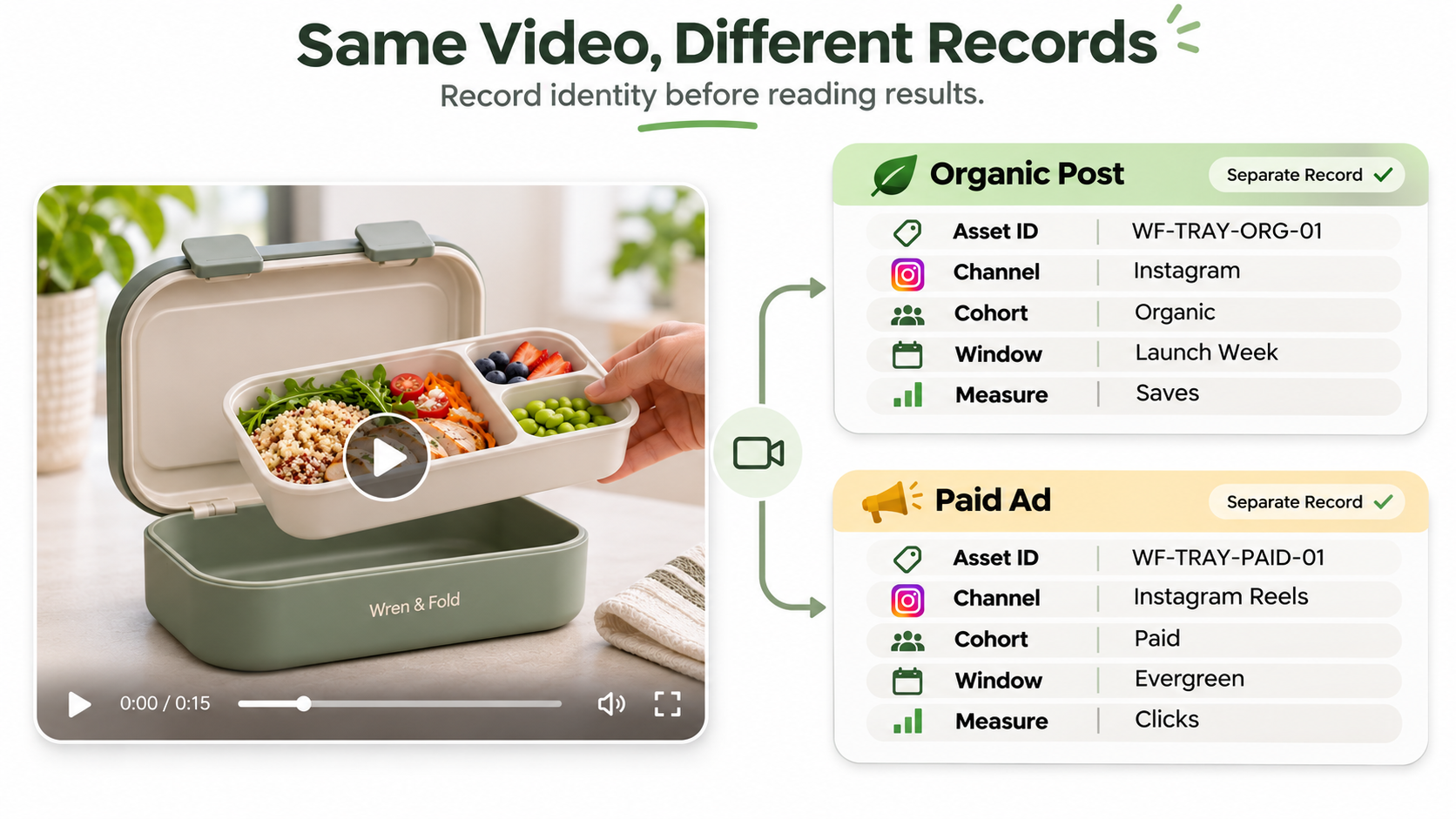
A date window belongs beside the measure. A launch-week export and a later evergreen export may describe different audiences, offers, or product pages. Do not combine them because the asset name looks familiar.
A Filled Audit for a Fictional Product Campaign
The example below is fictional. Wren & Fold published a lunch box video showing a removable inner tray. The team used an organic Instagram post and a paid placement from related creative files.
| Field | Filled example |
|---|---|
| Asset ID | Organic post IG-1842; paid creative AD-771B |
| Product / campaign | Wren & Fold lunch box launch |
| Channel | Instagram organic feed; paid mobile placement |
| Cohort | Organic distribution; paid acquisition audience |
| Date window | 2026-10-01 to 2026-10-14, account timezone |
| Video version | Community cut v01; acquisition cut v02 |
| Product claim | The inner tray lifts out of the current model |
| Primary measure | Organic saves; paid landing-page clicks |
| Metric definition | Platform export definitions recorded with each source file |
| Source export | organic-1842.csv; paid-771B.csv |
| Destination | Profile and product page for organic; product page for paid |
| Finding | The two results describe different channel jobs and should remain separate |
| Action | Keep the tray demonstration, revise the paid handoff |
| Next brief note | Keep the tray action and inspect the product-page section reached by the paid click |
| Owner | Brand marketing coordinator |
Here’s the bit I like about this example. The asset record keeps the creative conversation attached to the actual files. The team can discuss the tray demonstration without pretending that a save and a paid click measure the same response.
Browse the Pexo Gallery when the team needs a visual reference before choosing the next product-video direction.
Separate Paid and Organic Video Results
Paid and organic results can refer to the same product and still belong in different reporting rows.
| Review field | Organic result | Paid result |
|---|---|---|
| Asset ID | [post ID / file] | [ad / creative ID] |
| Delivery | Existing social distribution | Campaign delivery |
| Date window | [dates] | [dates] |
| Primary measure | [measure + definition] | [measure + definition] |
| Destination | [profile / page] | [landing page] |
| Supported finding | [bounded observation] | [bounded observation] |
| Open question | [unknown] | [unknown] |
Do not add organic saves to paid clicks and call the sum a campaign result. A cross-platform total can hide the reason each number exists.
If a platform changes a metric name, preserve the original export and add the current label beside it. Record what changed in the definition or reporting view before comparing periods. A renamed column does not automatically describe the same event.
Keep, Revise, or Retire Each Creative Asset
Use keep when the asset still supports the approved product claim and its result answers the channel question.
Use revise when one part needs work. Name the part. It might be the first shot, a caption, a voice line, the offer, the destination, or a product detail that became outdated.
Use retire when the claim, product, permission, destination, or source material no longer supports the asset. Archive the ID with the reason so an old version does not quietly return to the calendar.
Use investigate when the record is incomplete. Missing source exports, mixed date windows, changed audiences, or an unclear metric definition can block a creative verdict.
Pexo can support the production request after the team approves the next change. The brand still supplies the source material and owns account analysis, permissions, and performance interpretation. Start from the Pexo homepage when the approved audit needs to become a production request.

Turn the Findings Into the Next Production Brief
Carry five fields from the audit into the next brief.
-
The exact asset being revised
-
The part that should stay
-
The moment that needs to change
-
The product claim and proof that must remain accurate
-
The approval owner and destination to check
A useful note might say, “Keep the continuous tray lift from AD-771B. Replace the first shot with the product in the lunch bag. Keep the approved tray wording and send the revised cut to the current product-page section.” Start the next production request in Create after the owner approves that note.

FAQ
Can a deleted post still be included in an audit export?
Yes, if the export preserves the asset ID, date window, metric definition, and source file. Mark the post as deleted and keep the record separate from any active replacement. Do not recreate missing values from memory.
What if a platform changes a metric name mid-campaign?
Keep both labels with their dates and source exports. Check the platform’s current definition for each period, then decide whether the measures can be compared. If the event definition changed, record the break instead of treating the two columns as one continuous series.
How should a team record a video that ran in two ad accounts?
Give the creative a shared internal ID, then create one row per ad account. Record account, audience, placement, date window, spend context, and measure separately. A shared file does not make the delivery records identical.
Can a creator withdraw permission after an audit is completed?
Check the contract and the current permission status before reusing the asset. Mark the audit record with the withdrawal date, affected placements, and action taken. Pause reuse while the responsible owner confirms what remains permitted.
What should a team do when one platform has no conversion data?
Keep the platform’s available measure and label the conversion field as unavailable. Use the record to assess the part of the viewer journey it can show, then avoid comparing it directly with a platform that reports a later action.
Conclusion
A video audit should leave the team with an identified asset, a defined measure, a bounded finding, and a next brief. Keep paid and organic rows separate, preserve the source exports, and write the next change beside the file it belongs to.
If the next approved change is clear but producing the revised cut is slowing the team down, bring the asset, source material, and revision note to Pexo. Related production examples are collected on the Pexo Blog. Review the returned video against the same product claim before it goes back into the channel plan.