
 ChatGPT
 Perplexity
 Claude
 Gemini
 Grok



Your team probably has more usable material than it can publish. A product page carries the promise. A case study carries proof. A webinar carries the question a buyer asked and the answer that followed. Existing footage may already show the action a new illustration would only suggest.
Start by deciding what each source can support. Content repurposing begins with choosing what each new video should say and which parts of the source support that message. Several videos can come from one source, but each needs a hook, a clear message, supporting material, and a CTA suited to its audience. Once those choices are approved, give Pexo the selected materials and describe the video you want it to produce.

Which Source Assets Can Support a New Video?
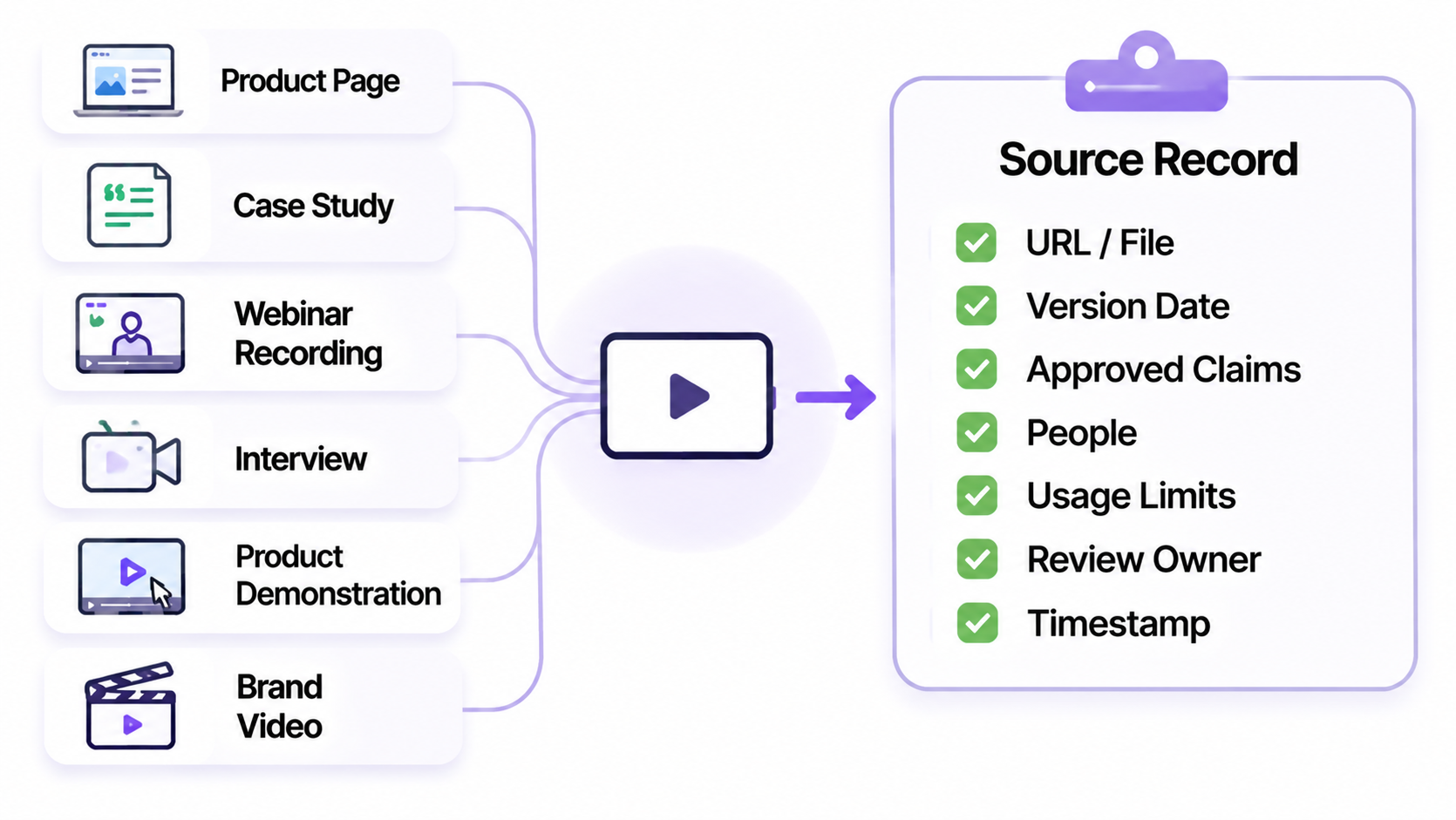
Start with the source that already carries an approved claim. It might be a current product page, a case study, a webinar recording, an interview, a product demonstration or an existing brand video.
Each source offers a different kind of evidence. A product page can support a feature explanation while its wording and interface remain current. A case study can support a customer result when the quote and context are still approved. A webinar clip can preserve a speaker's explanation, but the question before the answer may carry the qualification. Existing footage can show an action that a generated illustration can only describe.
Build the source record before you write the hook. Capture the URL or file, version date, owner, approved claims, people shown or heard, usage limits, review owner and the passage or timestamp that supports the scene. A title gives the team a topic. It does not give the producer enough evidence.
A Source-to-Video Output Matrix
Use the matrix to define the job of the derivative. The examples below are planning patterns, not automatic outputs.
| Owned source | Video output | What changes | What stays traceable |
|---|---|---|---|
| Current product page | Short feature explainer | Hook, scene order, length, captions and CTA | Feature wording, interface state and source URL |
| Approved case study | Proof-led social clip | Opening question and proof framing | Customer quote, result context and approval date |
| Webinar recording | One-question vertical clip | Select a self-contained answer, add setup and captions | Speaker, timestamp, question and surrounding qualification |
| Product demonstration | Paid product ad | Recut the action around one buyer benefit | Product behavior, visible steps and claim sheet |
| Existing brand video | Cutdown or response clip | Crop, pace, opening and destination CTA | Original file, source version and music or talent rights |
The output column describes a new assignment. The source can inform the derivative without being copied unchanged into every channel. A derivative earns its format by giving that audience a reason to watch.
Turn One Fictional Product Page Into Two Video Briefs
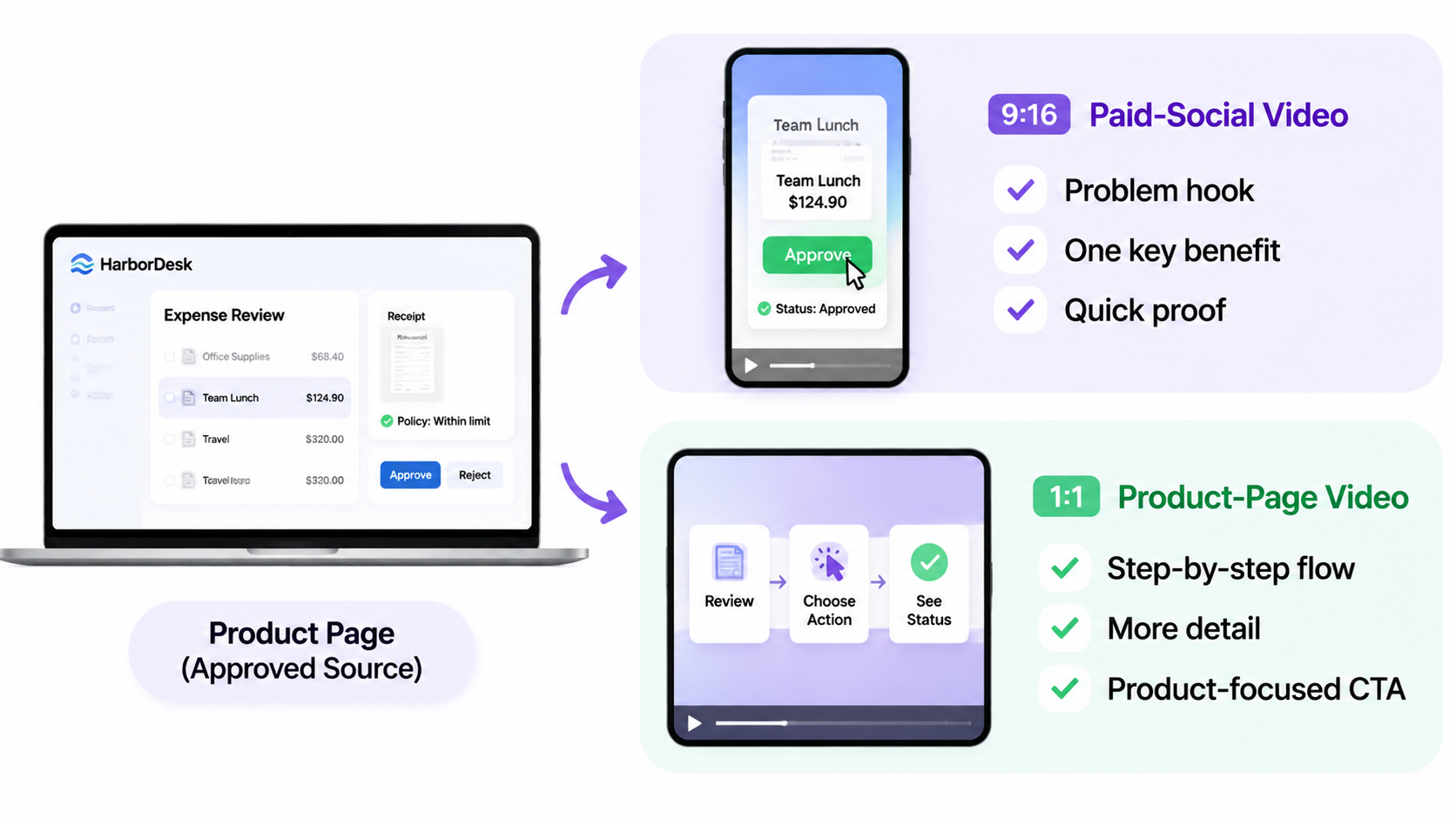
The following example is fictional. HarborDesk is an invented expense-management product. Its approved product page says that a manager can review a receipt, choose an approval action and see the request status update. The page includes one interface screenshot and a short explanation of the review flow.
The first brief is a 9:16 paid-social video for operations managers who feel buried in approval requests. The planning logic resembles the one-benefit, visible-action approach in Pexo's product-ad tutorial, while the claims here remain fictional.
Hook: “Still searching through receipts for the one that needs your decision?”
Message: HarborDesk puts the receipt, policy note and approval action on one review screen.
Visual plan: Open on a queue of fictional requests, zoom into one receipt, show the approved interface action, then display the status change.
CTA: “See the approval flow.”
This version starts with the buyer's interruption. The product page supplies the interface and approved action. The new work is the opening, pacing and proof order. Let the screen and captions carry the claim. Do not add a result the page never stated.
The second brief is a 1:1 product-page video for visitors who already understand the problem.
Hook: “Review the receipt, choose the action, see the status.”
Message: Show the three-step review path in the order a new user would follow it.
Visual plan: Use a wider interface view, then three labeled close-ups with more reading time.
CTA: “Explore HarborDesk.”
The second version changes the job. It teaches the sequence rather than dramatizing the backlog. The same page supports both briefs, but the hook, pace, crop and next action change. That is repurposing. New product claims would require a separate copy-approval task.
How to Keep Claims and Visuals Traceable
Give every important line a source pointer. The pointer can be a page section, case-study paragraph, recording timestamp, product screenshot or approved claim-sheet row.
| New video element | Traceability note |
|---|---|
| Spoken product claim | Source sentence and approval owner |
| On-screen label | Exact approved spelling and interface version |
| Customer quote | Original publication, speaker permission and allowed edit |
| Real footage | Original file, take or timestamp and usage scope |
| AI illustration | Label as generated and record the prompt or source reference |
| CTA | Destination URL, campaign and expiry date |
Review the source and derivative together. If the product page changes from “review in one screen” to a longer workflow, find every approved video that uses the old wording. If a case-study result applies to one customer segment, keep that qualification in the clip. A shorter video still carries the source claim's conditions.
When the derivative needs a creator-style presentation, Pexo's AI UGC Video Generator is a relevant internal route. Its page frames the presenter around approved product facts and visible details, rather than an invented customer story. For a broader product-video handoff, as of November 2026, Pexo's product-video workflow documents product-photo or store-URL inputs and a script, shots, voice and caption path. Keep the source record beside the project so a later revision has the same evidence.
How Should Each New Video Be Reviewed?
Review each derivative against its own brief, then compare it with the source. Ask five questions:
-
Does the opening give this audience a reason to continue?
-
Does the visual show the action or proof named in the message?
-
Do the words preserve the source's scope and qualification?
-
Does the CTA match the destination and campaign stage?
-
Can another reviewer locate the source in under a minute?
For a webinar clip, watch the section with the question included. A strong answer can sound misleading after the setup is removed. For a case study, check that the customer quote still describes the same result. For an AI illustration beside real footage, label the generated image and make sure it does not imply that the illustrated scene was filmed or tested.
Keep a version number on the source record and the video file. When the source changes, mark the derivative for review before changing the caption or scheduling a new export. A repurposing system becomes difficult to manage when the team remembers the original claim but loses the version that authorized it.
Conclusion
Start with the approved source and assign each derivative a job. Change the hook, message, pacing and CTA to serve that job, then keep every claim and visual tied to its source version. A video is ready for the next review when another person can understand the brief and find the evidence without rebuilding the research.