ChatGPT
 Perplexity
 Claude
 Gemini
 Grok
Grok


Decide where the ad will run before approving its framing. Then watch the full product action inside that shape. A wide demonstration, a tall mobile cut, and a square feed version may need different compositions to explain the same feature.
Choosing a video aspect ratio is part of that direction. The brief should say what each shopper must see, where the words belong, and which shot needs to change.
What Does Aspect Ratio Change in a Product Shot?
It changes the shape of the frame and how much room you have for the product, its surroundings, and its movement. Aspect ratio describes width relative to height: 16:9 is wide, 9:16 is tall, and 1:1 is square.
For an illustrative shot plan, use a rectangular tool case on a table. A demonstrator releases its two side latches, then raises the lid. The proposed line is “Two side latches.” Verify that feature against your actual product before filming.
A wide composition can hold the case and both hands. A narrow crop might keep the central label while losing one latch. The shopper would recognize the case but miss part of the opening sequence.
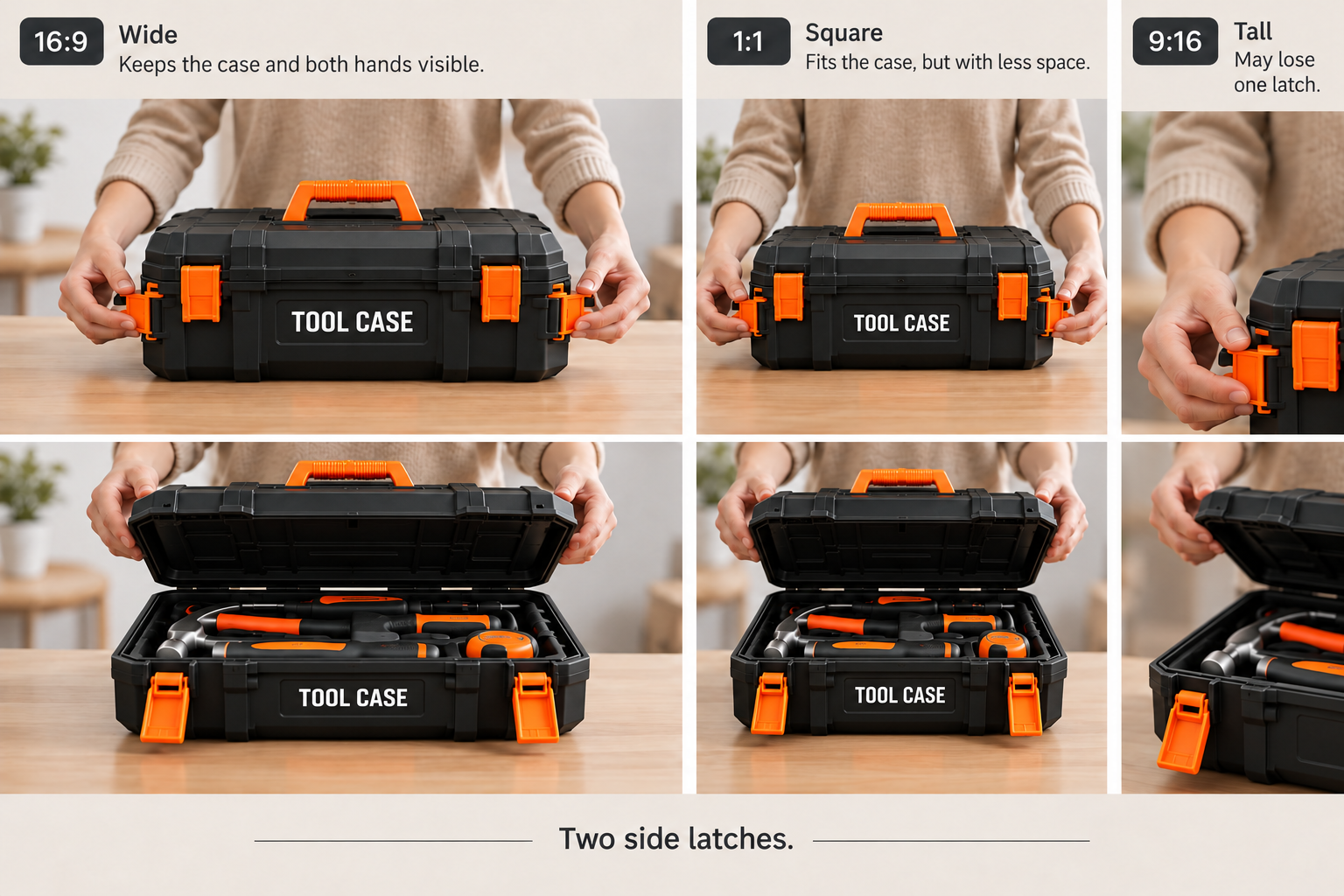
That is the framing decision: which relationships must remain visible together?
Choose 16:9, 9:16, or 1:1 by Placement
Start with the exact ad placement, then choose the composition within its accepted formats. A platform name alone leaves too much undecided.
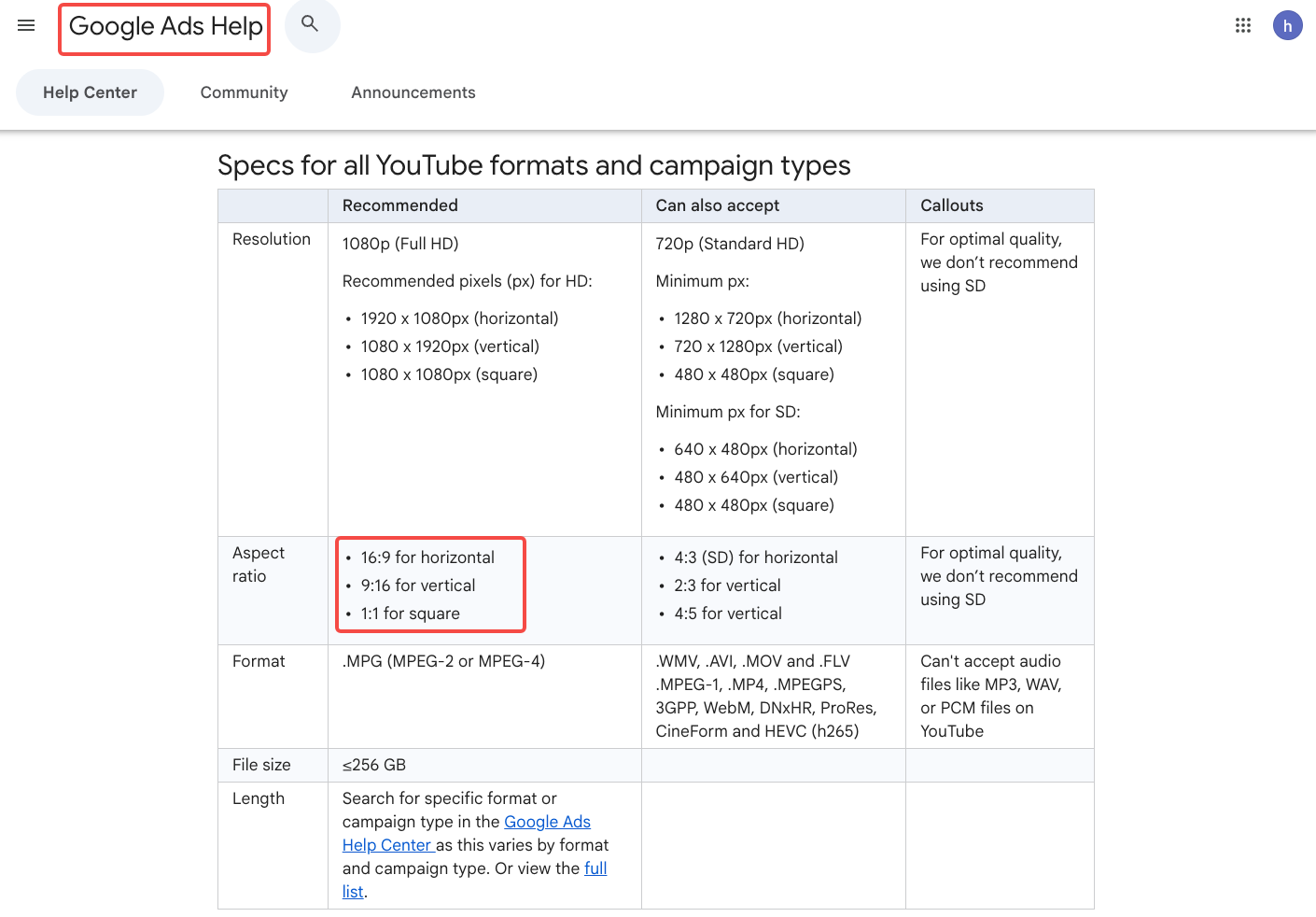
At the October 29, 2026 check, Google's video ad specifications listed horizontal 16:9, vertical 9:16, and square 1:1 recommendations. Requirements still need checking for the campaign and format you're buying.
| Ratio | Where to consider it | Tool-case composition to plan | Main trade-off |
|---|---|---|---|
| 16:9 | A horizontal ad placement or wide page player | Both latches, both hands, and the raised lid; copy beside the case | A distant composition can make the label too small on a phone. |
| 9:16 | A vertical placement designed for tall video | A new camera angle that fits both latches, or a clearly explained sequence of details; copy above or below the action | A center crop may remove a latch or the hand operating it. |
| 1:1 | A feed or ad slot that accepts square video | A tighter view of the whole case, with a separate closing card if needed | Keeping both hands may leave little space for copy beside the product. |
Square video for ads can be a useful delivery choice when the placement accepts it. It doesn't remove the need to check the other versions separately.
Keep Labels, Hands, and Demonstrations in Frame
Review the action from start to finish. An opening frame with everything visible tells you little about where the hands or lid will move.
For the tool case, inspect three moments: the hands reaching the latches, both releases, and the lid fully open. Keep enough of the case visible to connect those actions. If the label identifies a particular model, include a readable view before or after the demonstration.
Text needs its own space. A title over the latch can hide the feature even when the crop is otherwise acceptable. Move the title, change its timing, or give it a separate frame.
Do not stretch the case to fill a different shape. Distortion can change the apparent proportions of the product you're asking someone to buy.
Plan Native Versions From the Original Brief
Give each version its own composition before approving the master. The buyer question and verified claim can stay consistent while the camera angle, text position, and shot order change.
A useful brief might say:
Show how the case opens. Preserve both latch releases and the raised lid. For 16:9, test the full tabletop view. For 9:16, propose an angle that holds the action without making the case too small. Keep the label readable in an identification shot. Use “See the compartments” on the closing frame.
The same brief can guide a production conversation in Pexo, which publishes this guide. Its reframing workflow asks for the source video, target ratios, and details that must remain visible. Ask whether both latches can stay visible in the vertical version or whether another angle is needed. Confirm the output dimensions and inspect each cut before accepting it.
Before uploading, check your footage permissions and any written consent required for promotional use under Pexo's current terms. Ask your legal reviewer about uncertain permissions.
Check Text and Safe Areas Before Export
Safe areas depend on the placement. TikTok's current In-Feed ad guidance says they vary with the video dimensions, caption length, and additional formats. It also warns that previews can differ slightly from the live display.
Use the current template for the actual ad configuration. Then inspect the rendered version with its interface overlays:
-
Can the shopper see both latch releases without a button covering either one?
-
Are the model name, claim, captions, and closing action readable at viewing size?
-
Does necessary qualifying text remain visible with the claim?
-
Does the exported file match the required ratio, pixel dimensions, and file specifications?
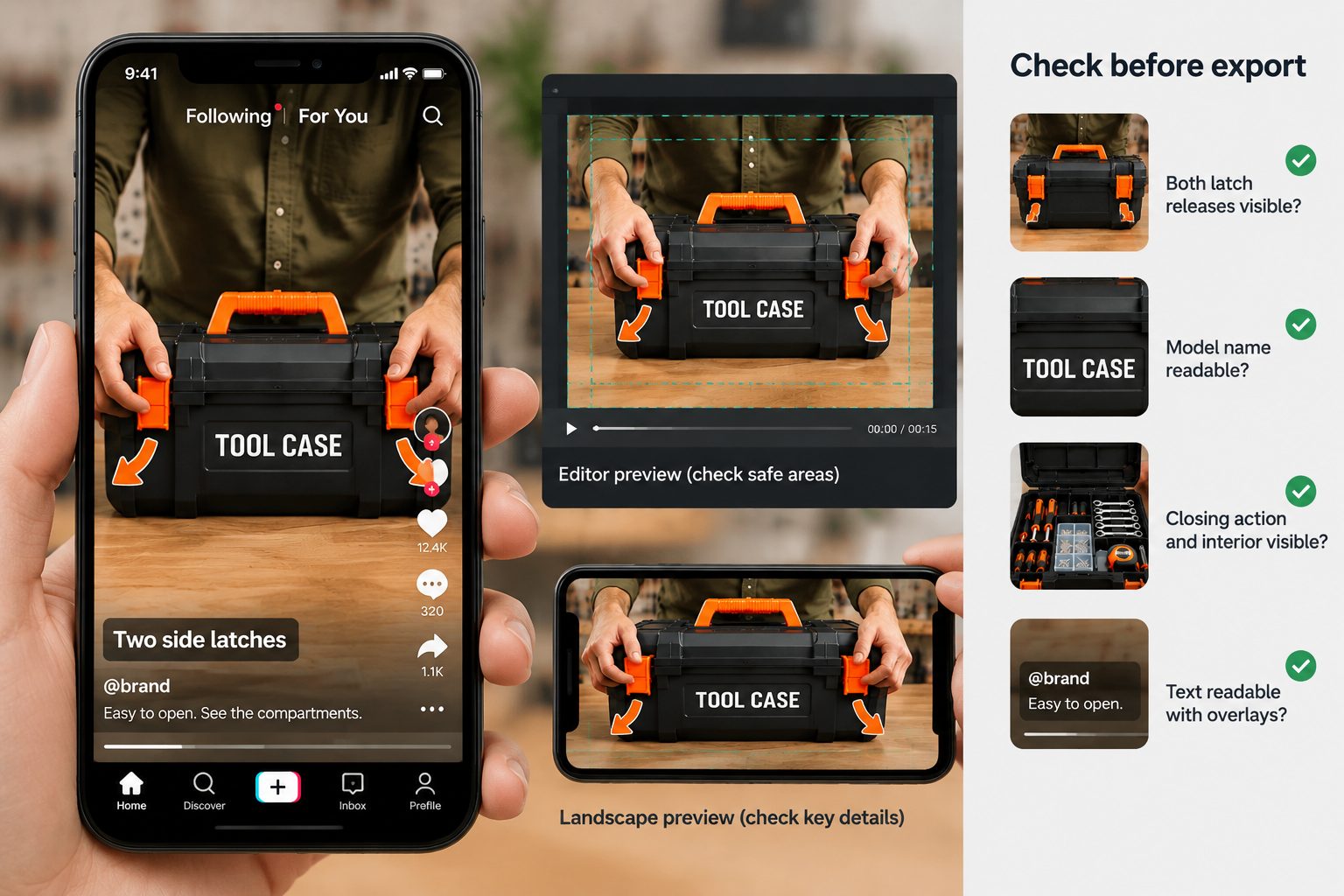
Watch on the target device as well as in the placement preview. An editor's large canvas can conceal how small the product has become.
When Is a Second Shoot Better Than a Crop?
A second shoot is better when the source cannot show the required action clearly within the target frame. Moving the crop repeatedly won't help if the viewer needs to see both ends of the case together.
Try fitting the complete source inside the new canvas if the placement allows it. If that makes the latches unreadable, capture another angle. A higher-resolution source can offer more cropping room, but it cannot recover an action filmed outside the frame.
Approve the version that explains the opening. If none does, put the camera back on the case before making another export.