 ChatGPT
 Perplexity
 Claude
 Gemini
 Grok



Free UGC video tools are useful when the team is still deciding whether a product idea deserves a video. Paid plans become relevant when the same campaign needs clean exports, several revisions, creator-style variations and a review path that other people can use.
The comparison only works when “usable” has a clear meaning. A UGC-style product video can use a creator-like script, framing and delivery without representing a real customer's experience. The brief below treats the format as an ad style. It does not turn an AI presenter into a customer testimonial. Pexo's AI UGC video generator follows the same product-centered distinction by pairing a brief with approved references.
What Counts as a Usable UGC-Style Product Video?
Use the same fictional brief for every route. LumaSip, an invented electrolyte powder, needs a 15-second vertical ad for paid social.
-
Hook: “Your afternoon slump may need a better refill.”
-
Product proof: show the packet, the mixing action and the finished drink.
-
Message: LumaSip dissolves in cold water and comes in three flavors.
-
CTA: “See the flavor set.”
-
Assets: approved packet photo, flavor names, color palette and claim sheet.
For this comparison, one usable video meets five conditions:
-
The product label is readable and matches the approved asset.
-
The script uses the approved claim wording.
-
The file has the required vertical dimensions and resolution.
-
The export is free of a provider watermark when the placement requires it.
-
A reviewer can request and approve a revision without losing the source record.
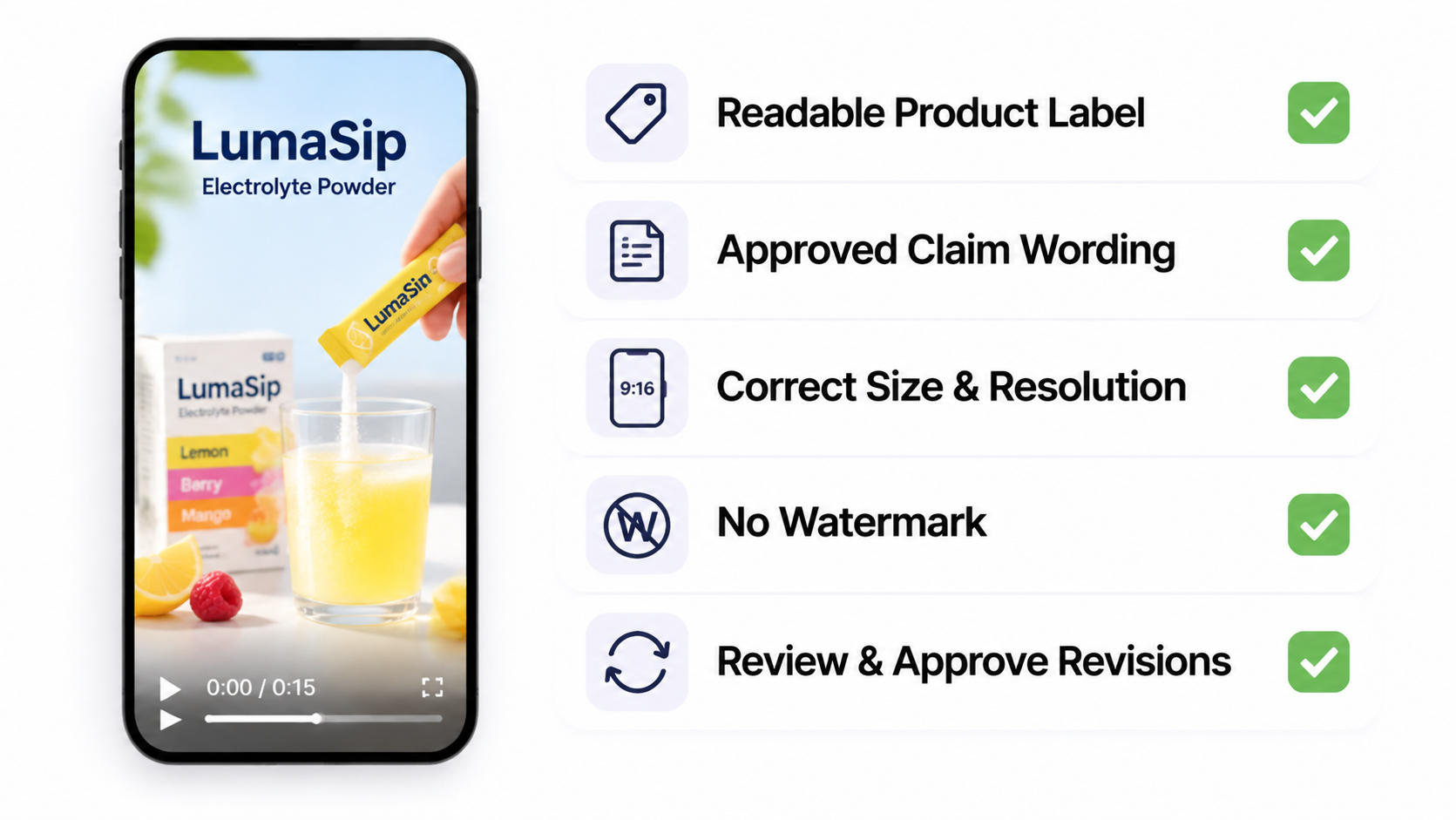
A free draft can pass the visual review and still fail the campaign handoff because of a watermark, export cap or missing commercial-use condition. Count accepted files, rather than generations, when you compare routes.
Compare Free and Paid Limits on the Same Brief
The free route tests the workflow. The paid route buys room for work around the first render.
| Decision point | Free route | Paid route |
|---|---|---|
| First concept | Enough for a small number of drafts or short tests | More credits, longer clips or higher usage limits |
| Watermark | Common on free exports | Often removable, subject to the plan and export screen |
| Revisions | May consume the remaining credits quickly | More room for changed hooks, voices, scenes or product details |
| Export quality | May be capped by the plan | Higher resolution or cleaner delivery may be included |
| Creator or avatar | Trial access can be limited | Custom actors, voices or expanded libraries may require a paid tier |
| Team review | Often one user or a basic share path | Seats, workspaces, comments or client separation may be available |
Creatify's current help pages state that the free plan includes limited credits, allows video-ad exports and revisions, and places a watermark on every free export. The same documentation lists a standard 15-second generation charge and a separate revision charge, while advanced tools can use variable credits. The account page should settle any conflicting free-credit display before you plan a batch. See the current Creatify FAQ for the dated rules.
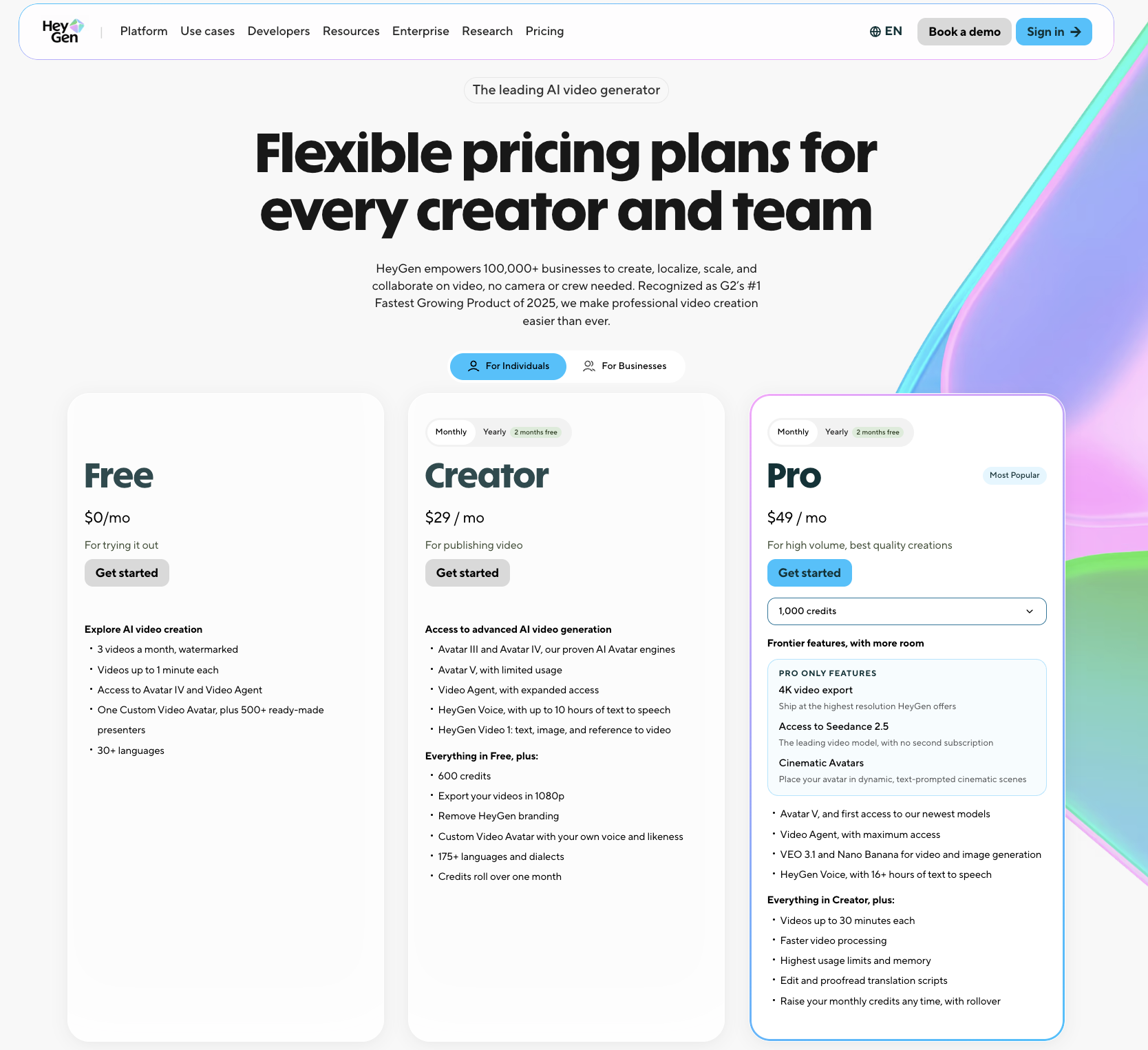
HeyGen's current pricing page lists a Free plan with up to three videos per month, videos up to one minute and watermarked exports. Its Creator plan lists 600 credits, 1080p export and watermark removal. Pro lists 1,000 credits and 4K export. Treat those as a current public snapshot, then check the account and billing screen before committing to a campaign. HeyGen's current plan comparison shows the published limits.
Arcads measures generation through a shared monthly credit pool. Its current help page lists Starter and Creator plans that stop generation at the monthly limit, while Pro, Scale and Business can bill extra usage on the next invoice. The same page says current prices appear in the app and that Arcads may test different rates or plan sizes. A free trial has its own duration and billing transition, so record the cancellation date before using it for a client batch.
Watermarks, Export Quality, Credits, and Revisions
Ask four separate questions before choosing a plan. Can the team download the file? Is the resolution accepted by the destination? Does the file carry a provider mark? How many changes can the remaining credits support?
Creatify's standard video-ad examples show why the last question matters. A 15-second generation and a 15-second revision draw from different credit lines. A new script, avatar or voice can also change the revision path on higher tiers. HeyGen's paid plans use a shared credit pool, while the free plan is limited by videos and watermark rules. Arcads lists fixed credit costs for many models, but the actual account rate can change.
Write the acceptance rule before the render. “Clean 9:16 MP4 with the packet label intact” is easier to budget than “a good UGC ad.”
A Fillable Cost-Per-Usable-Video Worksheet
Complete one copy of this worksheet for each tool or plan. Fill the values from the current account offer.
| Budget line | Your input | Notes |
|---|---|---|
| Planned first drafts | ____ | Count one per distinct hook or delivery. |
| Planned revisions | ____ | Include changed script, voice, avatar or product scene. |
| Drafts accepted | ____ | Count files that pass the campaign checklist. |
| Monthly plan or top-up | $____ | Use the pre-tax plan or top-up amount and billing term. |
| Creator or talent fee | $____ | Add a real creator only when the brief requires one. |
| Extra credits or overage | $____ | Record the account's displayed rate. |
| Tax and payment charges | $____ | Include only taxes and payment fees not already counted above. |
| Cost per usable video | $Total campaign cost ÷ accepted files = $____ | Total campaign cost divided by accepted files. |
Hypothetical example: a team plans six first drafts and six revisions, expects two accepted videos, and enters a current plan cost of P, talent cost of T, and other charges of O. The planning figure is (P + T + O) ÷ 2. If only one file passes review, the same spend becomes (P + T + O) ÷ 1.
When Is a Free Route Enough?
A free route can be enough for an internal concept, a draft sent to a reviewer, or a short test where a watermark is acceptable.
Keep the brief narrow. Use one product, one hook and one claim. Save the source assets and review notes outside the tool so a credit limit does not erase the decision history.
Do not use the free export for a paid placement until the current plan and terms confirm the intended use. HeyGen's current terms restrict Free-plan outputs to personal, non-commercial and internal evaluation uses. Creatify's FAQ says its creatives can be used across channels, while the free export still carries a watermark. The provider's terms and destination rules control the final decision.
When Does a Paid Workflow Earn Its Cost?
Pay for the route when the campaign needs several accepted variants, clean files, a real review loop or a creator identity that must remain consistent. The plan earns its cost through the work it makes possible, rather than through a promise of a lower unit price.
Separate tool credits from creator rights. Arcads says its library actors have consented to likeness use and are paid, while custom actors require the customer to confirm rights and consent. HeyGen's plan can include a custom avatar or voice feature, but a subscription does not create permission to use a real person's likeness. Keep the consent record, channels, campaign dates and withdrawal process with the project.
For a single-photo product ad, use the Pexo product-ad workflow. Its product-ad tutorial covers source-photo and placement decisions. A broader assignment can use Pexo's product video workflow. Match the route to the brief before budgeting.
Conclusion
Compare free and paid tools by accepted exports, revision room and team handling. A free plan can answer whether the first brief is worth pursuing. A paid workflow becomes easier to justify when clean delivery, repeated variants and accountable creator rights determine whether the campaign can ship.