




Create Bible Videos from Scripture
Create Bible videos from reviewed verses, lesson notes, book overviews, timelines, and character studies with clear scenes, narration, captions, and human review.
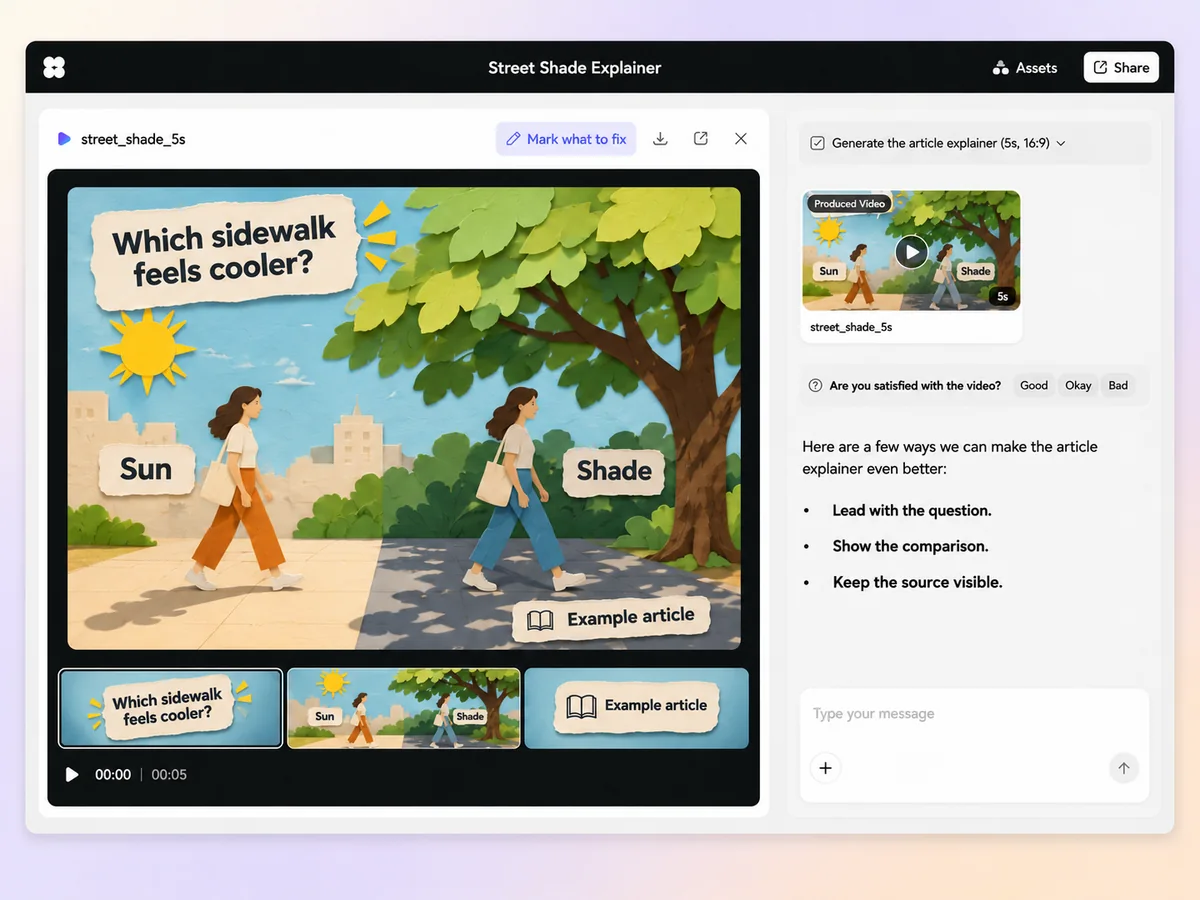
Create an AI article-based explainer video from your source text. Choose the question it answers, turn the evidence and examples into scenes, and check that the video makes sense on its own.
Give Pexo’s article-based explainer video maker the article text or the sections you want to use. Say who will watch and what they should understand at the end. Ask for an outline with the central point, the evidence it needs, and one example. Review the outline in chat.
Choose a chart, example, or process from the article and say what it needs to show. Ask Pexo for a diagram or a short visual demonstration that supports that point. If you use a number on screen, keep its unit, time frame, and source with it.
Arrange the points in the order a viewer needs to hear them. Give unfamiliar terms a short explanation and introduce the example before drawing a conclusion. Use script to video with your reviewed narration and specify what should appear alongside each line.
Mark the quotes, figures, and qualifications that need to carry through. Ask for the credit where a viewer can read it, such as below a chart or on a closing card. Compare the preview with the article and check that the conclusion reflects the evidence shown.
Ask for 16:9 for a lesson, presentation, or article embed. For a 9:16 social cut, keep one question and the strongest example. Preview charts and captions in both frames so the labels and source stay readable.
Open with the research question. Use one chart and a narrated example to explain the finding and the group it applies to. Keep the source and date with the chart.

Choose one concept from a reading and introduce it with a worked example. Use a short animation to show the step the article describes. Close with a takeaway learners can repeat.

Use the source article to identify the steps a viewer needs. Show what happens at each step and how it changes the result. Give the closing frame the article title or source credit.

An article-based explainer video turns the main idea and supporting material of a written article into a video explanation. It can use narration, diagrams, and worked examples so viewers can follow the argument from the video alone. Quotes and figures stay connected to the source where they support the point.
Yes. Share the full article or the sections relevant to the question you want to answer. For a long piece, choose the central point and the examples viewers need to understand it. Review a short outline before generating scenes so each part of the video has a purpose.
Yes. Provide the chart or quote with its context, including the source, units, or dates where they apply. Say what the viewer needs to notice and when to show it. For an infographic animation, keep the chart’s labels and units visible. Compare the final frame and narration with the original to check the wording and numbers.
Pexo lets you plan an outline, visuals, and narration from the source in one chat. It can use a model such as MiniMax H3 for a short illustrative scene. Request a 16:9 cut for a lesson or embed, then review the facts, captions, and source credits.
A general explainer video can start from a topic, product, or problem. An article-based explainer video starts from a written source, carries forward its argument and examples, and gives viewers the context to understand them. It follows the source when presenting numbers, quotes, or conclusions.
Start with subject + action + camera movement + setting + style for the visual scenes. Add the article’s question, example, and source credit. Try “Explain why the article compares these two results. Use a fixed view of a clean chart, highlight the difference, and close with the author’s main finding and the source.”
Share the article and one question you want the video to answer. Give the evidence and examples room to make the point.
Create Bible videos from reviewed verses, lesson notes, book overviews, timelines, and character studies with clear scenes, narration, captions, and human review.
Create Islamic videos from reviewed sources and lesson notes, covering history, culture, ethics, and education with respectful visuals and narration.
Create Christian videos from reviewed Scripture, lesson notes, and historical sources with clear visuals, narration, captions, and human review.
Create a medical video from your script or images with Pexo. Generate scenes, narration and captions for patient education, medical explainers and staff training.
Make an onboarding video that walks new users to their first win. Pexo scripts, narrates and edits it with Seedance 2.5, Kling AI 3.0 and MiniMax H3.
Make a tutorial video that teaches any task step by step. Pexo scripts it, generates every step, and narrates it with Sora 2, Kling and Veo, up to 4K.
Make a how it works video that walks viewers through your product step by step. Pexo scripts, narrates, and captions it with Seedance 2.5 and Kling AI 3.0.
Turn any product into a finished demo in minutes with Pexo. The AI product demos generator scripts, voices, and animates every scene with Sora 2, Kling and Veo, up to 4K.