








Pexo

Create a Teaser Video that builds the hype

Tell Pexo what you are teasing, and it builds a short, suspenseful clip that hints at what is coming without giving it away. It writes the script, scores it, and edits the whole thing, so you can drop a teaser that gets people watching for the reveal.

Loved by 10,000+ creators
+ Tease it
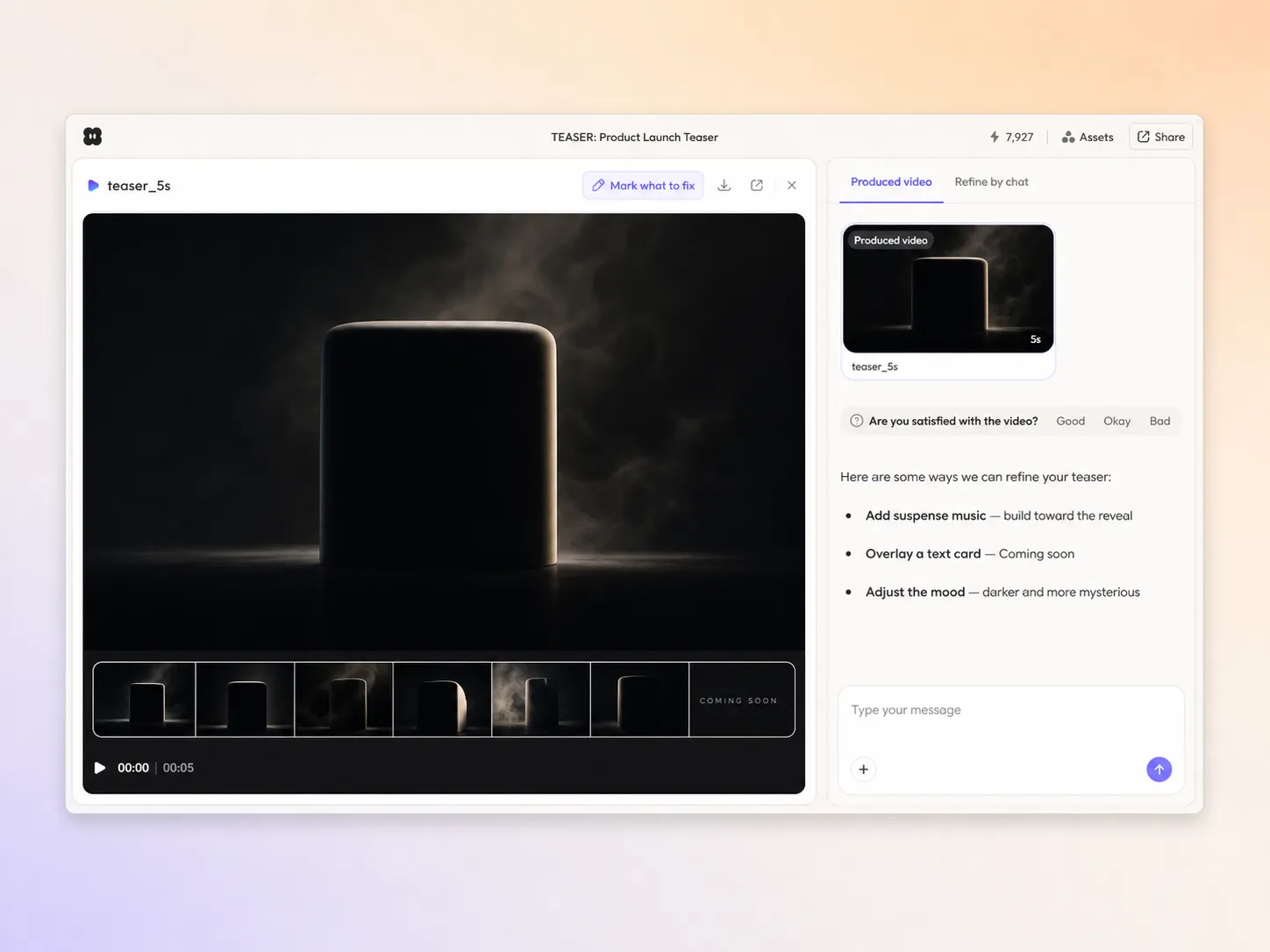
Teaser video created with Pexo AI building anticipation for a reveal
What Pexo Does

Everything you need to tease on video

Text & image to video

Turn a prompt or a photo into a finished teaser video

Start from a single line of text or a product photo. Pexo writes the script, generates every shot, and stitches them into one continuous, edited video. You can mix text to video, image to video, and script to video inside the same project, and stay in plain language the whole way. No timelines, no keyframes, no editor to open.

Text to videoImage to videoScript to video
Creating a teaser video from a text prompt and a photo in the Pexo editor
Pexo composing an original soundtrack for a teaser video
Original music

A score written for this video

Pexo generates an original soundtrack tuned to the mood and pacing of your teaser video, so you are not digging through stock libraries or risking a copyright strike. Tell it the feel you want, energetic, cinematic, calm, and it scores the cut and mixes the levels under the narration automatically.

Original scoreMood-matchedCleared
Built to tease

Show just enough to hook them

Pexo paces a teaser that builds suspense and stops right before the reveal, so curiosity does the work. It hints at the product, the story, or the date, holds back the payoff, and ends on a clear nudge to stay tuned. You go from a flat announcement to a teaser people actually wait on.

SuspenseHint not revealStay-tuned CTA
Pexo building suspense in a teaser video
Pexo assembling script, music, and subtitles into a finished teaser video
Finished video, not raw clips

A publishable cut, not a pile of assets

Pexo runs the whole pipeline so you get a video, not homework. It writes the script, plans the shots, adds transitions, generates an original score, lays in subtitles, and can even clone a voice for narration. Everything renders together into one finished teaser video you can publish straight away. No exporting clips into another editor, no lining audio up by hand.

Auto scriptTransitionsMusicVoice cloningSubtitles
Platform-ready

One teaser video, every aspect ratio

Pexo delivers your teaser video natively in 16:9 for YouTube, 9:16 for TikTok and Reels, and 1:1 for feeds, up to 4K and anywhere from 5 to 120 seconds. Each aspect ratio is generated fresh for that screen, with the composition framed for it rather than cropped down from one master. Ask for several formats at once and post the right version to every channel. It looks intentional everywhere it lands.

16:99:161:1Up to 4K
A teaser video exported in 16:9, 9:16, and 1:1 formats up to 4K
Loved by creators

Creators are teasing launches with Pexo

We teased our drop with a 12-second clip Pexo built from one line of copy. The comments asking 'when' were exactly the reaction we wanted.

Iris Vogel, Brand marketer
Iris Vogel
Brand marketer

I needed suspense, not a full reveal, and Pexo nailed the pacing. It scored and cut the teaser in an afternoon.

Bram Kessler, Content lead
Bram Kessler
Content lead

No editor on the team, so this was huge. Pexo gave our campaign a teaser that built real anticipation before the launch post.

Lina Haddad, Social strategist
Lina Haddad
Social strategist

Teaser video questions

How do I make a teaser video?+

Describe what you are teasing and Pexo writes the script, builds the suspense, adds music, and edits a finished teaser. Start from text to video or add your own images with image to video.

What should a teaser include?+

Hint at what is coming, build a little suspense, and stop before the full reveal, then end on a clear stay-tuned or sign-up call to action. The goal is curiosity, not the whole story.

How long should a teaser be?+

Most teasers do best between 10 and 30 seconds. Pexo generates anywhere from 5 to 120 seconds, so you can make a short teaser and a longer follow-up from one project.

Can I make a teaser series?+

Yes. Spin up a first tease, a mid-campaign hint, and a final pre-reveal clip from the same project, each framed for the platforms you post on.

What formats do I need?+

Use a 16:9 cut for YouTube, a 9:16 vertical for TikTok, Reels, and Shorts, and a 1:1 square for feeds. Pexo frames each ratio natively so it looks intentional everywhere.

Tease your big moment the right way

Turn one line of copy into a teaser that builds hype and keeps people watching.